
When buying USB-C cables, have you also seen labels like 60W and 100W, and wondered: aren’t they all reversible flat connectors? Does a bigger number mean faster charging? Is buying a 100W cable a one-and-done solution? Many people spend extra money with the mindset of “buying higher wattage rather than lower”, only to find that the charging speed for their phone doesn’t change, or there’s no response at all when trying to connect a monitor — in fact, wattage is just one of the cable’s parameters, and charging power, data speed, and video capability are three separate things. Today we will thoroughly explain the core differences between 60W and 100W USB-C cables to help you choose the right product.
1. First, Understand: What Exactly Do 60W and 100W Refer To?
The first misconception many people have about cable wattage is treating “rated power” as “actual charging speed”. In fact, 60W and 100W refer to the maximum charging power upper limit that a compliant cable can stably carry, equivalent to its “maximum load capacity”, not that it will charge at this speed as soon as it’s plugged in.
Actual charging power is determined jointly by the charger, cable, and device, and the final value is the lowest capability among the three. Take two most common examples: using a 100W charger + 100W cable to power a phone that only supports up to 45W charging, the phone will only run at around 45W according to its own strategy at most, and won’t get faster just because the cable can handle 100W; conversely, using a 100W charger + 60W cable to charge a laptop that supports 100W input, the cable will cap the power at 60W, and the laptop will never run at full speed.
Plain Language Explanations of Several Key Terms
No need to memorize complex terms, just know the general meaning, so you can correspond when mentioned later:
- USB-C: It’s just a shape of connector (the flat port that can be plugged in either way), and itself does not represent fast charging, high-speed transmission, or video output — just like round water pipes, some can water flowers, some can carry fire water, you can’t judge capability just by the shape.
- USB PD (Power Delivery): The universal “fast charging communication rule” between USB-C devices. Chargers and devices use it to negotiate what voltage and current to use, so they won’t charge randomly and damage the device.
- 3A cable/5A cable: A (ampere) is the unit of current. You can think of current as water flow: 3A means the pipe can carry a maximum of 3 units of flow, 5A means it can carry 5 units. Under the common 20V voltage used in PD, 3A corresponds to 60W (power = voltage × current, i.e., 20V × 3A = 60W), and 5A corresponds to 100W (20V × 5A = 100W).
- E-Marker chip: The “electronic ID card” hidden in the cable connector, which will actively tell the charger and device “how much current I can handle, what functions I support”. According to USB specifications, currents exceeding 3A must have an E-Marker chip, otherwise the device will not dare to provide too high power for fear of burning the cable.
- SPR/EPR: Two power ranges of the PD protocol. Ordinary 100W cables belong to SPR (Standard Power Range), and higher 140W, 240W cables belong to EPR (Extended Power Range). The differences will be explained in detail later.
Unified Premise for Comparison in This Article
First clarify the comparison scope to avoid misunderstanding:
- The comparison is for cables with USB-C connectors on both ends (C to C cables), not including cables with USB-A on one end and C on the other, which have more power limitations and different rules.
- The default discussion is about universal USB PD fast charging, not taking the private fast charging of some mobile phone brands as the only standard (private fast charging has dedicated cable rules, which will be mentioned separately later).
- Exclude falsely labeled cables, inferior cables, damaged cables, and special cables only adapted to private protocols, only compare compliant ordinary products.
- Factors affecting experience such as length, material, data specification, and certification will be explained separately later, first compare the core power differences.
Remember Three Core Conclusions First
Remember these three sentences, and the following content will be easier to understand:
First, most 60W cables are 3A cables, and most 100W cables are 5A cables;
Second, to truly run at full 100W, the charger, cable, and device all three must support the corresponding power, none can be missing;
Third, charging power, file transfer speed, and whether it can connect to a monitor are three completely independent things, you can’t just look at “100W” and think this cable is all-purpose.
2. Core Differences: What Exactly Is the Difference Between 60W and 100W Cables?
First, here’s a core comparison table for you to understand the main differences at a glance, and then we will explain in detail by dimension:
| Comparison Dimension | 60W USB-C Cable (Common 3A Specification) | 100W USB-C Cable (Common 5A Specification) |
|---|---|---|
| Maximum Carrying Power | 20V/3A, approx. 60W | 20V/5A, approx. 100W |
| Charging Speed for Devices ≤60W | Full speed, no difference from 100W cable | Full speed downward compatible, no difference |
| Devices 65W and Above | Cannot run at full speed, maximum approx. 60W | Can support full speed (requires device/charger cooperation) |
| Data/Video Capability | Unrelated to power, depends on separate specifications | Unrelated to power, depends on separate specifications |
| Common Labels | 60W, 3A, 20V/3A | 100W, 5A, 20V/5A, E-Marker |
| Feel (under the same specifications) | Thinner and softer, better portability under the same brand, same length, same data specification | May be thicker and stiffer, slightly worse portability under the same brand, same length, same data specification |
| Price (under the same specifications) | Lower | Slightly higher |
Charging Capability: Differences Only Exist for Devices Over 60W
The core difference between the two is the maximum carrying current, and in charging scenarios, the difference only manifests on devices of 65W and above.
If your devices are mobile phones, Bluetooth headsets, game controllers, e-readers, ordinary tablets, or thin and light laptops with a maximum input power within 45W, there is almost no difference in charging speed between using a 60W cable and a 100W cable — because the power required by the device itself does not exceed 60W, no matter how high the cable’s upper limit is, it can’t be used. If the device’s maximum input is exactly 60W, both types of cables can meet the demand, and there will be no speed difference.
But for 65W, 90W, 100W devices, such as high-performance thin and light laptops, handheld game consoles, portable monitors, the 60W 3A cable is not enough. Because 65W requires 3.25A current at 20V voltage, which exceeds the 3A upper limit, the cable will cap the power at around 60W, and the device will never run at full speed.
It should be noted that even for a 100W laptop, it doesn’t always run at 100W. Most devices only reach peak power for a short time when the battery is low, the temperature is low, and the load is low. When the battery is high, the temperature is high, or the device is used under high load, the power will drop. This is normal, not a problem with the cable.
Appearance and Labels: Cannot Be Judged by Shape or Thickness
Many people think that the interface of a 100W cable is different, or that a thicker one is 100W, but in fact, neither is accurate.
From the appearance of the interface, both 60W and 100W cables are standard USB-C interfaces, look exactly the same, and can charge when plugged in, there’s no way to tell them apart by eye. Under the premise of the same material, same length, and same data specification, to carry 5A current, 100W cables usually require more suitable conductors, connectors, and structural design, and may feel slightly stiffer and thicker, but this is definitely not a judgment standard.
Many unscrupulous merchants make the outer sheath thick and bulky to impersonate high-power cables, but the inner wire core is actually very thin. The thickness of the wire core is only one of the factors affecting the carrying capacity; material purity, length, connector solder joints, and overall heat dissipation design are equally important.
The most reliable method is to look at the labels: regular 100W cables usually clearly mark “100W”, “5A”, “20V/5A”, “E-Marker” on the packaging, cable body, or product detail page; 60W cables usually mark “60W”, “3A”, “20V/3A”, or only write ordinary fast charging. If there are USB-IF certification, USB4, Thunderbolt labels, the reference value will be higher, but you can’t just look at the Logo: you need to check the brand’s official website, USB-IF/Thunderbolt official certification information or the complete specifications on the product page, and confirm the specific power, data rate, and whether it supports video output, to avoid buying products with fake labels.
Pitfall avoidance reminder: If the packaging only writes “fast charging” or “super fast charging” but does not mark the specific wattage/current, or the e-commerce title is full of keywords but the parameter page has no solid evidence, it is probably unreliable, and it is recommended to skip it directly.
Data Transfer and Video Capability: Wattage Has Nothing to Do with Speed
This is the pitfall that most people step into: many people think that a 100W cable is a “full-featured cable” that can transfer large files and connect to a monitor, but that’s not the case at all. 100W only represents the cable’s charging carrying capacity, and has nothing to do with data transfer speed or whether it can output video.
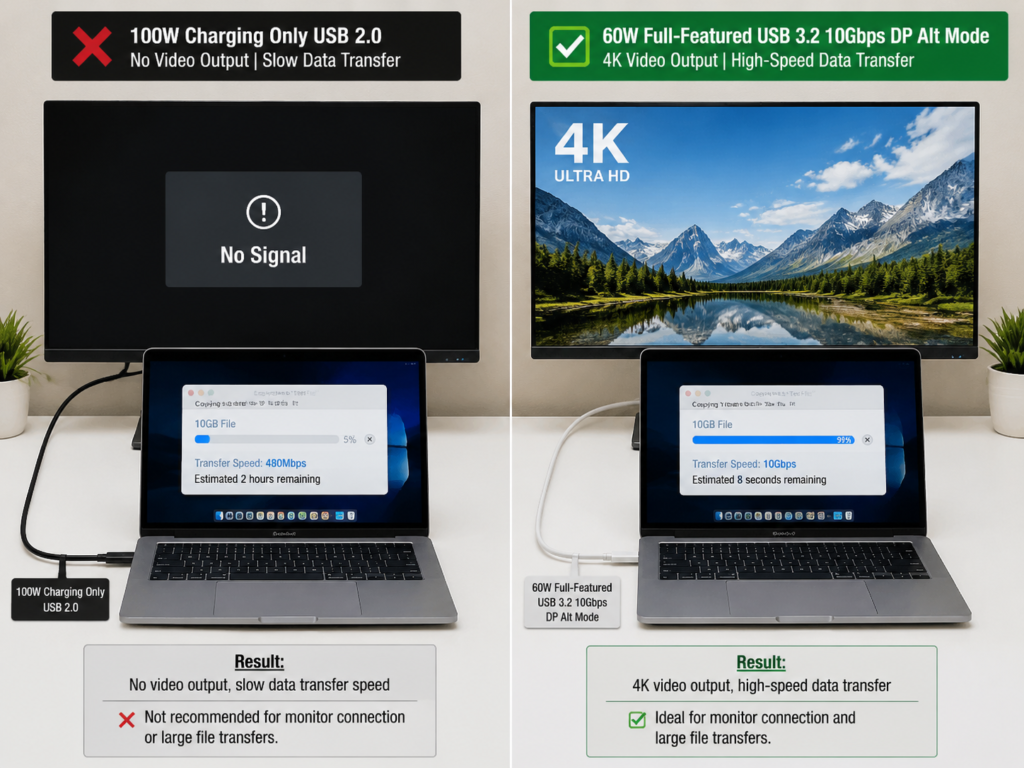
Many 100W cables positioned purely for charging only support USB 2.0 data rate (theoretical upper limit of about 480Mbps), and the actual speed is also affected by the device, interface, and file system. It’s fine for charging and syncing small files, but transferring large files of about 10GB will be significantly slower than USB 3.2/USB4 cables, and is not suitable for scenarios where large files are transferred frequently. A small number of non-standard or extremely poor quality control charging cables may have worse data compatibility, and even cannot stably recognize peripherals such as USB flash drives. There are also many ordinary 100W charging cables that do not support video output, and there is no response when plugged into a monitor, so they cannot expand the screen. Conversely, a 60W full-featured cable may support USB 3.2 high-speed transmission and can also connect to a 4K monitor, and except for not being enough to charge high-power laptops, other functions are better than cheap 100W cables.
When purchasing, be sure to look at the needs separately: if you only charge, look at wattage and current; if you transfer large files, look at Gbps (such as USB 3.2 10Gbps, USB4 40Gbps); if you connect to a monitor, look for labels like “full-featured USB-C”, “DP Alt Mode”, “USB4”, “Thunderbolt”, don’t just stare at wattage. DP Alt Mode can be understood as a mode that allows the USB-C interface to temporarily undertake DisplayPort video output; if the cable or device does not support this mode, even if the cable is marked 100W, it may only charge, and the screen will not light up.
Compatibility: Neither Type of Cable Will Damage the Device
Many people worry “will using a 100W cable to charge a phone damage the battery?”, or “will plugging a 60W cable into a 100W laptop burn the cable?”, in fact, compliant PD cables will not have these problems.
100W cables are downward compatible with all low-power devices, such as mobile phones, headsets, tablets, and will not “force feed” 100W just because the cable’s power upper limit is high — charging power is actively requested by the device, the cable only provides the capability of “being able to handle higher”, and gives as much as the device requests, so it won’t damage the device by charging.
Some people are also afraid that “plugging a 60W cable into a 100W laptop will burn the cable”. Under the premise that the charger, device, and cable are all compliant and the cable is intact, there will be no safety problems: the PD protocol will automatically negotiate to the highest power that the cable can withstand (about 60W), and the result is only slower charging, or the battery level cannot rise when used under high load. But if the cable is falsely labeled, damaged, has loose connectors, or is paired with an inferior charger, there may still be abnormal heating, disconnection, or even safety risks, and such cables are recommended to be stopped using directly.
Compliant PD cables are basically cross-brand universal, whether it’s MacBook, Windows laptops, iPad, Android tablets, or handheld game consoles, they can all be used. The only exception is the private fast charging of some mobile phones: for example, some brands’ 120W, 150W or even higher power private fast charging uses their own private protocol, whether it can run at full speed depends on the brand’s original cable, certified cable, and charger protocol. Ordinary 100W PD cables can only run at universal PD power, usually only 20-30W. In addition, if a docking station, adapter, monitor, or multi-port charger is connected in the middle, it may also limit the final power, which is not necessarily a problem with the cable.
Price, Feel, and Durability: More Expensive Doesn’t Mean More Durable
Under the premise of the same brand, same length, and same data specification, 100W cables are usually a little more expensive than 60W cables, but the price difference has no fixed standard, because there are many factors affecting the price — such as whether it supports USB4/Thunderbolt, whether it is full-featured, how long it is, what material the outer sheath is, whether there is certification, and how the brand’s quality control is, all of which will affect the price.
In terms of feel, 100W cables of the same brand, same length, and same data specification, in order to support 5A current, require more reasonable conductor and structural design, and are usually slightly stiffer, with slightly worse convenience for storage and carrying. If you like to carry it in your pocket, a thin and light 60W cable may be more comfortable.
Many people think that 100W cables are thicker so they are more durable, but in fact this is a misconception. Durability mainly depends on the outer sheath material (for example, braided cables are more wear-resistant than ordinary plastic cables), anti-bending design at the connector, bending life, terminal process, and quality control, and there is no necessary connection with power. Some cheap 100W cables have no stress relief at the connector, and the core will break after not long use, which is less durable than a well-made 60W cable.
Purchase suggestion: If you only charge mobile phones and headsets, there is no need to blindly buy expensive 100W cables for “more durability”; if you use them for laptops, first ensure that the power is sufficient, then consider durability.
Safety and Heating: Higher Power Doesn’t Mean More Dangerous
Compliant 60W and 100W cables are both safe, and a higher rated power does not mean it is easier to break or more dangerous.
The main causes of heating during charging are current magnitude, cable length, contact resistance, and ambient temperature: the larger the current, the longer the cable, the worse the connector contact, and the hotter the weather, the more obvious the heating. During high-power charging, a slight warmth of the connector or cable body is normal. For example, when charging a 100W laptop at full load, it’s common for it to be a little hot in summer, so don’t panic.
But if the cable body or connector is too hot to hold, has a burnt smell, the interface is blackened, the plastic is deformed, or it disconnects frequently, you must stop using it immediately, don’t try again. The real safety hazard is not the high rated power of the cable, but falsely labeled cables, damaged cables, loose connectors, inferior chargers, dust or water in the interface — these are the culprits that cause overheating and short circuits.
3. Why Are There These Differences? A Brief Explanation of the Underlying Principle
If you want to understand “why there are these differences between 60W and 100W”, you can read this part. It’s semi-professional knowledge that you don’t usually use, but it can help you avoid more pitfalls.
3A vs 5A: The Essence of Power Difference
Just like the metaphor of water flow and water pipe we mentioned earlier, to pass a larger water flow, you need a more suitable water pipe — it’s not just about being thick, but also about good material, no leakage at the interface, and reasonable overall design.
60W cables are designed with a current capacity of 3A, and at the common voltage of 20V, the maximum can reach 60W; 100W cables are designed with a current capacity of 5A, and at 20V voltage, the maximum can reach 100W.
Here we want to emphasize again: it’s not that the thicker the wire core, the larger the current it can definitely carry. The material of the wire core (such as the purity of copper), length, solder quality of the connector, shielding design, and overall heat dissipation capacity will all affect the final carrying capacity. Many inferior cables have a very thick outer sheath, but the copper core inside is as thin as a hair, and can’t handle 5A current at all.
E-Marker: The Safety Switch of 100W Cables
We mentioned earlier that E-Marker is the “electronic ID card” of the cable, and it is actually the core safety mechanism in the PD protocol.
According to the USB-C specification, C to C cables without E-Marker by default can only negotiate at a maximum of 3A current — because the charger and device don’t know how much current this cable can handle, for safety, they dare not provide higher power. Only when the E-Marker chip in the cable actively reports “I support 5A”, the charger will dare to output higher current and reach 100W.
In addition to current capability, E-Marker may also record information such as the data rate supported by the cable, USB4/Thunderbolt related capabilities, etc., but this does not mean that a cable with E-Marker must be a full-featured cable — whether it supports high-speed transmission or video output still depends on the overall specification of the cable, you can’t judge that it can transfer files or connect to a monitor just by “having E-Marker”.
This is also a hard-hit area for many falsely labeled 100W cables: some cables are printed with 100W on the packaging, but there is no E-Marker chip inside, or the chip parameters are falsified, and when plugged in, it can actually only run at 3A 60W, and may even heat up due to overload. If you want to confirm whether the cable really supports 100W, you can use a USB tester that can read E-Marker information to detect it, but ordinary users don’t need to buy it specially, just look at reliable reviews and real user feedback.
USB PD Version: It’s Not That PD 2.0 Can Only Reach 60W
Many people think that only PD 3.0 can support 100W, and PD 2.0 can only reach up to 60W, but this is wrong. For the 100W power upper limit discussed in this article, both USB PD 2.0 and PD 3.0 can support the 20V/5A gear within SPR (Standard Power Range); PD 3.0 also introduces additional capabilities such as Programmable Power Supply (PPS), but this does not mean that PD 2.0 can only reach 60W.
It was not until the PD 3.1 version introduced EPR (Extended Power Range) that the power upper limit was raised to 140W, 180W, and 240W. The ordinary 100W cables we usually talk about are all SPR specifications, which are not the same as 240W EPR cables. If you need to charge devices in the EPR power range such as 140W, 180W, or 240W in the future, you should buy cables that are clearly marked with PD 3.1 EPR and support the corresponding power gears; to leave enough compatibility margin, you can prioritize 240W EPR cables, but do not use ordinary 100W SPR cables as high-power EPR cables. At the same time, the charger and device interface must also support USB PD 3.1 EPR and the corresponding power gear, changing the cable alone cannot break through the upper limit of the charger or device.
Length, Wire Diameter, and Voltage Drop: Long Cables Don’t Necessarily Only Reach 60W
The longer the cable, the greater the resistance, just like the longer the water pipe, the greater the water pressure loss. When charging at high power, the voltage loss (also called voltage drop) will be more obvious, which is prone to heating and the actual power cannot go up.
But this doesn’t mean that cables longer than 2 meters can only reach 60W. As long as compliant long cables use better conductors (such as higher purity copper, thicker wire cores) and more reasonable structural design, they can also stably support 100W, but the cost is higher and the price is more expensive.
When purchasing, don’t just guess the power by the length, be sure to check whether the product is clearly marked with 100W/5A/E-Marker, and whether there are reliable reviews. Generally speaking, 1-meter cables are the most versatile and stable; for cables of 2 meters and above, try to choose brands with good reputation, don’t buy super long cables that cost a few yuan, they are most likely falsely labeled.
Why Charging a Phone with a 100W Cable May Not Be Faster
Many people buy a 100W cable to charge their phone, and find that the speed is the same as the original 60W cable, so they think the cable is fake. In fact, it is probably a problem with the phone itself.
The charging speed of the phone is controlled by the Battery Management System (BMS). If the battery temperature is too high, the battery level is too high, or the system is running high-load applications, it will actively reduce the charging speed to protect the battery. Moreover, many mobile phones’ high-power fast charging uses private protocols, not universal PD, and ordinary 100W PD cables cannot trigger full speed at all, and can only run at universal PD gears. For example, a phone that supports up to 30W PD charging, whether you use a 60W or 100W PD cable, the charging speed is the same, because the phone only draws up to 30W.
So here we return to the core principle at the beginning: the cable only provides the power upper limit, the device will draw power according to its own strategy, and slow phone charging is not necessarily a problem with the cable.
4. Which One to Choose for Different Needs? Scenario-Based Suggestions
After talking about so many differences, you may still not know which one to buy. We have sorted out the most common usage scenarios, just match them directly.
Scenarios Where a 60W Cable Is Completely Sufficient
If your needs meet the following situations, buying a 60W cable is enough, no need to spend extra money:
- Mainly used to charge mobile phones, Bluetooth headsets, game controllers, e-readers, ordinary power banks;
- The maximum input power of the tablet or thin and light laptop does not exceed 60W;
- The original charger is 30W, 45W, 60W, and there is no plan to upgrade to high-power devices in the next 1-2 years;
- Only used as a spare cable or travel cable, paying more attention to lightness, softness and low cost;
- Only used to connect low-power peripherals such as keyboards, mice, USB flash drives, and no high-power charging is required. If it’s just ordinary low-speed peripherals, 60W cables are completely sufficient; but if it’s devices that require data speed such as high-speed USB flash drives, mobile hard drives, video capture cards, you also need to confirm the cable’s USB 3.2/USB4 and other data specifications separately, you can’t just look at the power.
Here we need to note a boundary case: if your thin and light laptop’s maximum input power is indeed no more than 60W, and the battery level cannot be maintained or even drops slowly when charging while using under high load, changing to a 100W cable usually cannot break through the device’s own input upper limit; but if the device itself supports 65W or higher power, but is currently paired with a 60W cable or 60W charger, then upgrading to a 100W/5A cable and a charger with sufficient power can improve the charging speed while using.
Scenarios Where 100W Cables Are More Recommended
If you have the following situations, prioritize buying a 100W cable, the experience will be much better:
- Using 65W, 67W, 90W, 96W, 100W chargers to power laptops or high-power devices;
- The device’s maximum input power exceeds 60W, such as MacBook Pro, high-performance Windows thin and light laptops, handheld game consoles like Steam Deck, portable monitors;
- Want to use one cable to cover mobile phones, tablets, laptops, power banks at the same time, no need to switch back and forth;
- Using a multi-port charger, don’t want the cable to become a power bottleneck;
- Need “one-cable solution” scenarios: use one cable to connect to a monitor or docking station, and charge the laptop at the same time — but in this case, in addition to 100W, you also need to confirm that the cable supports data and video transmission;
- May upgrade to higher power devices in the next 1-2 years, 100W cables leave room, and the price difference is not big.
How to Judge Boundary Scenarios
If your situation is ambiguous, you can choose according to the following principles:
- Device rated 65W: prioritize 100W cable, because 65W exceeds the upper limit of 3A cables, 60W cables can’t run at full speed;
- Device rated 60W: 60W cable is sufficient, if the price difference between the two cables is very small, you can also choose 100W, for future use;
- Only have mobile phones and tablets: usually 60W is sufficient, unless you also have a 100W power bank or laptop to charge;
- Car charging: if the single-port output of the car charger is ≤45W, 60W cable is fine; if the car charger supports 65W or higher output, match it with a 100W cable;
- Power bank: look at the input and output power of the power bank, if it’s a 100W power bank, and you want to charge or discharge at full speed, it is recommended to match with a 100W cable;
- Connecting to a monitor: don’t worry about choosing between 60W and 100W, first confirm that the cable supports video output, USB4 or Thunderbolt, otherwise no matter how high the power is, it’s useless.
5. Purchase Pitfall Avoidance: How to Buy Real and Reliable Cables
Now the USB-C cables on the market are mixed, with many falsely labeled and counterfeit ones. Here are a few quick identification methods to avoid most pitfalls.
4 Methods to Quickly Identify Real Power
- Look for clear hard parameters: Prioritize products that are clearly marked with “60W/100W”, “3A/5A”, “20V/3A”, “20V/5A” on the packaging or product page. Those that only write vague expressions like “fast charging” or “super fast charging” are recommended to be skipped directly.
- See if E-Marker is mentioned: 100W/5A cables must have an E-Marker chip according to specifications, and regular products will clearly mark it. If the product page does not mention E-Marker at all and only boasts 100W, be cautious.
- Look at certifications and specifications: Products with USB-IF certification, USB4, Thunderbolt certification are much more reliable, but you can’t just look at the certification Logo: you need to check the brand’s official website, official certification database or the complete parameters on the product page, confirm the specific power is 60W/100W/240W, the data rate is USB 2.0/10Gbps/40Gbps, and whether it supports video output, to avoid being misled by false labels.
- Look at actual measurements and real reviews: Especially for long cables and high-power cables, focus on whether users or review bloggers have actually measured that it can stably run at 100W, and whether there are feedbacks of frequent disconnection or severe heating, don’t just look at the positive review rate.
Purchase Keywords for Different Needs
Don’t just search for “USB-C cable” when searching, adding keywords can help you find what you want faster:
- Only charging mobile phones: search for “60W USB-C fast charging cable”, “3A PD cable”;
- Charging laptops above 65W: search for “100W USB-C cable”, “5A”, “E-Marker”, “20V/5A”;
- Need high-speed file transfer: search for “USB 3.2 10Gbps”, “USB4 40Gbps”;
- Need to connect an external monitor: search for “full-featured USB-C cable”, “USB4 cable”, “Thunderbolt 3/4 cable”;
- Want to be compatible with future devices above 140W: search for “240W USB-C cable”, “PD 3.1”, “EPR”.
5 Most Common Cognitive Misconceptions
- 100W cables will damage low-power devices: No, devices draw power as needed, and compliant PD cables have safety mechanisms.
- 100W cables transfer files faster: Power and data speed are completely independent parameters, you can refer to the purchase judgment in “Data Transfer and Video Capability” above, don’t just choose based on wattage.
- All USB-C interfaces support 100W: The interface is just a shape, the pins, protocols, and cable capabilities inside may be different, some USB-C ports can only charge slowly.
- The thicker the cable, the more reliable it is: The outer sheath can be made thick, the core is the wire core material, E-Marker chip, certification and workmanship, don’t just feel the thickness.
- Buying 100W is a one-and-done solution: If you need 140W/240W in the future, you have to buy PD 3.1 EPR cables; if you need to connect a monitor, you have to buy full-featured/USB4/Thunderbolt cables, 100W is just the upper limit of charging.
Additional Details to Pay Attention to When Purchasing
- Length: 1 meter is the most versatile and stable; for 2 meters, pay attention to voltage drop and cable quality, try to choose reliable brands; for super long cables over 2 meters, don’t be greedy for cheap, they are most likely falsely labeled.
- Material: Cables with braided outer sheath are more wear-resistant, rubber/TPE outer sheath are softer and feel better, but durability also depends on the anti-bending design at the connector, it’s not that braided ones are necessarily more durable.
- Connector: L-shaped connectors are suitable for handheld consoles and desktop fixed scenarios, they don’t block hands, but may not be compatible with thick phone cases and some docking stations, pay attention before buying.
- Multi-port charger: Even with a 100W cable, the single-port power will drop when multiple devices are charged at the same time. For example, a 100W dual-port charger may output 65W+30W when charging at the same time, this is normal.
- Private fast charging: If you want to run at full speed for some mobile phones’ 120W, 150W private fast charging, you must buy original or officially certified dedicated cables, ordinary PD 100W cables cannot trigger it.
6. Problems When Using? Common Troubleshooting
After buying the cable and encountering problems, don’t rush to conclude that the cable is broken first, follow the steps below to troubleshoot, most problems can find the cause.
Charging Is Still Slow Even with a 100W Cable
Check these points in order:
- Check the charger: Does the single port really support 100W? Will the power drop when multiple ports are used at the same time?
- Check the device: Does the device itself support 100W input? Is the current battery level very high? Is the temperature too high?
- Check the cable: Is it really 100W/5A/E-Marker? Is it too long? Is the connector plugged in tightly?
- Check intermediate devices: Is there a docking station, adapter, or monitor connected? These devices may limit the PD output power.
If the phone is charging slowly, it is probably a protocol mismatch, temperature control speed reduction, or the battery level has reached the speed reduction stage, not a problem with the cable.
Is It Normal for the Cable or Connector to Heat Up During Charging?
- Slight warmth is normal, especially during high-power charging, in summer, or when the laptop is under full load, don’t be nervous.
- If it is obviously hot to the touch, stop using it immediately, check whether the cable, charger, and device interface are damaged, and whether there is dirt or foreign matter.
- If there is a burnt smell, blackened interface, or softened and deformed plastic, stop using it immediately and replace it, don’t continue testing.
- If you are not sure which one has the problem, you can cross-test with a low-power charger, another cable, and another device to locate the source of the problem.
Will a 60W Cable Break When Plugged into a 100W Device?
Compliant cables will not break, the PD protocol will automatically negotiate to the power range allowed by the cable, that is, a maximum of 60W, the result is only slower charging, or the battery level cannot be maintained when used under high load, there will be no safety problems.
But if it is an inferior, falsely labeled, or already damaged cable, it may bring risks due to overload heating and poor contact, such cables should not be used no matter what device they are plugged into.
Possible Causes of Frequent Charging Disconnection
- The internal core of the cable is broken or the connector is loose, it will disconnect when moved a little;
- The E-Marker chip is abnormal, the device recognition is unstable, and it reconnects repeatedly;
- When a second device is plugged into a multi-port charger, the power will be redistributed, triggering a short disconnection and reconnection, this is normal;
- The device temperature is too high, the system actively reduces or interrupts charging to cool down;
- The connected docking station, monitor, or adapter has poor PD compatibility, resulting in unstable power supply.
Why the Power Tester Shows That It Can’t Reach 100W
Many people buy a power tester and find that the displayed power is less than 100W, so they think the cable is fake, but that’s not necessarily the case:
- The device will not always request 100W, it will automatically reduce power when the battery level is high, this is normal battery protection;
- Laptops will have dynamically changing input power when under low load, sleep, or high temperature, and will not always run at full speed;
- Multi-port chargers may split the total power into multiple gears, such as 65W+30W, so a single port naturally cannot reach 100W;
- What the tester displays is the current instantaneous power, not the maximum carrying capacity of the cable. To verify whether the cable has 100W carrying capacity, several conditions need to be met at the same time: use a compliant charger that supports 100W single-port output, pair it with a device or electronic load that supports close to 100W input, the cable’s 5A/E-Marker can be correctly identified, and the device is in a state of low battery and normal temperature during testing.
Finally: 3 Steps to Choose the Right USB-C Cable for You
After talking so much, finally we summarize the simplest 3-step decision method for you, no need to memorize complex parameters, just follow to choose:
Step 1, look at the maximum charging power of the device: ≤60W choose 60W cable, >60W choose 100W/5A cable;
Step 2, see if there are additional needs: only charging then look at power, transferring large files then look at Gbps specifications, connecting to a monitor then look at full-featured/USB4/Thunderbolt;
Step 3, look at length and usage scenarios: short cables are more stable and portable, for long cables, prioritize products with clear certification and reliable reputation.
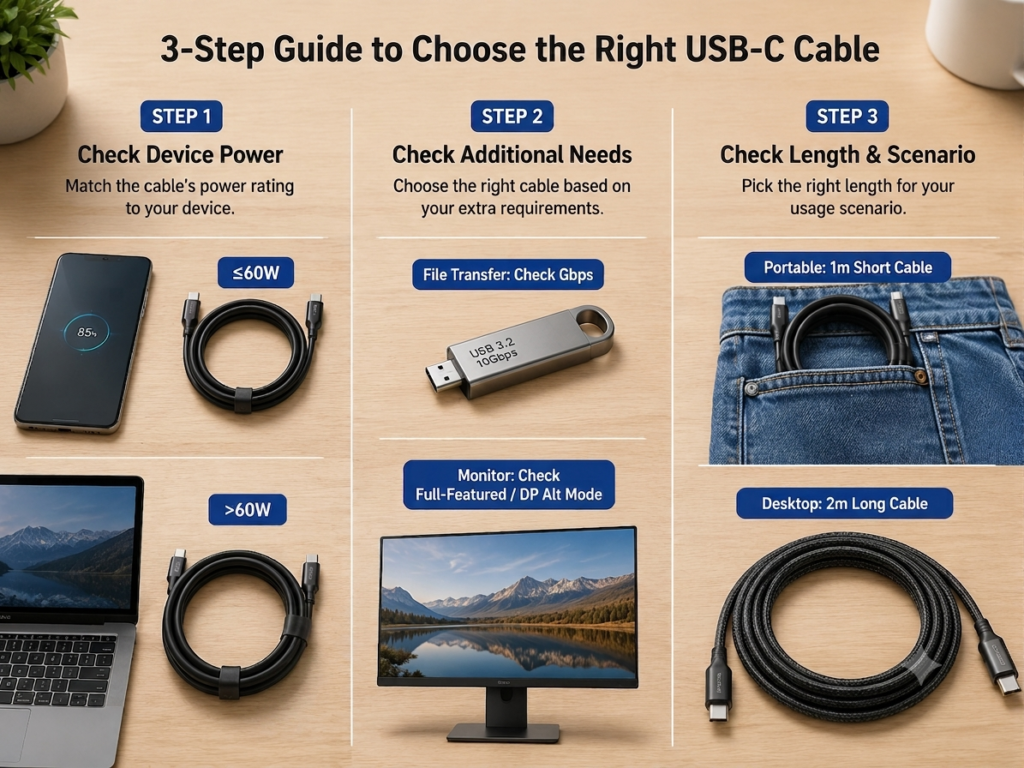
After reading this article, you should be able to distinguish that USB-C interface, PD protocol, cable power, data speed, and video output are different concepts; when you see labels such as 5A, E-Marker, 20V/5A, USB4, Thunderbolt, you can also quickly judge that they correspond to charging, data, or video capabilities respectively, and you can also troubleshoot common small problems such as slow charging, heating, disconnection, and external monitor not working by yourself.
Finally, here are a few quick references for you:
- Only charging mobile phones, headsets, ordinary tablets: 60W cable is sufficient;
- Have laptops above 65W, handheld game consoles, 100W power banks: prioritize 100W cable;
- Need one-cable solution (charging + file transfer + monitor connection): look for full-featured USB-C, USB4 or Thunderbolt specifications;
- To be paired with devices above 140W in the future: directly choose 240W PD 3.1 EPR cable.
In fact, there is no absolute good or bad between 60W and 100W USB-C cables, only whether they are suitable for your needs. Don’t blindly pursue high wattage, and don’t buy falsely labeled inferior cables to save a few yuan — choosing according to device power, data/video needs, and length scenarios can usually avoid most wrong purchases.