
Why Your 100W USB-C Multi-Port Charger Slows Down When You Plug In a Second Device
You’re on a business trip, armed with a 100W dual USB-C charger you picked up to power your laptop and phone at the same time. You plug in your laptop first, and it charges at full speed. The second you plug in your smartphone, your laptop’s charging speed drops by half — and your screen even flickers for a split second.
This isn’t a defective product. It’s not a marketing scam. It’s just how most multi-port chargers work.
Too many shoppers fixate on the big “100W” number on the front of the box and assume every port can deliver 100W at all times. The real-world charging experience depends entirely on how the charger distributes its power internally — either through power sharing or independent output architecture.
In this guide, we’ll break down both technologies in plain English, explain why slowdowns and brief disconnections happen, show you how to read a spec sheet like a pro, and help you pick the right charger for your setup.
How Multi-Port Chargers Manage Power: A Simple Building Water System Analogy
To make this easy to grasp, imagine your charger is an apartment building:
- The total power rating is the main water tank on the roof.
- Each USB port is a faucet in an apartment.
- The power architecture is the plumbing system that decides how water gets to each faucet.
There are three main setups used in modern chargers.
2.1 Power Sharing: One Shared Power Pool for All Ports
Power sharing is a multi-port power management approach where all ports draw from a single shared power budget. It can use either fixed allocation or dynamic power allocation to distribute available power between ports. When more devices connect, the total available power gets split between them.
Two Common Power Sharing Modes
- Fixed Ratio Allocation The charger splits power according to a pre-set, unchanging formula. For example, a 65W dual-port charger might always split into 45W + 20W when both ports are in use, no matter what devices are plugged in. This is common in budget and entry-level models.
- Dynamic Power Allocation A smart control chip adjusts power in real time based on what each device actually needs. If your laptop is pulling 60W and your phone only needs 15W, the charger will deliver exactly that instead of sticking to a rigid split. This is the standard for mid-range and premium GaN chargers today, and it makes far better use of the total power budget.
What It Feels Like to Use
- Single device: One high-power USB-C port can often reach its maximum rated output (up to the charger’s total wattage), depending on which port you use. Lower-power ports like USB-A will remain capped at their own lower limits.
- Multiple devices: Each port gets less power; the more devices you add, the slower each one charges.
- Plugging in a new device: You may see a brief charging pause while the charger rearranges power.
2.2 Independent Output: Dedicated Regulation for Each Port
Independent output means each port has independent power regulation and protocol control, allowing each port to manage its output separately within the charger’s total power capability. What happens on one port has minimal effect on the others, as long as the overall power budget is not exceeded.
Note: Most modern independent-output chargers share the front-end AC-DC power stage and a common DC bus, but use separate DC-DC controllers and protocol circuits for each port. They are not literally multiple full chargers glued together, but they still deliver stable and independently regulated power to each port.
What It Feels Like to Use
- Multiple devices: Each port can maintain its rated output more consistently, as long as the charger’s total power capacity is not exceeded.
- Plugging in a new device: Other ports keep charging normally with little to no interruption — no unexpected flicker or reconnection sound in most cases.
2.3 Hybrid Architecture: The Best-of-Both-Worlds Premium Setup
Higher-end 4+ port desktop chargers often use a hybrid architecture:
- High-speed USB-C ports share a large power pool for flexible fast charging.
- Lower-power USB-A ports have independent, fixed output for small accessories.
A typical example: 2 USB-C ports share 100W dynamically, plus 2 USB-A ports each deliver a steady 12W independently.
This design strikes a balance between size, cost, and real-world usability, and it’s become the go-to choice for multi-device desktop charging stations.
Side-by-Side Comparison: Power Sharing vs. Independent Output
This table sums up the real-world differences at a glance:
| Aspect | Power Sharing | Independent Output |
|---|---|---|
| Single-port peak speed | High — the primary high-speed port can reach the charger’s full total wattage | Fixed — limited to each port’s individual rated output |
| Multi-port charging speed | Per-port speed drops as more devices connect | Each port maintains its rated output more consistently within total power limits |
| Effect of plugging/unplugging | Often causes a brief charging pause to reallocate power | Minimal to no effect on other active ports |
| Size & portability | Highly compact, great for travel | Bulkier, better for fixed desk use |
| Cost & value | More affordable; higher wattage per dollar | Typically 30–50% more expensive for equivalent total power |
| Predictability | Low — you need to check the combined output specs | High — rated output stays consistent under normal use |
| Best for | Travel, commuting, mostly single-device fast charging | Desks, workstations, multiple always-on devices |
Why Do Multi-Port Chargers Slow Down and Disconnect?
It’s not a bug — it’s physics and design tradeoffs. Here’s the full story.
4.1 Three Real Reasons Charging Speeds Drop
- Hard Total Power Limit This is the biggest reason. A 100W charger can never output more than its rated total power. It’s a fixed-size cake — the more people you share it with, the smaller each slice gets. There’s no way around this physical limit.
- Conversion Efficiency Loss Turning wall AC power into DC power for your devices isn’t perfect. Some energy is lost as heat through components like MOSFETs and transformers. A 100W charger may deliver slightly less than its rated output because of conversion losses and thermal management, and the gap grows when all ports are under full load.
- Thermal Protection Kicks In High power = high heat. When internal temperatures rise too high, chargers automatically dial back output to protect components and stay safe. This is why you may notice slower charging on hot summer days.
4.2 That Brief “Flash” Disconnect Is Common — Not a Defect
When you plug a new device into a power-sharing charger, the charger has to reallocate its power budget. To do this, it may temporarily renegotiate power with connected devices using the USB PD protocol.
The standard negotiation flow works like this:
- The charger advertises its available power profiles (called PDOs, or Power Data Objects) through USB PD communication over the CC pin.
- Each connected device selects a supported voltage and current combination from those PDOs, then sends a formal request based on its charging needs.
- The charger acknowledges the request and adjusts its output accordingly.
In simple terms, the charger and all connected devices “talk” again to agree on a new set of power levels.
This reallocation causes a short power interruption. The interruption may range from barely noticeable to a few seconds, depending on the charger design and power management strategy. You may see your phone screen light up or your laptop briefly show “not charging.”
Important fact: This behavior is common in many USB PD multi-port chargers when power allocation needs to be changed. Compliant chargers follow strict voltage and current limits defined by the USB PD specification at all times, and this brief interruption will not damage your devices, your battery, or your laptop motherboard.
How to Tell Which Architecture a Charger Uses (3 Simple Steps)
You don’t need to tear one apart. Just do these three checks before you buy.
5.1 Step 1: Look for the “Combined Output” Spec Sheet
This is the most reliable method.
- Power sharing signs:
- The single-port max wattage of the main port equals (or is very close to) the total wattage.
- The spec page explicitly lists combined output formulas, e.g.
C1 + C2 = 65W + 35Wor3-port: 45W + 30W + 20W.
- Independent output signs:
- Each port has its own fixed maximum wattage listed separately.
- Marketing copy uses phrases like “simultaneous full-speed charging” or “independent output, no power drop.”
- The sum of all port wattages roughly equals the total output rating.
5.2 Step 2: Read Between the Marketing Lines
- If you see “up to 100W per port,” “smart power distribution,” or “intelligent dynamic allocation,” it is almost certainly a power-sharing design.
- If you see “full speed on all ports at once” or “independent charging on every port,” it’s likely independent or hybrid.
- Critical myth bust: GaN (gallium nitride) is just a semiconductor material that makes chargers smaller and cooler. It says nothing about the power distribution architecture. Many compact GaN chargers use power-sharing architectures because this design offers higher power density and lower cost.
5.3 Step 3: Test It When You Get It
Plug in your first device and let it charge normally. Then plug a second device into another port.
- If the first device makes a charging chime, shows a brief disconnection, or drops in power, it’s power sharing.
- If nothing changes on the first device at all, it has independent output.
Total Power vs. Single-Port Power: Stop Confusing Them
Let’s define three numbers you’ll see on every charger spec sheet:
- Total Output: The maximum combined power all ports can deliver together (e.g. 100W).
- Single Port Max: The highest power one port can deliver when used alone.
- Combined Output: How much power each port actually gets when multiple are in use. This is the number that determines your real daily experience.
Rule of thumb: A 100W total power rating does not mean every port can do 100W. Always scroll down to the combined output table.
Real-World Spec Sheet Example
Actual output tables vary by charger model. The example below shows a common 100W 3-port power-sharing configuration, not a universal rule.
Single-port use:
- USB-C1: 100W Max
- USB-C2: 100W Max
- USB-A: 18W Max
Dual-port use:
- USB-C1 + USB-C2: 65W + 35W
- USB-C1 + USB-A: 65W + 18W
- USB-C2 + USB-A: 65W + 18W
Triple-port use:
- USB-C1 + USB-C2 + USB-A: 45W + 30W + 18W
This tells you exactly what to expect: you only get the full 100W when using one C port alone. Plug in a second device, and both ports drop to pre-defined levels. Add a third, and power splits again. Always match these numbers to your daily device combination before buying.
Which One Should You Buy? Match It to Your Lifestyle
There’s no universally “better” technology — just the one that fits how you actually charge your devices.
7.1 Choose Power Sharing If You Are…
- A frequent traveler or commuter: You want the smallest, lightest charger possible that can power your laptop at full speed when used alone.
- Mostly a single-device user: You mainly fast-charge one laptop or phone, and only occasionally top up earbuds or a watch at the same time.
- Budget-conscious: You want the highest single-port wattage and smallest size for your money.
7.2 Choose Independent Output If You Are…
- A desk-based power user: You keep multiple devices (laptop, tablet, phone) plugged in all day and want consistent speed on all of them.
- Using power-sensitive peripherals: You charge or power external hard drives, docks, or accessories that cannot tolerate even a split-second power interruption.
- A set-it-and-forget-it user: You leave devices plugged in permanently and don’t want speed drops when you add a new one.
7.3 Choose Hybrid Architecture If You…
- Own 4+ devices, with a mix of high-power laptops and low-power wearables/accessories.
- Want the flexibility of dynamic high-power ports plus the stability of independent low-power ports.
- Primarily use it on a desk but don’t want a huge, heavy charging station.
7.4 Quick Buying Checklist
- Count how many devices you charge at the same time and note each one’s max charging wattage.
- Check the combined output specs to make sure they cover your most common device combination.
- Confirm it supports the protocols your devices need (USB PD 3.0, PPS, QC, etc.).
- Verify it has proper safety certifications: UL or other recognized safety certifications for electrical safety, and FCC compliance for electromagnetic interference requirements in the United States.
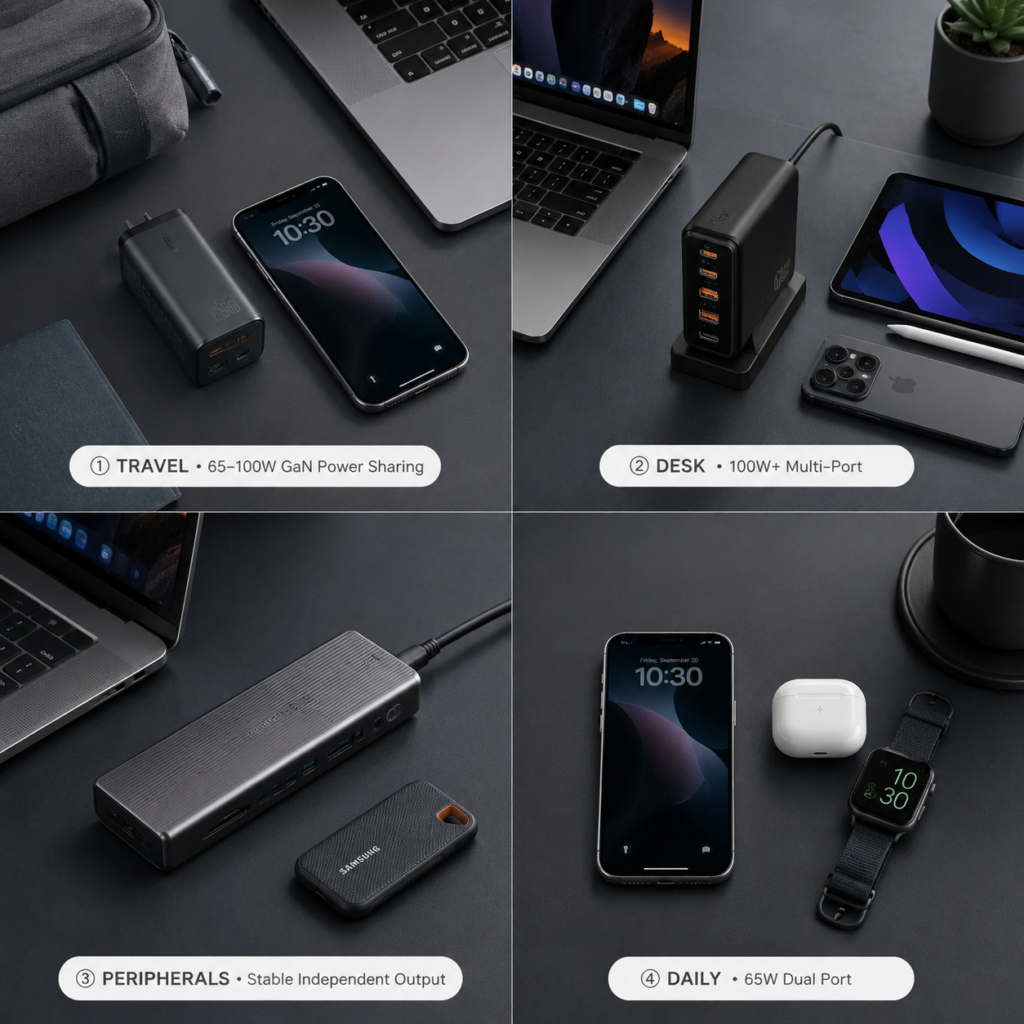
Which Charger Should You Buy? Quick Match by Device Setup
To make your decision even faster, here are the most common device combinations and the best charger type for each:
| Your Daily Device Setup | Recommended Charger Type | Why It Works |
|---|---|---|
| MacBook / laptop + phone (occasional dual charging) | 65W–100W compact GaN power-sharing charger | Tiny size for travel, full speed for the laptop alone, and enough shared power for both devices when needed |
| Laptop + tablet + phone (daily simultaneous charging) | 100W+ multi-port charger with dynamic power allocation | Smart power distribution maximizes speed for every device without wasting capacity |
| Laptop + external SSD + docking station (always-on, interruption-sensitive) | Stable independent-output desktop charging station | Consistent power with zero reconnection blips, critical for storage and peripheral devices |
| Phone, earbuds, watch, and power bank (multiple low-power devices) | 65W dual-port power-sharing GaN charger | Low cost, small footprint, and more than enough power for everyday accessories |
Myth Busting: Is Power Sharing Inferior to Independent Output?
No. They’re just different tools for different jobs.
Power sharing has unique advantages:
- Far smaller size and higher power density
- Lower cost for the same peak single-port wattage
- Better single-device charging performance
Independent output has unique advantages:
- Rock-solid, predictable multi-device speed
- Minimal interruptions when plugging/unplugging
- Better long-term stability for always-on setups
If you charge one device 90% of the time, a good power-sharing GaN charger is the smarter choice — not a compromise.
Frequently Asked Questions
Q: If I use a 100W power-sharing charger for my laptop + phone, how much power does the laptop get?
A: There’s no universal answer — it depends on the charger’s firmware and power allocation design. Common splits are 65W + 35W or 45W + 45W. Always check the combined output table in the product specs.
Q: Will the brief power disconnection damage my laptop motherboard or battery?
A: No. This is a normal behavior in multi-port power-sharing chargers. Certified chargers operate strictly within safe voltage and current limits at all times, and the short interruption poses no risk to hardware.
Q: Can a high-wattage independent output port damage small devices like wireless earbuds?
A: No. Devices actively request only the voltage and current they need via the USB PD protocol. The port’s maximum wattage is just its capacity — it doesn’t “force” power into devices.
Q: My charger charges slower in summer. Is it broken?
A: Most likely not. It’s almost certainly thermal protection kicking in to keep internal temperatures safe. Charging speed will return to normal when it cools down.
What’s Next for Multi-Port Chargers?
- Smarter Power Management: Improved firmware, refined temperature monitoring, and optimized charging algorithms will make power allocation smoother and reduce noticeable interruptions during reallocation.
- USB PD 3.1 EPR: The extended power range pushes single ports up to 240W, which increases available power levels and creates new design challenges for multi-port power management.
- More Compact High-Power Designs: Advances in GaN, integrated power ICs, and thermal design will improve efficiency and help reduce the size of higher-power multi-port desktop chargers.
- Wired + Wireless Unified Power Management: Desktop charging stations will combine wired ports and wireless charging pads under a single intelligent power budget system.
Final Takeaway: Ignore the Big Wattage Number — Check the Combined Output
- Power sharing is a smart, flexible power manager. It gives you blazing single-port speed and tiny size in exchange for shared power when you plug in more devices. It’s perfect for travel and mostly single-device use.
- Independent output works like dedicated lanes that reduce interference between devices. It delivers consistent, reliable speed for multi-device setups, and it’s ideal for fixed desks.
The golden rule of charger buying:
Single-port use → check peak wattage.
Multi-port use → check the combined output table.
Pick the architecture → match your daily usage.
Stay safe → look for recognized safety and compliance certifications.
Next time you’re shopping, skip the flashy “100W MAX” headline on the product page. Scroll straight to the specs, find the “simultaneous output” or “combined power” section, and check if it covers the devices you actually charge together. That’s how you avoid 90% of buyer’s remorse.