
Introduction
You plug your laptop into your new 100W USB-C charger. It charges fast — exactly as advertised. Then you plug in your phone. Suddenly your laptop drops from 100W to 65W, and you wonder: Did I just buy a fake charger?
You are not alone. This is the single most common confusion about multi-port chargers. The answer is almost never “false advertising.” It is dynamic power allocation — the smart technology that makes multi-port charging work at all.
This guide breaks down exactly what dynamic power allocation is, how it works behind the scenes, why your charger pauses briefly when you plug in a second device, and how to avoid overpaying for underperforming products. By the end, you will know exactly what to look for when buying your next multi-port GaN charger.
Quick Summary
- What it is: A smart charging technology that redistributes a charger’s fixed total power budget between ports based on what each connected device actually needs.
- What it does: Maximizes power efficiency, reduces wasted capacity, and gives you the fastest possible multi-device charging from a single wall plug.
- What it does NOT do: It cannot create extra power. A 100W charger will always output 100W maximum — it just uses those 100W more intelligently.
- Key tech behind it: USB Power Delivery (USB PD) protocol, dedicated controller chips, and — in modern chargers — gallium nitride (GaN) semiconductors.
- Buying tip: Always check the total output power and the published multi-port power distribution table, not just the single-port maximum rating.
1. Why Does Your Multi-Port Charger Slow Down When You Plug in More Devices?
1.1 The Scenario Everyone Recognizes
Let us start with the experience you have probably had:
- One device connected: Your 100W charger delivers a full 100W to your laptop. Everything is fast.
- Second device plugged in: Your laptop drops to around 65W, and your phone takes the remaining power.
- Third device added: All three charge at reduced speeds.
Many people assume something is broken. Nothing is broken. This is how almost all multi-port chargers are designed to work.
1.2 The Root Cause: A Shared Power Budget, Not Separate Chargers
Here is the big misconception:
❌ Wrong: “Two 100W ports = 200W total power.”
✅ Correct: Most multi-port chargers share a limited total power budget, but internal designs vary. Some use shared power rails, while higher-end models use independent conversion stages for more precise control.
A 100W dual-port charger does not contain two separate 100W chargers inside its case. It contains one power system with a 100W maximum combined output that feeds all ports.
Think of it like a water reservoir with multiple faucets. The total amount of water is fixed. Open one faucet all the way and you get full pressure. Open a second faucet and the flow splits between them.
For example, a typical 100W dual-port charger:
- Single port in use: Up to 100W from that port
- Both ports in use: Power is split between the two, totaling 100W or less
This is not cheating. It is basic physics. The question is not whether power is shared — it is how intelligently it is shared.
2. What Is Dynamic Power Allocation?
2.1 Simple Definition
Dynamic power allocation is the technology that allows a charger to adjust the power sent to each port in real time, based on how many devices are connected, what each device needs, and where each device is in its charging cycle.
Note: “Dynamic Power Allocation” is a common industry marketing term rather than an official USB-IF certification name. Different manufacturers may use different labels — such as intelligent power distribution, smart power sharing, or dynamic power management — for similar functions.
In plain language:
Total power stays fixed, but how it is divided between ports changes automatically.
2.2 The “Power Pool” Model
Imagine a 100W water reservoir:
- Your laptop is thirsty and draws 65W
- Your phone is moderately thirsty and draws 20W
- Your wireless earbuds sip just 5W
A smart control system opens each “water tap” just enough to satisfy each device. Total draw: 90W. The remaining 10W sits in reserve, ready if any device asks for more.
When your laptop reaches 80% battery and slows to trickle charge, it may only need 30W. The system automatically redirects the freed-up 35W to your phone, speeding it up. No buttons to press, no settings to change — it all happens invisibly.
This is the core idea of dynamic power allocation: power flows to where it is needed most.
2.3 Dynamic Power Allocation vs. Power Sharing vs. PD Negotiation
These three terms are often mixed up in product marketing, but they describe separate parts of the charging process:
- Power Sharing The basic mechanism where multiple ports draw from a common total power budget. It describes what is being shared, not how smartly.
- USB PD Negotiation The digital conversation between charger and device. The device states how much power it wants, and the charger confirms what it can deliver. This is how the charger knows what each device needs.
- Dynamic Power Allocation The charger’s decision-making logic. After collecting power requests from all connected devices, it calculates the best way to split the fixed power pool and adjusts each port accordingly.
They work together in a clear sequence:
plaintext
USB PD Negotiation
          ↓
Device Power Requests
          ↓
Dynamic Power Allocation
          ↓
Per-Port Output Adjustment
2.4 A Practical Example: 100W Charger Power Distribution
To make this concrete, here is how power shifts when devices are added one by one:
| Device | Peak Power Need | Single-device state | After adding phone | After adding earbuds |
|---|---|---|---|---|
| Laptop | 65W | 100W available → runs at 65W | 65W | 65W |
| Phone | 25W | 0W (not connected) | 25W | 25W |
| Wireless Earbuds | 5W | 0W (not connected) | 0W (not connected) | 5W |
| Total used | — | 65W | 90W | 95W |
| Reserve power | — | 35W | 10W | 5W |
Dynamic allocation does not create extra watts. It rearranges the existing power budget to match actual demand.
2.5 Important Distinction: Allocation vs. Adjustment
People often mix up two similar-sounding concepts:
| Dynamic Power Allocation | Dynamic Power Adjustment |
|---|---|
| Happens between multiple ports | Happens within a single device’s charging cycle |
| Example: Port 1 drops from 90W to 65W so Port 2 can have 25W | Example: A phone drops from 45W to 25W to 5W as its battery fills up |
| Controlled by the charger’s controller | Controlled by both the charger and the device’s battery management system (BMS) |
| Purpose: distribute a shared resource | Purpose: safely charge a single battery |
Both happen at the same time during multi-device charging, and together they determine the actual speed you see.
3. Fixed Power Allocation vs. Dynamic Power Allocation
Not all multi-port chargers are equally smart. There are two basic approaches.
| Feature | Fixed Power Allocation | Dynamic Power Allocation |
|---|---|---|
| Power rules | Pre-set and largely unchanging | Adjusted in real time |
| Flexibility | Low | High |
| Power utilization | Poorer — unused capacity is often not reassigned efficiently | Excellent — minimizes wasted power by reallocating unused capacity where needed |
| Multi-device experience | Often slow and inflexible | Optimized for each device combination |
| Cost | Lower | Slightly higher |
| Typical in | Cheap no-name dual-port chargers | Quality 65W+ GaN multi-port chargers |
Why Fixed Allocation Feels Frustrating
In a simple fixed-split design, each port is locked to a rough maximum. For example, 65W on Port 1 and 35W on Port 2.
If you plug a pair of wireless earbuds (needing only 5W) into Port 2, that port still operates within its preset power band. The remaining capacity is not efficiently redirected back to Port 1, so your laptop never gets the extra headroom.
Dynamic allocation eliminates that waste. As soon as the earbuds drop to trickle charge, the freed power flows back to the laptop.
Term note: “Shared capacity” is commonly used by charger manufacturers to describe a design where multiple ports share a total power budget. It is not an official USB-IF certification term.
4. How Dynamic Power Allocation Actually Works
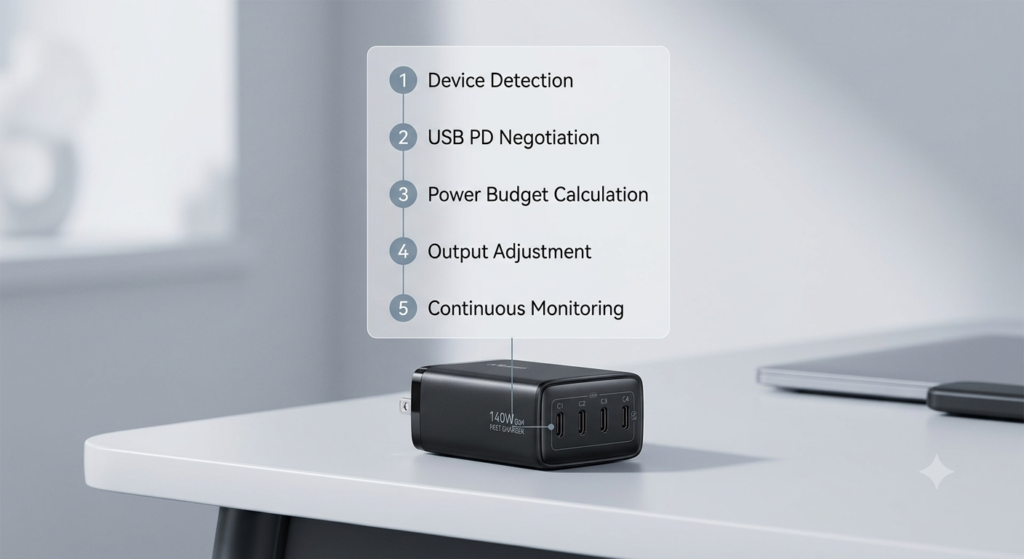
You do not need an engineering degree to understand the process. It happens in five clear steps.
Step 1: Device Detection
When you plug a device into a USB-C port, the charger detects the connection through the CC (Configuration Channel) pin. It immediately starts identifying what kind of device it is and what charging protocols it supports.
Step 2: Capability Exchange (USB PD Handshake)
Next, the charger and device have a digital conversation using the USB Power Delivery protocol. They exchange information about:
- What voltages the charger can supply (PDOs — Power Data Objects)
- How much power the device wants to draw (RDO — Request Data Object)
For example:
- A laptop might request 20V at 5A (100W)
- A phone might request 9V at 2A (18W)
Step 3: Power Budget Calculation
The charger’s control system — which may include a dedicated MCU, PD controller, or integrated power-management IC — evaluates all power requests, adds them up, and compares the total against the charger’s maximum power limit.
If the total request exceeds the limit — which it often does — the controller recalculates a fair and efficient distribution plan.
Step 4: Output Adjustment
The controller sends instructions to the DC-DC converter circuits and PD controllers for each port. Each port adjusts its voltage and current to match the newly calculated allocation.
In premium chargers with independent DC-DC per port, this adjustment is smooth and continuous. In budget designs, it may require a brief reset.
Step 5: Continuous Monitoring and Reallocation
The system never stops checking. Power is recalculated whenever:
- A new device is plugged in
- A device is unplugged
- A device finishes fast charging and enters trickle mode
- The charger’s internal temperature rises too high
- The total load approaches the safety limit
This constant, automatic adjustment is what makes it “dynamic.”
5. Why Does Plugging in a Second Device Cause a Brief Pause?
You have probably seen it: you plug in a second device, and your first device’s charging icon flickers off and back on one or two seconds later.
5.1 What Causes the Blip
In many mid-range and budget chargers, the power reallocation process requires:
- Briefly reducing or cutting power to one or both ports
- Updating the power distribution plan
- Re-negotiating the USB PD contract with each device
- Restoring full power
This whole sequence takes roughly 1–2 seconds. It is completely normal and harmless — just slightly annoying.
5.2 Why Premium Chargers Perform Better
Higher-end multi-port chargers use independent DC-DC converters per port or port group and more advanced power-path architecture. Instead of resetting everything, they can smoothly ramp power up or down on one port while the other keeps running.
Premium designs can greatly reduce interruptions and often provide smoother transitions, though no design eliminates every transient change entirely. This smoother switching is one of the most noticeable practical differences between budget and high-end chargers.
6. The Technology Behind Dynamic Power Allocation
Dynamic allocation does not exist in a vacuum. It relies on several supporting technologies.
6.1 USB Power Delivery (USB PD) Protocol
USB PD is the universal language that allows chargers and devices to talk about power. Without it, the charger would have no way to know how much power each device wants.
- PD 3.0 (SPR / Standard Power Range): Supports up to 100W at 20V/5A
- PD 3.1 (EPR / Extended Power Range): Extends the limit to 240W at 48V/5A, enabling high-wattage multi-port desktop chargers
Important note: USB PD is not the same thing as dynamic power allocation. USB PD handles communication. Dynamic allocation is the strategy the charger uses to divide up its power budget.
6.2 PPS (Programmable Power Supply)
PPS is an optional feature of USB PD that allows voltage to be adjusted in very fine 20mV steps, instead of jumping between fixed voltage levels like 5V → 9V → 15V → 20V.
In chargers that support PPS, it can improve charging efficiency and reduce unnecessary voltage conversion losses for supported devices. It also allows for finer, more granular power adjustments.
PPS can complement the dynamic allocation experience, but it is not a requirement for dynamic allocation to work. A charger can have solid dynamic power allocation without PPS.
6.3 Core Hardware Components
Every dynamic-allocation charger has these key pieces inside:
- PD Controller: Handles protocol recognition and USB PD negotiation with each device
- Control logic (MCU / integrated PMIC): The “brain” that runs the allocation strategy and makes decisions
- DC-DC Conversion Circuits: Perform the actual voltage and current adjustment for each port
- GaN Power Devices: Gallium nitride transistors that handle high-efficiency power conversion
6.4 GaN ≠ Dynamic Allocation
This is one of the most common marketing-induced mistakes.
❌ Myth: All GaN chargers have dynamic power allocation.
✅ Fact: GaN is a semiconductor material that makes chargers smaller, cooler, and more efficient. It says nothing about how smart the power distribution is.
You can absolutely find cheap GaN chargers that use basic fixed power splits. You can also find old silicon-based multi-port chargers with excellent dynamic allocation. GaN and dynamic allocation are complementary technologies — they often appear together in good products, but they are not the same thing.
7. Common Internal Architectures
How a charger is built inside has a huge effect on how well its dynamic allocation works. There are three main designs.
7.1 Shared Power Architecture
Multiple ports rely on a common power conversion stage and shared power budget.
- Pros: Low cost, simple circuit design
- Cons: Limited adjustment flexibility; port changes often require a full PD re-handshake
- Found in: Entry-level dual-port chargers
7.2 Independent DC-DC Architecture
Each port, or each port group, has its own dedicated DC-DC conversion stage.
- Pros: More stable power transitions, better cross-port isolation, stronger compatibility
- Cons: Higher cost, more complex circuitry, slightly larger board size
- Found in: Mid-to-high-end GaN multi-port chargers
7.3 Hybrid Architecture
The primary USB-C port gets its own independent high-power circuit. The remaining ports share a secondary power rail.
- Pros: Good balance of cost and performance; guarantees strong performance on the main port
- Cons: Secondary ports still share power with each other
- Found in: Most mainstream 2C1A and 3C1A chargers on the market today
8. Real-World Power Allocation Examples
Numbers make it concrete. Below are common distribution patterns, but exact splits always depend on the charger’s internal design and firmware.
65W Dual-Port Charger
- Single device: Up to 65W from the active port
- Two devices: Common splits include 45W+20W, but the exact ratio depends on the charger design
100W Dual-Port Charger
- Single device: Full 100W
- Two devices: Common examples include 65W+35W, 60W+40W, or similar combinations depending on firmware and hardware design
140W Three-Port Charger (2C1A)
- A single USB-C port may provide up to 140W on some models, while others reserve power for multi-port use. Maximum single-port output does not represent simultaneous multi-port output.
- Three devices active: A common configuration is roughly 100W + 20W + 18W
Important: Always check the manufacturer’s official power distribution table. Two 100W chargers from different brands can split power very differently.
9. How Cables Affect Dynamic Power Allocation
Even the smartest charger cannot deliver full power through a bad cable.
| Power Level | Cable Requirement |
|---|---|
| Up to 60W | Standard 3A USB-C cable — no special chip needed |
| 60W–100W | 5A cable with an E-Marker chip is required for full USB PD performance |
| Above 100W up to 240W | PD 3.1 EPR-certified cable is required |
Without a 5A-rated cable, USB PD charging is normally limited to 60W (20V/3A). The E-Marker chip is a tiny electronic “ID card” inside the cable connector. It tells the charger how much current the cable can safely handle.
If your dynamic allocation feels “broken” or slower than expected, check your cable first. It is the #1 overlooked factor.
10. How to Choose a Quality Multi-Port Charger
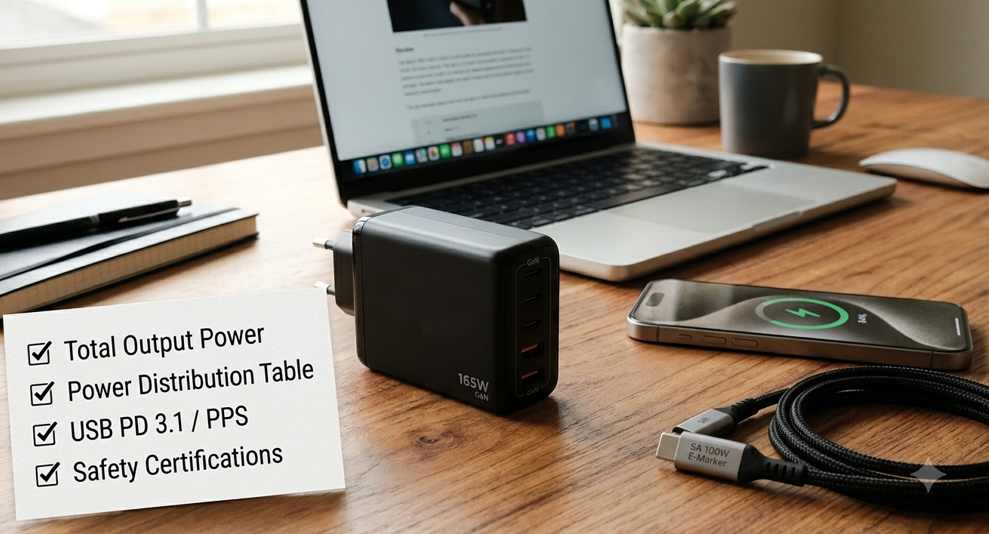
Use this checklist to avoid marketing hype and pick a charger with real, well-implemented dynamic power allocation.
10.1 Look at Total Output Power First
Ignore the big “100W” printed next to a single port. Find the line that says “Total Output” or “Maximum Combined Output”. That is the real number that matters.
10.2 Insist on a Published Power Distribution Table
A reputable brand will clearly show you:
- Single-port output
- Dual-port output
- Triple-port output (if applicable)
- Quad-port output (if applicable)
If a product page only lists single-port max power and says nothing about multi-port behavior, treat that as a red flag.
10.3 Match Wattage to Your Devices
| Your Setup | Recommended Total Power |
|---|---|
| Phone + earbuds / watch | 65W dual-port |
| Laptop + phone | 100W minimum |
| Laptop + tablet + phone + accessories | 140W+ |
| Family shared station / multiple laptops | 200W–240W desktop charger |
As a rule of thumb, choose a charger with about 20% more total power than the sum of your devices’ peak needs. This gives headroom for efficient allocation.
10.4 Check Protocol Support
Look for:
- USB PD 3.0 or PD 3.1
- PPS support (great for Android phones and charging efficiency)
- Compatibility with your specific devices’ fast-charge standards
10.5 Look for Safety Certifications
Trustworthy chargers carry:
- UL, CE, FCC, and RoHS certifications
- Preferably USB-IF certification for the PD implementation
No-name chargers with fancy specs but no safety marks are not worth the risk.
10.6 Check Thermal Performance
High-power multi-port chargers generate more heat when running all ports at full load. Good designs include:
- Temperature-aware power derating: automatically reducing output slightly instead of shutting down completely
- Effective heat dissipation to keep surface temperatures safe during long charging sessions
A charger that runs excessively hot will age faster and may throttle power more aggressively. Real-world temperature tests from reviewers are a good way to judge this.
11. Common Myths Debunked
❌ Myth: A 240W charger will fry my phone.
Fact: No. The device requests only the power it wants. The charger never forces more power than the device asks for. A 240W charger charging a phone is like a fire hydrant filling a water glass — the glass controls how much water it takes, not the hydrant.
❌ Myth: All GaN chargers have dynamic allocation.
Fact: GaN is about size and efficiency, not smarts. Budget GaN chargers can and do use basic fixed power splits.
❌ Myth: Multi-port charging is always slower than single-port.
Fact: Not necessarily. If the second device draws very little power (earbuds, smartwatch), the main device can often still run at or near full speed. It all depends on total power headroom and the allocation strategy.
❌ Myth: More ports = better charger.
Fact: Port count is just expandability. A well-engineered dual-port charger with independent DC-DC will almost always outperform a cheap four-port charger with a basic shared-power design. Quality beats quantity.
12. Future Trends
Dynamic power allocation technology continues to evolve, with four clear directions:
- Higher-wattage USB PD 3.1 chargers As PD 3.1 EPR becomes mainstream, 140W, 200W, and 240W multi-port chargers will become more common, supporting more high-power devices at once.
- Better multi-port stability Seamless power switching will trickle down from premium models to mid-range products, reducing or eliminating the brief reconnection blip.
- More efficient GaN designs Next-generation GaN semiconductors will push efficiency higher and heat lower, allowing smarter allocation in even smaller form factors.
- Wider PPS adoption Fine-grained PPS voltage control will become standard on more mid-range chargers, improving both charging smoothness and efficiency.
13. Frequently Asked Questions
Q: Why does my first device pause charging when I plug in a second one?
A: The charger is resetting and renegotiating power contracts with both devices. Budget and mid-tier chargers typically do this; premium chargers with per-port DC-DC can greatly reduce or nearly eliminate the interruption.
Q: Is dynamic power allocation the same thing as USB PD?
A: No. USB PD is the communication protocol. Dynamic power allocation is the charger’s strategy for dividing its total power using the information USB PD provides.
Q: Can a 65W charger really charge a laptop and a phone at the same time?
A: Yes. The laptop will charge at roughly 45W and the phone at roughly 20W in most designs. Both will charge — the laptop just will not charge at its absolute maximum possible speed.
Q: What cable do I need for a 100W charger?
A: You need a 5A E-Marker certified USB-C cable for full 100W performance. Standard 3A cables will limit you to around 60W, even if everything else is 100W-capable.
Q: Are more ports always better?
A: No. More ports mean more devices sharing the same power pool. If you regularly charge three or four high-power devices at once, you need a higher total wattage — not just more ports.
14. Final Thoughts
Dynamic power allocation is not magic. It will never make a 100W charger act like a 200W charger. But what it will do is make that 100W work harder and smarter.
The best multi-port chargers are the ones you never think about. You plug in your laptop, your phone, your earbuds — and everything just charges at the fastest reasonable speed, with no drama, no weird pauses, and no overheating.
When shopping, remember the golden rules:
- Total output power beats single-port marketing numbers
- A clear power distribution table is the mark of a transparent brand
- Independent DC-DC architecture delivers the smoothest experience
- Pair it with a proper E-Marker cable or you are wasting its potential
- Pay attention to real-world thermal performance, not just wattage numbers
Get those five things right, and one charger really can replace three or four — making your desk cleaner, your travel bag lighter, and your charging life a whole lot simpler.