
If you frequent Amazon’s discount section, local budget electronics stores, or the special offer zones of cross-border e-commerce platforms, you’ve definitely seen USB-C cables that cost a few dollars each. Their packaging is printed with “fast charging” and “high speed”, and they look almost the same as certified cables that cost ten or twenty dollars—both have USB-C connectors, and they can charge when plugged in. Many people wonder: it’s just a cable, right? As long as it fits and works, isn’t the expensive one just brand premium?
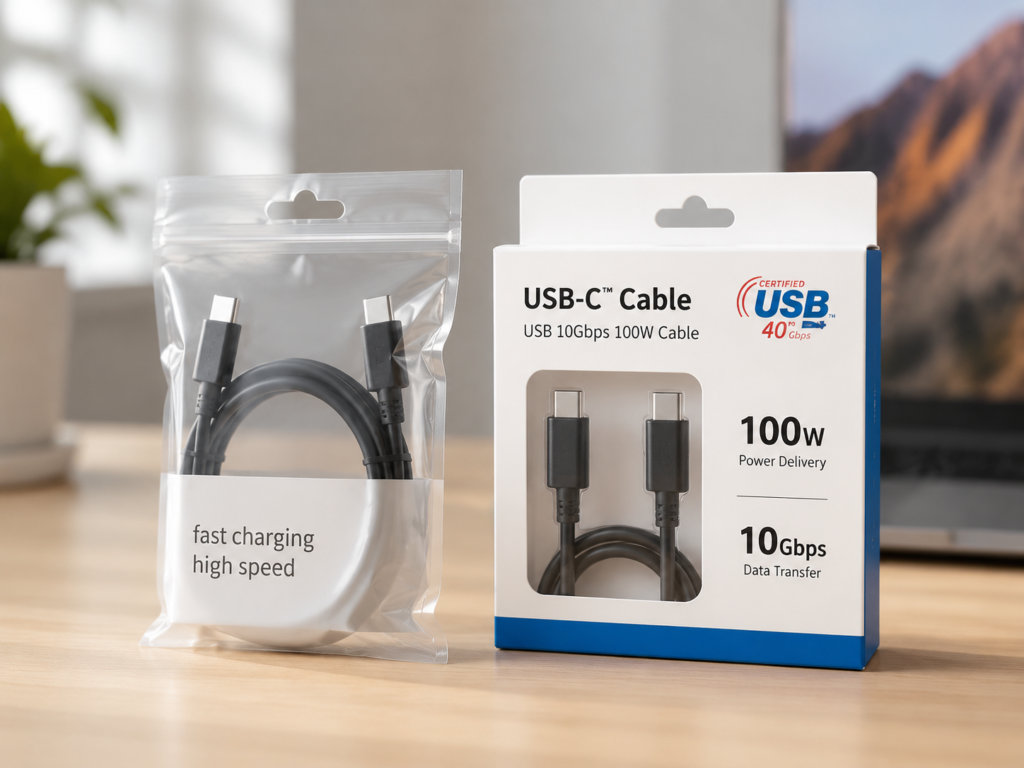
Actually, there is no absolute answer to this question: in some scenarios, ultra-low-cost cables are completely sufficient; but in other scenarios, using the wrong cable not only fails to charge fast or transfer data properly, but may even pose safety risks. Before the formal comparison, let’s first clarify the definitions of the two core comparison objects to avoid misunderstanding.
1. First Clarify the Comparison Objects: It’s Not “Cheap Cables vs Expensive Cables”
1.1 What is a Certified USB-C Cable
The certified cables mentioned in this article mainly refer to USB-C cables that have passed official testing by the USB Implementers Forum (USB-IF), and whose corresponding models and specifications are verifiable. Certification is not a general “qualified” label, but is tied to specific capabilities. For example, some certified cables only support USB 2.0 + 60W charging, some support 10Gbps data + 100W charging, and others support 40Gbps + 240W full functionality, with very large differences in capabilities.
Common identification methods include: Certified USB-related logos marked on the packaging or product page, clear speed/power labels, and specific product models. Some products can be queried and verified in the USB-IF official database through the TID number.
Several important boundaries need to be drawn here: USB-IF certification is not the same as Apple MFi certification; USB4 certification and Thunderbolt certification are higher-level special certifications, and are not default capabilities of ordinary USB-C certified cables. Having certification does not mean “all-around” either. You must check what exactly it is certified for: charging power, data speed, or video/USB4/Thunderbolt capabilities.
1.2 What Are the Cheap USB-C Cables Referred to in This Article
Not all low-cost cables are of poor quality. The “cheap cables” referred to in this article specifically refer to USB-C cables that have no credible certification, vague parameters, unqueryable models, opaque materials and craftsmanship, and are sold at low prices by cutting costs.
High-risk characteristics of this type of cable include: only labeled as “fast charging cable” or “high-speed cable” without specific power, current, and speed parameters; no clear brand or after-sales guarantee; the price under the same specification is significantly lower than the average price of mainstream brands; problems such as overheating, charging interruption, disconnection, and external drive dropouts frequently appear in user reviews.
Price can only be used as a risk reference and cannot be used alone to judge quality—promotions, clearance sales, and brand positioning may all lower prices. The key still depends on parameters and verifiability. Also note: USB-C is just the shape of the interface, and itself does not equal fast charging, high-speed transmission, video output, USB4 or Thunderbolt capabilities.
2. Plain Language Principle: Why USB-C Cables Can’t Be Judged by “If It Fits, It Works”
USB-C is just the physical shape of the interface, just like water cups: some are disposable paper cups that can only hold cold water, while others are thermos cups that can hold hot water and keep it warm—they look similar, but their internal structure and capabilities are vastly different.
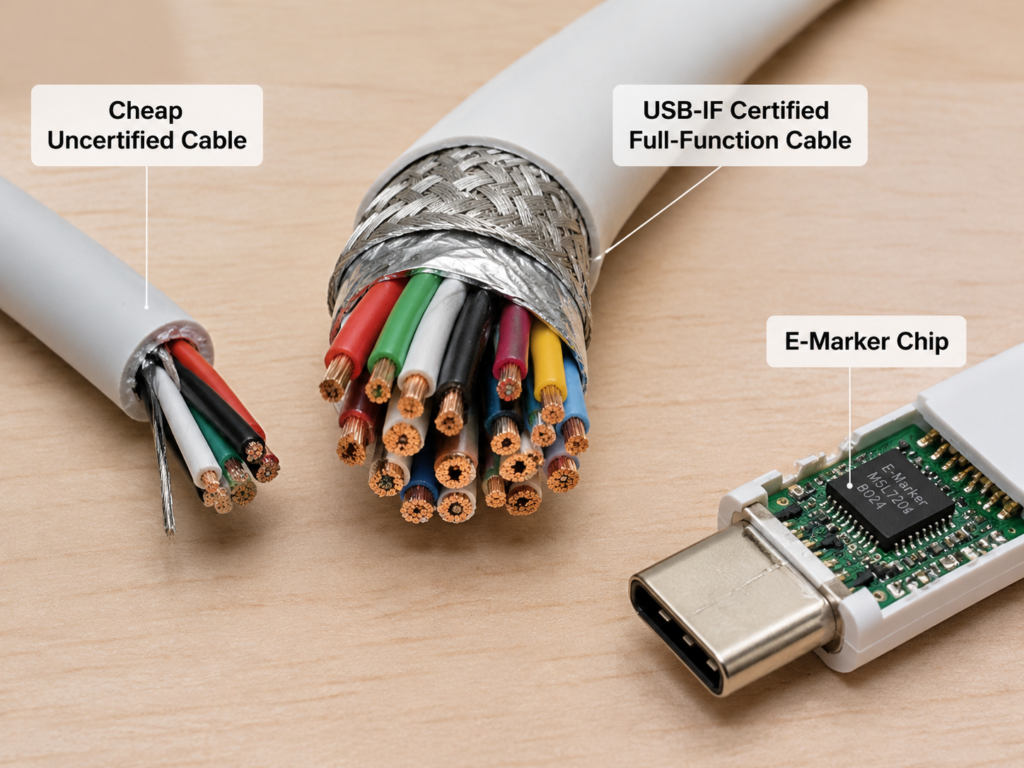
Even if they are both USB-C cables, they may have only a few charging conductors inside, or more than a dozen full-function conductors that support high-speed data and video. “It fits” only means the shape matches, and does not mean that power, speed, and video capabilities match. For example, the USB-C cable included with cheap Bluetooth earbuds usually only supports slow charging and USB 2.0 low-speed transmission. If you use it to connect a portable SSD or 4K display, there is a high probability that it will not be recognized or there will be no image—it’s not that the device is broken, but that the cable itself does not have the corresponding capability.
2.1 All Capabilities Require “Three-Way Negotiation”
Whether it’s charging, data transfer, or connecting a display, the cable doesn’t have the final say on its own. It requires all three parties—”charger/computer interface + cable + device”—to support the corresponding capability to achieve the best effect:
- The maximum charging power is determined jointly by the charger, cable, and phone/computer. If any party does not support high power, it will drop to the lowest standard among them;
- Data transfer speed is determined jointly by the computer interface, cable, and external device (such as a portable SSD). If the computer interface only has USB 2.0, even the best 10Gbps cable cannot achieve high speed;
- Video output has higher requirements: not only must the cable support high-speed signal channels, but the device’s USB-C port must also support DP Alt Mode (video output mode), USB4, or Thunderbolt. Otherwise, no matter how good the cable is, it cannot connect to a display.
2.2 Core Determinants of Charging Capability
Whether a cable can handle high-power fast charging mainly depends on two core components:
The first is the material and thickness of the conductors. High-quality pure copper conductors have lower resistance, less heat generation and less voltage loss under high power. If they are copper-clad aluminum or even aluminum conductors, coupled with a very thin wire diameter, they are prone to severe overheating under high power, and the actual power reaching the device will be greatly reduced.
The second is the E-Marker electronic label chip—you can think of it as the cable’s ID card, which stores information such as the maximum current the cable can carry and the supported power. The device will read this information to decide how much power to deliver. If there is no E-Marker or the E-Marker is fake, the device will not dare to deliver high power for fear of problems.
Here is a simple power tier reference: ordinary USB-C cables with 3A current support up to 60W (20V×3A); 100W fast charging usually requires 5A current + a cable with an E-Marker chip; 240W fast charging requires a dedicated cable that supports the USB PD 3.1 EPR standard, and all three parties—charger, device, and cable—must support it.
Another boundary to add: cables below 60W do not necessarily need an E-Marker. Don’t be fooled by merchants’ propaganda that “cables with E-Marker are high-end cables”. You need to look at the actual supported power.
2.3 Core Determinants of Data and Video Capabilities
Whether it can run at high speed and whether it can connect to a display depends on two core points:
The first is the number of data conductors. To save costs, many cheap charging cables either cut out the high-speed data conductors and only retain the slowest USB 2.0 data channel, or even simply weaken the data capability and can only be used for charging;
The second is the quality of the shielding layer. High-speed signals of 5Gbps, 10Gbps, and 40Gbps are very sensitive to interference, and require a high-quality shielding layer to ensure signal integrity. If the shielding is cut corners, problems such as speed drop, disconnection, external drive dropouts, and display flickering or black screens are prone to occur.
For your convenience in judging, here are practical usage references for several common speed tiers (these are not theoretical values, but real speeds achievable in daily use):
- USB 2.0: actual transfer speed is about 30-40MB/s, transferring a 1GB file takes about half a minute;
- USB 5Gbps (formerly USB 3.2 Gen1): actual speed is about 300-450MB/s, a 1GB file can be transferred in two or three seconds;
- USB 10Gbps (formerly USB 3.2 Gen2): actual speed is about 700-1000MB/s, suitable for connecting portable SSDs;
- USB4/Thunderbolt: can reach 20Gbps or 40Gbps, suitable for connecting high-refresh displays, high-speed docks, and Thunderbolt devices. Actual speed is greatly affected by the device and protocol.
As for video capability, simply put: only cables with high-speed data channels may support video output, and ordinary charging cables basically cannot; and the device’s USB-C port must also support video output, otherwise no matter how good the cable is, it’s useless.
3. Core Comparison of the Same Nominal Specifications: Actual Differences Between the Two Types of Cables
The following comparison is default based on common usage conditions: a length of about 1 meter, the same nominal power/speed parameters, indoor room temperature, and normal plugging and unplugging. In extreme cases such as long cables, high-temperature and humid environments, or frequent violent bending, the difference between the two types of cables will be significantly amplified.
For your convenience in quickly viewing the conclusions, we have first compiled a comparison table:
| Comparison Dimension | Certified USB-C Cable with Same Nominal Specifications | Cheap USB-C Cable with Same Nominal Specifications | Applicable Boundary |
|---|---|---|---|
| Charging Capability | Most likely meets nominal power, stable under high power | Prone to false labeling, large voltage drop, easy to interrupt charging or jump power under high power | Very small difference at low power below 20W |
| Data Transfer | High speed credibility, stable large file transfer | Often pretends to be high-speed with USB 2.0, prone to drive dropouts and transfer interruptions | No high speed needed for charging only / transferring small files |
| Video / Dock | Easy to reach nominal resolution and refresh rate, good compatibility | Often no image, flickering screen, peripheral disconnection | The device itself must support video output |
| Safety | Meets USB specification requirements, high-power risks are controllable | Prone to overheating under high power, no unified guarantee for insulation and flame retardancy | Low risk for short-term charging below 20W |
| Durability | Connectors, cable strain relief, and outer sheath are more wear-resistant | Prone to charging interruption, cracking, and poor contact after a few months | Low wear for spare cables that are fixed and not unplugged |
The table is a reference for general differences under the same specifications. Specific performance is still affected by actual materials and usage environment. The reasons and boundaries of the core differences are explained in detail below.
Charging Capability: False Labeling is the Most Common Problem with Cheap Cables
The most intuitive difference for entry-level users is the credibility of the nominal power: when both the charger and the device support it, certified cables have a higher probability of reaching the nominal power; the core reasons for false labeling of cheap cables are cut corners in conductor materials and fake E-Marker chips.
From the perspective of stability for semi-proficient users, in high-power scenarios, certified cables are less prone to charging interruption, frequent power jumps, and device prompts of “slow charging”; cheap cables often overheat due to excessive conductor resistance, triggering the device’s power reduction protection, and drop to a low power gear after more than ten minutes of charging.
Take a typical example: when charging a 65W thin and light laptop, a poor-quality falsely labeled cable may only deliver about 30W, causing the computer to lose power while in use and unable to be powered normally; a compliant 100W certified cable can stably carry 65W power, and charging while using is not affected.
Difference boundary: for low-power devices below 20W (such as Bluetooth earbuds, smart watches, fitness bands), the difference in charging performance between the two types of cables is usually very small, as long as the cable does not overheat and the connector is stable.
Data Transfer: “High Speed” May Just Be a Word Game
The most common pitfall for entry-level users is the word game of “USB-C = high speed”: many cheap cables only write “high-speed cable” but do not mark the specific speed, and the actual level may only be USB 2.0.
From the perspective of stability for semi-proficient users, certified high-speed cables have higher specification credibility. Under the premise that the host interface, peripheral controller, and storage medium all support it, they have a better chance of approaching the actual range corresponding to the nominal speed, and large file transfer is more stable; cheap cables often experience drive dropouts and interruptions when transferring large files due to insufficient shielding, and may damage files in severe cases.
For example, when editing videos with an external portable SSD, a 10Gbps certified cable can stably maintain high-speed transmission, and editing will not lag; a falsely labeled cheap cable may actually only have a speed of tens of MB/s, and also disconnect frequently, making it impossible to work normally.
Difference boundary: for scenarios that are only used for charging or occasionally transferring small files, high-speed cables are not needed; but when transferring important data, it is not recommended to use cheap cables of unknown origin.
Video and Dock Compatibility: Getting a Picture is Just the Minimum Requirement
The most intuitive difference for entry-level users is “whether it can produce an image”: certified full-function cables, USB4 cables, or Thunderbolt cables have clear specifications, and basically can produce images normally when connected to a display or dock; most ordinary cheap charging cables do not have high-speed data channels, and may have no signal at all when plugged in.
From the perspective of compatibility for semi-proficient users, in high-demand scenarios (such as 4K 60Hz, 4K 120Hz, dual-screen expansion), cheap cables are more prone to problems such as screen flickering, black screens, and dock network port/hard drive disconnections; certified cables are more likely to reach the nominal resolution and refresh rate, with better stability.
Difference boundary: if the device’s USB-C port itself does not support DP Alt Mode, USB4, or Thunderbolt video output, no cable change will allow external display connection.
Safety Performance: The Difference Under High Power Is Most Worth Attention
There’s no need to worry excessively about “cables exploding”, but the safety difference in high-power scenarios cannot be ignored. USB-IF certification mainly verifies the cable’s compliance with USB-related specifications, so certified cables are more likely to meet the nominal electrical load requirements; but for flame retardancy, voltage resistance, and local consumer product safety compliance, it also depends on the manufacturer’s material selection, regional special certifications, and production standards.
The safety risks of cheap cables mainly come from several aspects: severe overheating caused by excessive conductor resistance, non-standard internal welding, cut corners in insulation and flame-retardant materials, fake or missing E-Marker chips, and poor connector workmanship that is prone to short circuits.
A common misconception needs to be corrected here: the cable itself is not an active overcurrent protection device. Overcurrent and overvoltage protection is mainly undertaken by the charger, device, and PD control circuit; the core role of the cable is to meet the load capacity and truthfully declare parameters to the device. If a cable is falsely labeled as 100W but can actually only handle 30W, it may cause risks due to overheating.
The highest risk is scenarios with multiple combined factors: high-power fast charging + unattended + poor heat dissipation from being covered by a blanket/sofa + high car temperatures in summer + unbranded charger. This combination significantly amplifies safety hazards and should be avoided as much as possible.
In contrast, short-term charging at 5V2A and below 20W has lower risk, but cables that are damaged, overheat, or have an odor still cannot be used.
Durability and Long-Term Cost: Cheap Cables May Actually Be More Expensive
The most intuitive feeling for entry-level users is the difference in service life: certified cables or regular brand cables usually have stricter design and testing in connector tolerance, cable strain relief, and outer sheath materials, and can still work stably after one or two years of normal use; cheap cables often have problems such as charging interruption, poor contact, and outer sheath cracking after a few months of use due to thin conductors, poor connector workmanship, and no reinforcement at the cable end.
From a semi-proficient perspective, the core of durability is plug-in life, bending life, cable end reinforcement, tensile strength, and conductor quality; braided outer sheath is just a selling point for appearance and does not represent durability—many braided cables have very thin internal conductors and no reinforcement at the cable end, and are still easy to break.
Here is a reference value: the official specification target for USB-C connectors is about 10,000 plug cycles, but this is only the standard for the connector itself. The actual service life of the entire cable depends on the manufacturer’s design and testing, and cannot be equated with the promise of all certified cables.
You’ll understand after doing the math: a $5 cheap cable breaks after an average of 3 months of use, costing $20 a year, and may also wear out the device’s connector; a $15 compliant cable can be used normally for two to three years, with a lower overall cost.
4. Scenario-Based Purchasing: Choose Cables According to Your Needs Without Waste
After reading these differences, you may still be torn: which one should I buy? Actually, you don’t need to memorize so many parameters—just choose based on your usage scenario.
4.1 Low-Risk Scenarios Where Low-Cost Cables Can Be Considered
If all the following conditions are met, it’s fine to choose cheap cables:
- Only used to charge low-power devices below 20W, such as Bluetooth earbuds, fitness bands, and smart watches;
- Placed in a fixed position and not unplugged for a long time, such as a spare charging cable by the bed that is rarely plugged and unplugged;
- Only for temporary emergency, short-term use, and you will first check for overheating, charging interruption, or loose connector before use.
But note: this type of low-cost cable is not recommended for use with valuable devices, high-power fast charging, important data transfer, and unattended charging scenarios.
4.2 Scenarios Where Certified Cables or Regular Brand Cables Are Preferred
For the following scenarios, it is recommended to prioritize reliable cables to reduce subsequent troubles:
- Fast charging for laptops, tablets, gaming handhelds, and large-capacity power banks above 65W;
- Using 100W or 240W fast charging, which requires clear support for specifications such as 5A, E-Marker, PD 3.1 EPR;
- Connecting high-speed data devices such as portable SSDs, camera media drives, capture cards, and high-speed card readers;
- Connecting docks, 4K displays, high-refresh displays, or “one-cable connection” scenarios where one cable is needed to simultaneously supply power, transfer data, and output video;
- Long-term charging for valuable devices such as flagship phones, tablets, and laptops;
- High-wear scenarios such as frequent plugging and unplugging, carrying around, and commuting/travel.
4.3 High-Risk Scenarios Where Cheap Cables Are Not Recommended
In the following scenarios, it is not recommended to save on cable costs, as the cost of problems is far greater than the price of a cable:
- Unattended high-power overnight charging, especially for laptops, gaming handhelds, and large-capacity power banks;
- High-temperature, poor heat dissipation environments such as direct sunlight in a car in summer, being covered by a blanket, or in sofa gaps;
- Uninterruptible video or data scenarios such as meeting screen casting, live streaming, recording, exams, and work delivery;
- Transferring important data such as the only backup, customer information, and shooting materials, which are difficult to recover once damaged;
- Cables that already have overheating, odor, disconnection, or loose connectors are not recommended for continued use and should be replaced in time.
4.4 General Purchasing Steps
If you’re still unsure, follow these six steps and you basically won’t buy the wrong one:
- Determine the purpose first: Figure out whether the cable is only for charging, data transfer, or connecting a display/dock. Different needs mean completely different specifications.
- Then determine the power: Choose 60W, 100W, or 240W. Don’t just look at the word “fast charging”—be sure to check the specific power number.
- Then determine the speed: For charging only, USB 2.0 is sufficient. For connecting high-speed hard drives, it is recommended to start with 10Gbps, and choose 20Gbps or 40Gbps for USB4/Thunderbolt devices.
- Choose the right length: Under the same specifications, prioritize the shortest length that meets your needs; for high-speed/high-power cables longer than 1 meter, 2 meters, or more, pay more attention to certification, wire diameter, shielding, active/passive cable descriptions, and brand actual tests. Do not directly apply the purchasing experience of short cables.
- Verify certification and model: Prioritize products with verifiable certification, complete parameters, and corresponding models that can be found on the brand’s official website.
- Compare price and after-sales service: Choose the one with high cost-effectiveness under the same specifications. Don’t blindly buy the most expensive one, and don’t choose one with a ridiculously low price under the same specifications.
5. Identification Methods Ordinary People Can Use: Judge Without Taking the Cable Apart
Many people say, “I can’t take the cable apart to look, so how do I know if it’s good?” Actually, you don’t need to take it apart. You can make a pretty accurate judgment through a few simple methods.
5.1 Check Labels Before Buying: The More Detailed the Parameters, the Higher the Credibility
Before buying, check the packaging or product detail page. Regular cables will have parameters written clearly. Be careful if they are vague:
- Check power: whether it clearly writes 60W, 100W, 240W, or current parameters of 3A or 5A;
- Check speed: whether it clearly writes USB 2.0, 5Gbps, 10Gbps, 20Gbps, 40Gbps. Only writing “high speed” does not count;
- Check video capability: whether it writes specific capabilities such as supporting 4K 60Hz, 8K, USB4, Thunderbolt, DP Alt Mode;
- Check certification information: whether there are Certified USB-related logos, clear product models, TID certification numbers, and they can correspond to the official or brand page.
Here are a few pitfalls to avoid: braided outer sheath, gold-plated connectors, glowing effects, magnetic design—these are all appearance selling points, and have no inevitable relationship with performance or certification. Don’t pay unnecessary premiums for such extra features.
5.2 Simple Tests After Receiving the Goods: Eliminate Problems in a Few Minutes
After receiving the goods, don’t rush to confirm receipt. Spend a few minutes doing a few simple tests, and you can basically judge whether the cable is reliable:
- Charging test: Use your own fast charger and device to see if it can trigger the corresponding fast charging gear. Charge for more than ten minutes, touch the cable body and connector to see if there is abnormal overheating, and whether there is frequent charging interruption;
- Data test: Transfer several GB of large files to see if the speed roughly matches the corresponding nominal range (you can compare with the actual speed reference given earlier), and whether it is interrupted midway;
- Video test: If it is used to connect a display or dock, after connecting, confirm whether it can reach the resolution and refresh rate you want, and whether there is screen flickering, black screen, or dock peripheral disconnection.
Note: test results are also affected by computer interface, hard drive speed, charger power, and device system limitations. You can’t conclude that the cable is faulty just based on one low-speed result. It’s best to rule out other variables before judging.
5.3 Auxiliary Judgment from Price, Channel, and After-Sales Service
There are several other auxiliary judgment methods:
- Under the same specifications, if the price is significantly lower than the average price of mainstream brands, and the parameters are vague, there is no clear model, and no after-sales guarantee, you must be vigilant. It is most likely falsely labeled;
- Prioritize regular platforms, brand flagship stores, authorized channels, or merchants with clear return and exchange policies, so you can return if there is a problem;
- Overseas users should also pay attention to local compliance requirements: different regions may focus on safety certifications such as UL/ETL, compliance marks such as CE/UKCA, and environmental protection requirements such as RoHS/REACH. The specifics are subject to local regulations and product categories;
- Especially for high-power and high-speed cables, after-sales service is more important than low price, because many problems only appear after a period of use. Having after-sales service is more secure.
5.4 Semi-Proficient Verification: Checking Official Information Is More Reliable
If you want to be more rigorous, you can do two advanced verifications:
- Go to the USB-IF official certified product library, enter the brand, model, and TID number to query the corresponding certification information, and see if it is consistent with what the product page says;
- Go to the brand’s official website to check the parameters of the corresponding model. Don’t just look at the title of the e-commerce platform—e-commerce titles often write random parameters for traffic, and the information on the official website is accurate.
Also be alert to the theft of logos: if the product page only pastes the certification icon, but does not give the specific model or TID, and it cannot be found on the official website, then the certification is most likely fake and has very low credibility.
Finally, a boundary to add: not having USB-IF certification does not mean it must be a poor-quality cable. Some regular brands do their own testing, meet the standards but do not pay to send for USB-IF certification. Such products can be judged by combining brand reputation, warranty policy, and user actual test reviews.
6. Common Misconceptions and Troubleshooting
6.1 The 6 Most Common Cognitive Misconceptions
We have compiled the 6 most commonly misunderstood questions. See if you have ever fallen for them:
- Misconception 1: If the USB-C interface is the same, the functions are the same. Wrong! The differences in internal conductors, chips, and shielding layers are very large, and capabilities can differ by dozens of times. Don’t assume that just because it’s a USB-C port, it can fast charge, transfer high-speed data, or connect to a display.
- Misconception 2: If it can charge, it supports fast charging. Wrong! Being able to slow charge does not mean it can support 60W, 100W, or even 240W fast charging. Many cheap cables can only do 5V2A slow charging.
- Misconception 3: The thicker the cable, the better. Wrong! Thickness may just be a thick outer sheath, and the internal conductors may be very thin. The key depends on parameters, certification, and actual tests, not thickness.
- Misconception 4: The more expensive the cable, the better. Wrong! High prices may come from brand premium, appearance design, or channel costs, and do not necessarily represent higher specifications. The one that suits your needs is the best.
- Misconception 5: Certified cables can do everything. Wrong! Certification only corresponds to a specific specification. For example, a 60W USB 2.0 certified cable cannot be used as a 40Gbps video cable. Don’t think that having certification means it’s all-around.
- Misconception 6: Cheap cables are completely unusable. Wrong! They can be used in low-power, short-term, non-critical scenarios, as long as you pay attention to check for abnormalities and do not use them in high-power and critical task scenarios.
6.2 Quick Judgment: Is It the Cable’s Problem?
If your device charges slowly, has data transfer interruptions, or has no image when connected to a display, how to quickly judge if it’s the cable’s problem? Follow these four steps:
- First change a charger to rule out the problem of insufficient charger power or protocol incompatibility;
- Then change a device interface to rule out the problem of dust or poor contact in the computer/phone interface;
- Test with a known good certified cable with sufficient specifications. If it returns to normal immediately after the change, then the probability that the original cable is faulty is very high;
- If it still doesn’t work after changing the cable, then check the device’s protocol support, system settings, drivers, dock, or the peripheral itself for problems.
6.3 Signs That a Cable Should Be Replaced
If your cable has the following conditions, stop using it and replace it in time for safety:
- Loose connector, unstable plug-in, charging or connection cuts off with a light touch;
- Outer sheath cracked, bulging, exposing internal conductors;
- Cable body is obviously hot to the touch, has an odor during high-power use, or the connector is yellowed or deformed;
- Transfer speed is significantly lower than when first bought, external hard drive frequently drops out;
- The device repeatedly prompts “slow charging” or “accessory not supported”, and problems with the charger and device have been ruled out.
7. Final: Purchasing Answers for Ordinary Users
Core Conclusion in One Sentence
Cheap USB-C cables are not necessarily unusable, but they are only suitable for low-power, non-critical, short-term, or spare scenarios; USB-IF certified cables are more suitable for high-power fast charging, high-speed data transfer, video output, valuable devices, and long-term use scenarios.
Quick Selection Reference by Demand
If you don’t want to bother researching parameters, just choose directly according to your needs:
- Daily charging only for mobile phones: Just choose a 60W regular brand cable, no need to pursue excessively high specifications.
- Mixed use for phones, tablets, and thin and light laptops: Choose a 100W, 5A cable with E-Marker, which can cover most daily fast charging needs.
- External portable SSD, high-speed card reader: Prioritize cables with 10Gbps or higher data speed to match the performance of the storage device.
- Connecting displays, docks, or one-cable connection: Prioritize cables labeled with full function, DP Alt Mode, USB4 or Thunderbolt support, and verify whether they can reach the target resolution and refresh rate. The specifics are subject to the device’s support.
- Want to reserve future compatibility: You can choose a 240W USB PD 3.1 EPR cable, but you need to confirm that existing or future devices and chargers support this standard, otherwise it’s just redundant investment.
Overall, the core logic of choosing a USB-C cable is very simple: first clarify your needs, then verify the parameters and verifiability, and finally choose the right product combined with the scenario. There’s no need to blindly pursue high prices, and don’t take unnecessary risks just to save a little money.