
If you have ever bought charging accessories for Apple devices, you have most likely seen the terms “Apple Fast Charging” and “USB PD”. Many people think these are two completely different fast charging standards, and struggle to choose which one is more suitable — some even believe “Apple Fast Charging” is an exclusive Apple technology that has nothing to do with PD. In fact, this is the biggest misunderstanding about the relationship between the two.
Pre-comparison Clarification: What We Compare and What We Don’t
Before we officially start, let’s clarify the objects, scope and rules of the comparison to avoid the situation where “the same product is said to be fast by some and slow by others”.
The Two Objects We Actually Compare
The “Apple Fast Charging” mentioned in this article specifically refers to Apple’s modern wired fast charging — that is, the fast charging solution used by iPhone 8 and later models, iPads that support USB-C charging, USB-C port MacBooks, and MacBooks that support MagSafe 3 fast charging. “USB PD” (full name USB Power Delivery) is a cross-brand universal USB power supply and fast charging negotiation standard.
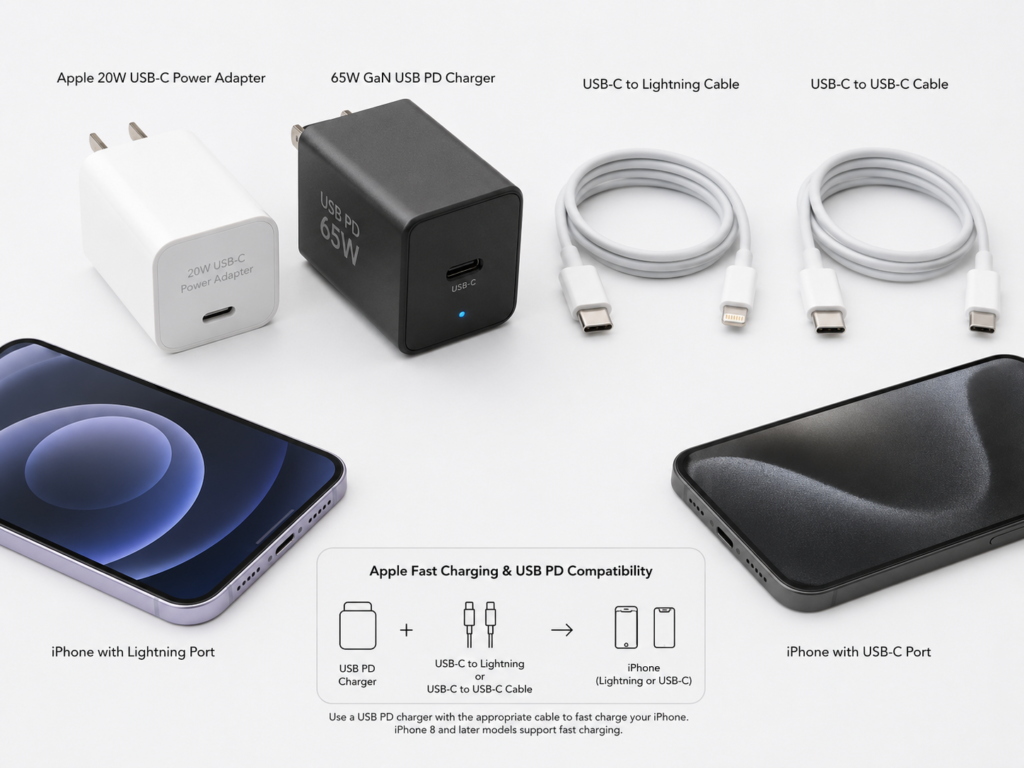
The two are not opposites at all: Apple’s wired fast charging essentially means that Apple devices use the USB PD protocol according to their own power curves, temperature control strategies and cable certification rules. To put it bluntly: when you buy so-called “Apple fast charging accessories”, most of the time you are buying “USB PD chargers and cables suitable for Apple devices”.
Comparison Scope of This Article
Our comparison mainly focuses on the wired fast charging of iPhone, iPad and MacBook. The accessories involved include Apple original chargers, third-party PD chargers, USB-C to Lightning cables, USB-C to USB-C cables, multi-port GaN chargers, car chargers and power banks. We will focus on the most concerning topics: charging speed, accessory cost, compatibility, cable requirements, safety, and whether original accessories are worth buying.
Content Not Covered in Detail
There are several types of content we will not discuss in depth to avoid confusion: First, wireless charging such as MagSafe and Qi. We will only briefly explain their power supply relationship with PD chargers, and will not directly compare wireless speed with wired PD, because the two have completely different charging paths. Second, the old Apple 2.4A charging solution, which is an old standard from the USB-A era, only has 10-12W, is not considered modern PD fast charging, and is only used as a comparison of old solutions. Third, Android proprietary fast charging (such as SuperVOOC, HyperCharge, etc.). We will only mention the boundaries and will not go into technical details. Fourth, content that ordinary users do not need to care about, such as chip-level power management and certification laboratory processes. We will only cover knowledge useful for purchase and use.
Unified Comparison Criteria
All speed and power conclusions are based on unified conditions to avoid variable interference: the battery level focuses on the 10%-80% range (fast charging is mainly concentrated in the low to medium battery stage), the environment is around 25°C room temperature, the device screen is off, single device charging, and all accessories are products from formal brands with true specifications and USB PD support. We will exclude variables such as using while charging, high temperature environments, simultaneous multi-port current sharing, cable aging, and abnormal device heating. In addition, different models have different peak powers. The values given in this article are all common ranges, and the specific ones shall be subject to the official device specifications and actual measurements.
Plain Language Introduction: First Understand Several Key Concepts
First, let’s explain the most easily confused concepts in plain language. After reading this, you won’t be confused by merchants’ promotional words.
What Exactly is USB PD
You can think of USB PD as a set of “fast charging negotiation language” between chargers and electronic devices: after plugging in, the charger first tells the device “I support these voltage, current and power levels”, and the device then selects the most suitable level according to its own tolerance, current battery level, temperature and other states. If the negotiation is successful, high-power fast charging will start; if the negotiation fails, only 5V basic slow charging can be used.
The biggest advantage of this standard is universality: as long as mobile phones, tablets, laptops, handheld consoles, and power banks all support USB PD, they can share the same charger, so you don’t need to carry a bunch of charging heads. But note: universality does not mean that all devices can reach full maximum power. The final charging speed is determined by the device, charger, cable, and temperature together.
How to Choose Between PD2.0, PD3.0, PPS, and PD3.1
People often ask about the differences between different PD versions and whether to buy the latest one. Simply put:
- PD2.0 is the most basic PD fast charging, covering common levels such as 18W, 20W, 30W, 45W, 60W, 100W, and is sufficient for most daily devices;
- PD3.0 enhances information interaction on the basis of PD2.0, and can extend support for functions such as PPS;
- PPS (Programmable Power Supply) can adjust voltage and current more precisely. Many Android phones rely on PPS to achieve more efficient fast charging, but Apple’s wired fast charging usually does not require PPS;
- PD3.1 is a higher power version, up to 240W, mainly for high-power laptops, monitors, docking stations and other devices, and is basically useless for iPhones.
Ordinary iPhone and iPad users do not need to blindly pursue PD3.1 at all. Only high-power MacBook users need to focus on PD3.1 EPR, 28V level and corresponding cable specifications.
“Apple Fast Charging” Actually Has Three Meanings
Many people argue endlessly because they have different understandings of “Apple Fast Charging”. In daily context, this term has at least three meanings:
The first is the modern wired PD fast charging that is the core of this article, that is, the PD-based wired fast charging used by iPhone 8 and later, new iPads, and MacBooks;
The second is the old Apple 2.4A, which is Apple’s charging solution from the USB-A era, only 10-12W, a bit faster than 5V, but definitely not PD fast charging;
The third is MagSafe wireless fast charging. Although its charger may require PD power supply, the phone side uses a wireless charging path, so its speed, heat generation and efficiency cannot be directly equated with wired PD.
Next time you see a promotion for “Apple Fast Charging”, first figure out which one it is referring to.
Four Groups of Concepts That Are Most Likely to Cause Pitfalls
First, USB-C port is not equal to PD fast charging. USB-C is just the shape of the port, just like the shape of a socket. Whether fast charging is possible depends on whether both the device and the charger support USB PD and whether the power levels match. Many cheap USB-C port chargers only have 5V output, they can charge when plugged in, but it is just slow charging.
Second, MFi certification is not equal to faster charging. MFi is Apple’s authorized certification for Lightning accessories, which mainly solves compatibility problems (for example, it will not pop up the prompt “This accessory is not supported”), but it cannot break through the power limit of the device itself. For example, the iPhone only supports up to 27W fast charging, no matter how expensive an MFi cable you use, it is impossible to exceed this speed.
Third, original is not equal to faster. As long as the power is the same, the protocol matches, and the cable is compliant, the charging speed of formal third-party PD chargers for Apple devices is usually similar to that of original ones. The advantages of original products lie more in quality control, compatibility and after-sales service, not speed.
Fourth, high wattage is not equal to faster. Many people think that a 100W charger will definitely charge an iPhone faster than a 20W one, but that’s not the case. The iPhone itself has a receiving power limit, just like the maximum water output of your faucet is fixed, no matter how thick the water pipe you connect, the water volume will not increase. When using a 100W charger to charge an iPhone, the iPhone will only draw power according to its own limit, and will not charge faster.
Remember the Relationship Between the Two in One Sentence
You can quickly sort out the composition of Apple fast charging and USB PD with three formulas:
- Lightning port iPhone fast charging = USB PD charger + MFi certified USB-C to Lightning cable + iPhone’s own charging strategy
- USB-C port iPhone/iPad fast charging = USB PD charger + compliant USB-C to USB-C cable + device’s own charging strategy
- MacBook fast charging = USB PD charger with matching power level + compliant C-C cable or MagSafe 3 cable + maximum power supported by the model
Fast Charging Working Logic: Why Plugging In Does Not Mean Full Power
After understanding the basic concepts, you may encounter a problem: you obviously bought a PD fast charging head, why is the charging speed still slow? This brings us to the working logic of fast charging — it does not run at full power as soon as you plug it in.
The Basic “Handshake” Process of USB PD
The start of fast charging is not plug-and-play full speed, but has a negotiation process:
After plugging in, the charger first informs the device of the voltage, current and power levels it supports through the PD protocol; after receiving it, the device selects the appropriate level according to its own support range, current battery level, temperature, and operating status; only after successful negotiation will it enter higher power charging, and if the negotiation fails, it will fall back to 5V slow charging.
Moreover, the power is dynamically adjusted during the charging process: when the battery is low, it can accept higher power, so charging is fast; when it is nearly full, to protect the battery, the power will gradually decrease, and the speed will slow down.
The “Exclusive Temperament” of Apple Devices Using PD
Although Apple devices follow the PD negotiation rules, they have their own set of strategies:
First, Apple’s battery protection strategy is relatively conservative, which limits the duration of peak power and will not run at the highest power all the time;
Second, models with Lightning ports must use certified USB-C to Lightning cables to stably trigger PD fast charging. Many cheap uncertified cables may only charge slowly when plugged in, or occasionally trigger and then disconnect;
Third, Apple devices with USB-C ports do not require MFi cables, but the cable itself must be able to carry the corresponding current and power, otherwise it will also limit the speed;
Fourth, Apple is particularly sensitive to temperature. As long as the body heats up, you use it while charging, or the ambient temperature is high, it will actively reduce the charging power, even if you use the original highest power charger.
The Short Board Effect of Fast Charging Speed
To put it bluntly, fast charging speed is like the water capacity of a wooden barrel, determined by the shortest plank:
- Device short board: iPhone, iPad, and MacBook each have their own receiving power limits, which are fixed at the factory, and no matter how high-wattage the charger is, it cannot break through;
- Charger short board: you can’t just look at the total wattage, you also need to see if there is a suitable PD level (for example, iPhone fast charging requires 9V level, MacBook requires 20V level, high-power PD3.1 devices require 28V level). If the levels do not match, no matter how high the wattage is, it is useless;
- Cable short board: For Lightning devices, look at MFi certification; for high-power USB-C scenarios, look at whether the cable is 3A or 5A, whether it has an E-Marker chip, and whether it supports EPR. These determine how much power the cable can carry;
- Environment short board: high temperature, using while charging, thick phone cases, exposure to the sun in the car, and high background load will all cause the device to heat up and trigger power reduction, affecting the duration of fast charging;
- Battery short board: battery aging, decreased health, or activation of the system’s battery management strategy will also affect charging speed, but there is no one-size-fits-all standard that “fast charging is not possible below a certain percentage”.
The Correct Understanding of “Charge to 50% in 30 Minutes”
“Charge to 50% in 30 minutes” is the most commonly heard promotion. This statement is not a lie, but it has strict applicable conditions: only some iPhones can charge up to 50% in 30 minutes under the conditions of low battery (for example, starting to charge from 10%), room temperature of about 25°C, screen off, and using a 20W or higher power PD adapter.
If you start charging from 50%, use it while charging, the ambient temperature is very high, or you use an iPad, MacBook, or old device that does not support PD, you will not reach this speed. In addition, slower charging in the 80%-100% stage is a completely normal battery protection strategy, not a broken charger. To judge whether fast charging is good, don’t just look at the instantaneous peak power in the first few seconds after plugging in, but also look at the overall time and temperature performance of 10%-80%.
Core Dimension Comparison: Apple Fast Charging vs USB PD
After understanding the working logic, we compare from several dimensions that everyone cares most about — in fact, it is more about the difference between “Apple devices using PD” and the “general PD ecosystem”.
Relationship Comparison: Not Either-Or, But an Inclusion Relationship
USB PD is an open universal power supply protocol that all brands can use; while Apple fast charging is a specific experience of Apple devices using USB PD to achieve wired fast charging. The two are not competitive at all, but an inclusion relationship of “how Apple devices apply PD”.
So next time you see a product promoted as an “Apple fast charging head”, don’t just look at the promotional words. Focus on whether it clearly supports USB PD, whether the power level is appropriate, and whether the matching cable is compliant — these are the keys to determining whether fast charging is possible.
Device Scope Comparison: General PD Covers Wider
USB PD has a very wide range of applications: as long as it is a PD-supported mobile phone, tablet, laptop, handheld console, earphone, power bank, or monitor, it can be used. The scope of application of Apple PD fast charging is limited to specific devices within the Apple ecosystem: iPhone 8 and later models, new iPads that support USB-C charging, USB-C port MacBooks, and MacBooks that support MagSafe 3 fast charging. Old models such as iPhone 7 and earlier, and old MacBooks with MagSafe ports do not support this USB-C PD fast charging.
Simply put: the more multi-brand devices you have, the more obvious the advantage of general PD; if you only have one iPhone, the perceived difference between the two is mainly reflected in price and cables.
Speed and Power Comparison: No Essential Difference in Speed Under the Same Specifications
First, here is a set of common power references:
Common USB PD powers range from 18W, 20W, 30W, 45W, 65W to 100W, and the PD3.1 version can also extend to higher powers of 140W, 180W, and 240W.
The fast charging powers of Apple devices vary: the common fast charging power of iPhone is in the 18-30W range, and a 20W-30W charger is sufficient; the common fast charging power of iPad is in the 20-45W range, and 30W-45W can be selected for large-screen or Pro models; the charging power of MacBook ranges from 30W to 140W, thin and light models (such as MacBook Air) can use 30W-67W, and high-performance MacBook Pro commonly has 96W and 140W levels.
Here is a core conclusion for everyone: for the same Apple device, as long as a compliant third-party PD charger with matching power levels is used, the charging speed is usually not essentially different from that of an Apple original PD charger. Of course, there are exceptions: if the ambient temperature is very high, the cable quality is poor, multi-port simultaneous charging shares current, the charger has false specifications, or the device is running under high load, the speed difference may become larger.
Accessory Requirements and Cost Comparison: Lightning Cables Are the Core of the Difference
The basic combination of general PD is very simple: PD charger + compliant USB-C cable. But the situation for Apple devices is different:
- For iPhone/iPad with Lightning port, a PD charger + MFi certified USB-C to Lightning cable is required — this is also the place with the biggest cost difference between Apple fast charging and general PD. MFi certified cables are usually much more expensive than ordinary C-C cables;
- For iPhone/iPad with USB-C port, the requirements are basically the same as general PD, only a PD charger + compliant C-C cable is needed, no MFi certification is required;
- MacBook requires a PD charger with matching power + a C-C cable or MagSafe 3 cable that supports the corresponding power.
Overall, Apple original and officially certified accessories are usually more expensive; formal third-party PD accessories have higher cost performance, but you need to carefully check the protocol, power, cable and certification information, not just the “suitable for Apple” promotion.
Cable Capability Comparison: Many Fast Charging Failures Are Caused by Cables
Different cables may look similar, but their capabilities are vastly different:
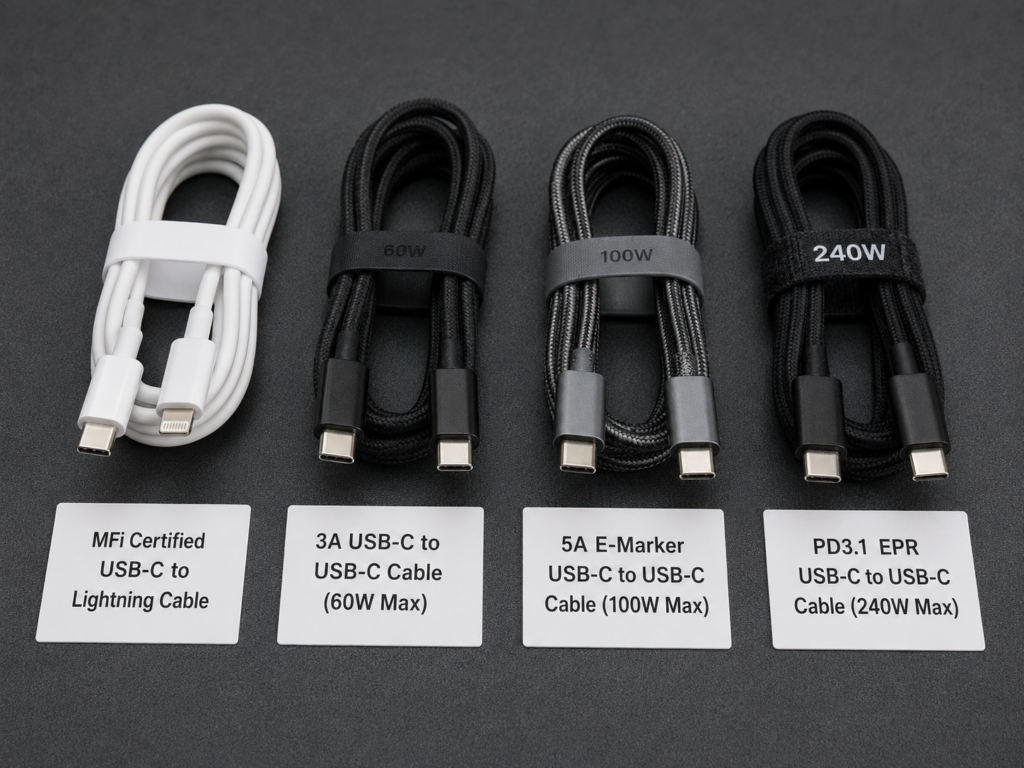
- USB-C to Lightning cable: For Apple devices with Lightning ports to fast charge, prioritize MFi certified ones, otherwise it is very likely that fast charging cannot be triggered, or prompts will pop up frequently;
- Ordinary 3A USB-C to USB-C cable: usually carries up to 60W power, which is completely sufficient for iPhone, iPad and some thin and light laptops;
- 5A E-Marker cable: If the power exceeds 60W (such as a 100W-level MacBook), you need to choose a 5A cable with an E-Marker chip, otherwise the cable cannot withstand large currents and will limit the power;
- PD3.1 EPR cable: For high-power scenarios of 140W and above, you need to pay attention to whether the cable supports EPR (Extended Power Range) and whether it can withstand the corresponding voltage and current.
Here’s a pitfall to avoid: the appearance, thickness, and whether the cable is braided do not represent power capability. Many braided cables that look very thick may only be ordinary 3A, and cannot support 100W at all; there are also many thin cables that can support high power because they use better conductors. When buying, be sure to look at the parameters, not just the appearance.
Compatibility and Versatility Comparison: Choose General PD for Mixed Use of Multiple Devices
The biggest advantage of general PD is universality: one charger can charge Apple and Android phones, iPads, MacBooks, handheld consoles like Switch and Steam Deck, even power banks and earphones, as long as the device supports PD. Apple’s original PD head can actually charge other PD-supported devices, but its power levels and number of ports may not be suitable for all devices. For example, Apple’s original 20W head only has one C port, which is not enough for multiple devices.
We also need to mention the boundary of proprietary protocols here: some Android phones may require the brand’s own proprietary protocol or PD PPS to reach the advertised maximum fast charging speed. Ordinary PD can only provide medium to high-end general fast charging, and cannot reach the peak. So single Apple users can choose original or third-party products, but for mixed use of multi-brand devices, the value of general PD multi-port chargers will be much higher.
Safety and Stability Comparison: Formal Products Are All Safe
Formal PD products should have overvoltage, overcurrent, overtemperature, and short circuit protection, and meet the safety certification requirements of the region — such as UL or ETL certification in the United States, CE certification in the European Union, UKCA certification in the United Kingdom, and CCC certification in China. Note here: FCC certification is electromagnetic compatibility certification, not safety certification. Don’t be fooled by merchants’ “FCC certification” promotions.
The advantages of Apple original or officially certified accessories are better compatibility, more stable quality control, and more guaranteed after-sales service, so it is easy to find solutions if there are problems. But this does not mean that third-party products are unsafe: as long as they are third-party PD products from formal brands with compliant protocols, power and cables, fast charging for Apple devices is usually safe and stable.
The truly high-risk products are those with low prices and false specifications, no certifications, abnormal heat generation, rough workmanship, and unclear multi-port power labeling — no matter whether it is promoted as “Apple fast charging” or “PD fast charging”, don’t buy it, safety first.
Device-by-Device Adaptation Guide: How to Choose PD Accessories for Apple Devices
After finishing the comparison, we give specific purchase suggestions by device type, you can just check according to your own device.
iPhone 8-14 Series (Lightning Port)
To achieve PD fast charging for these models, two conditions must be met: a charger that supports USB PD + an MFi certified USB-C to Lightning cable, neither is dispensable. In terms of power, 20W-30W is completely sufficient. Most users do not need to buy a 65W or even 100W charger for a single iPhone, it is a waste of money.
If you want peace of mind, just buy Apple’s original 20W charger plus original cable; if you pursue cost performance, choose a 20W or 30W PD head from a formal brand, paired with a reliable MFi certified C-L cable. The speed is similar to the original, and the price is much cheaper. The most common mistake is using ordinary USB-A cables, non-MFi C-L cables, or charging heads that only support 5V. They can charge when plugged in, but only slow charging.
iPhone 15 and Later (USB-C Port)
The fast charging requirements for these models are much simpler: a charger that supports USB PD + a compliant USB-C to USB-C cable is enough, no MFi certification is required, and there is no need to buy very expensive cables. In terms of power, 20W-30W is still sufficient. Ordinary compliant C-C cables can meet the fast charging needs of mobile phones, and there is no need to buy 100W or 240W high-power cables separately for the iPhone.
The biggest benefit of the USB-C port is that you can share cables and chargers with iPads, MacBooks, and Android devices, so you don’t need to carry a separate Lightning cable.
iPad Series
If it is an iPad with a Lightning port, first check whether the specific model supports PD fast charging (you can check the technical specifications on Apple’s official website). If it does, just like the Lightning iPhone, you need a PD charger + MFi certified C-L cable. If it is an iPad with a USB-C port, a PD charger + compliant C-C cable is enough.
In terms of power, 20W-30W is sufficient for ordinary entry-level iPads; 30W-45W can be selected for iPad Air or iPad Pro, which is a bit faster. Many people ask whether using a MacBook’s high-power PD charger to charge an iPad will damage it. Don’t worry, it won’t — the iPad will only draw power according to its own needs, and as long as it is a formal PD charger, it is safe.
MacBook Series
What we are talking about here mainly refers to USB-C port MacBooks and new MacBooks that support MagSafe 3 fast charging — old MacBooks with MagSafe ports do not apply to the ordinary USB-C PD direct charging logic, don’t buy randomly.
In terms of power selection, 30W-67W is generally sufficient for MacBook Air; MacBook Pro can choose 67W, 96W, 100W, 140W depending on the model, just refer to the power of the original adapter first. Low-power PD heads can also charge the MacBook, but only slow charge or maintain the battery level — it may be sufficient for light office work, but for high-load operation (such as video editing, running large software), the battery may drain while using.
In terms of cables, ordinary 3A C-C cables are usually sufficient for within 60W; 5A E-Marker cables are required for 100W level; for 140W fast charging, the charger, cable, and device all need to support the corresponding PD3.1 EPR capability, and if using a MagSafe 3 cable, you also need to check the corresponding specifications. When purchasing, first refer to the original power. If you also need to charge other devices, you can choose a PD charger of the same level or slightly higher power.
Multi-Device Shared PD Charger
Now many people have several devices. Buying a multi-port PD charger can replace several single-port ones, making the desktop tidier and more convenient for business trips. You can refer to the following for how to choose:
- Only mobile phones: 20W-30W single-port or dual-port PD is sufficient;
- Mobile phone + iPad: 30W-45W dual-port is more practical;
- Mobile phone + iPad + thin and light laptop: 65W multi-port GaN charger has the highest cost performance;
- Apple full set + high-performance MacBook: 100W-140W multi-port model is more suitable.
Here we need to pay attention to a key parameter: don’t just look at the “maximum total power” of the charger, but also look at the maximum power of a single port, and the power distribution rules when multiple ports are used at the same time. For example, a 65W dual-port charger, when used with a single port, the C port can reach 65W, but when used with both ports at the same time, it may become 45W for C1 port and 20W for C2 port — if you plug the MacBook into the C2 port at this time, it can only run at 20W, which is definitely not enough.
Real Scenario Decision-Making: How Different Users Choose
Combined with real usage scenarios, we give more direct selection suggestions for users with different needs.
Users Who Only Use One iPhone
If you want peace of mind and don’t want to study parameters, just buy Apple’s original 20W charger plus the corresponding cable. Compatibility and after-sales service are the simplest. If you pursue cost performance, choose a 20W or 30W PD charger from a formal brand, with MFi C-L cable for Lightning models, and compliant C-C cable for USB-C models. The speed is similar to the original, and the price is much cheaper.
It is not recommended to blindly buy a charger above 100W for a single iPhone, unless you will use it for a laptop in the future, otherwise it is a waste. Also, avoid this pitfall: don’t just look at promotional words like “suitable for Apple” and “super fast charging” on the packaging. Be sure to check whether the product parameters clearly state “supports USB PD”, otherwise it is very likely that you will buy a slow charger.
Apple Full Set Users (iPhone + iPad + MacBook)
For such users, it is more recommended to choose a 65W, 100W or 140W multi-port PD/GaN charger, and the specific upper limit is determined by the power of the MacBook. For example, 65W is enough for MacBook Air, and 140W multi-port charger for 140W MacBook Pro.
The advantage of this is that you don’t need to equip each device with a charger, one can handle all, which is convenient for business trips and commuting, and the total cost is usually lower than buying several sets of original accessories. When purchasing, focus on: when multiple ports are used at the same time, can the port for the MacBook still output enough power — for example, when charging with two ports at the same time, can the MacBook’s port maintain above 65W, otherwise it may not be enough under high load.
Of course, if you have a sufficient budget, pay special attention to after-sales certainty, and just want to buy according to official specifications, original accessories are also fine, just a bit more expensive.
Multi-Brand Mixed Users (Apple + Android + Laptop + Handheld Console)
For such users, prioritize multi-port chargers that support USB PD, and preferably also support PPS. Because Apple devices can use PD fast charging, and many Android devices can also get good fast charging speed through PD or PPS, one set of chargers can cover most devices.
But note a boundary: the proprietary super fast charging of some Android phones (such as above 100W) must use the original charger and cable to reach full peak, general PD cannot reach it, and can only reach a relatively fast general speed. But for most people, this speed is already sufficient. Overall, the more mixed devices you have, the higher the value of a general PD charger.
Car, Travel, and Power Bank Scenarios
For car scenarios, be sure to choose a car charger that clearly supports USB PD output. Most ordinary car USB-A ports are 5V slow charging, which charges very slowly. For travel scenarios, choose a PD charger that supports 100-240V wide voltage input. When going to different countries, you only need to match a corresponding plug converter to use it, no need to buy another charger.
For power banks, don’t just look at the capacity in mAh. Focus on whether the USB-C port supports PD output, what the single-port output power is, and whether the capacity meets the air carry regulations. Many people think that the larger the power bank capacity, the better, but if the PD output is only 10W, no matter how large the capacity is, it won’t charge the MacBook fast, and may even drain while using.
Purchase Parameter Quick Reference Table
For everyone’s convenience in quick comparison, we have sorted out the core purchase parameters into the table below, which you can refer to directly when buying accessories:
| Device Type | Recommended Power | Cable Requirements | Additional Notes |
|---|---|---|---|
| Lightning port iPhone | 20W-30W | MFi certified USB-C to Lightning cable | No PPS needed, no need for 65W+ for single charging |
| USB-C port iPhone | 20W-30W | Compliant USB-C to USB-C cable (ordinary 3A is enough) | No need for high-power cables, can be shared with other devices |
| Ordinary iPad | 20W-30W | Lightning models need MFi C-L cable, USB-C models use compliant C-C cable | High-power PD heads can charge, will not damage the device |
| iPad Air/Pro | 30W-45W | Same as above | Pay attention to the allocated single-port power in multi-port scenarios |
| MacBook Air | 30W-67W | Use 3A C-C cable for within 60W, use 5A E-Marker cable for higher | Low-power heads can charge, may drain under high load |
| MacBook Pro (high-performance) | 67W-140W | Use 5A E-Marker cable for 100W level, use PD3.1 EPR cable/MagSafe 3 for 140W level | Refer to original power for selection |
| Multi-port PD charger | Choose 65W/100W/140W according to device combination | Match cables with corresponding power | Focus on single-port maximum power, multi-port distribution rules, and whether PPS is supported |
Advanced Pitfall Avoidance and Troubleshooting: From Beginner to Semi-Proficient
Finally, we will talk about some advanced pitfall avoidance knowledge and problem troubleshooting methods. After reading this, you will not only know how to buy, but also be able to solve common fast charging problems by yourself.
How to Judge Whether an Apple Device Supports PD Fast Charging
The easiest way is to check the technical specifications on Apple’s official website to see if there is information such as “fast charging”, “USB-C charging”, “USB Power Delivery”. You can also roughly judge: iPhone 8 and later models support wired PD fast charging, iPhone 7 and earlier do not; USB-C port iPads and MacBooks can usually directly use general PD accessories.
If you don’t want to check the parameters, you can also test it practically: under the conditions of low battery (10%-20%), screen off, room temperature, and single device charging, if the charging speed is obviously faster than an ordinary 5V charger (for example, it can charge more than 30% in half an hour), it basically means PD fast charging is triggered. Don’t just look at whether there is a charging icon. Slow charging also has an icon, which doesn’t explain anything.
Correction of Common Misconceptions
- Misconception: You must buy original products for Apple fast charging. Correction: Compliant third-party PD chargers and cables can also normally fast charge Apple devices, original products are not necessary.
- Misconception: The higher the wattage, the faster the charging. Correction: Devices have a receiving power limit. High-wattage chargers mainly improve the versatility in multi-device and laptop scenarios, and will not make a single iPhone charge faster.
- Misconception: USB-C port must support PD fast charging. Correction: USB-C is just the port shape. Whether fast charging is possible depends on whether there is a PD protocol and corresponding power levels. Many cheap C-port chargers only have 5V output.
- Misconception: A charging icon means fast charging. Correction: Slow charging also shows a charging icon. It can only be judged by combining the actual charging speed or power test.
- Misconception: PD is an Android protocol. Correction: Apple’s modern wired fast charging uses the USB PD protocol, and PD is a cross-brand universal standard.
- Misconception: The more PPS, the more suitable for Apple. Correction: PPS is mainly more important for some Android phones. Apple’s wired fast charging usually does not require PPS, so you don’t need to specifically buy one with PPS for Apple.
- Misconception: The thicker the cable, the faster the charging. Correction: Cable capability depends on parameters such as certification, rated current, and E-Marker chip. Thick cables do not necessarily support high power, and thin cables are not necessarily bad.
Troubleshooting Steps for Fast Charging Speed Not Meeting Standards
Troubleshoot step by step in order, and you will find the problem quickly:
- Confirm that the device supports PD fast charging, exclude old devices such as iPhone 7 and earlier, or old MagSafe MacBook;
- Confirm that the charger clearly supports USB PD, and the single-port output power meets the device’s requirements;
- Confirm that the cable is compliant: for Lightning devices, focus on MFi certification; for high-power USB-C devices, focus on 5A/E-Marker/EPR specifications;
- Switch to single-port single-device testing to exclude the current sharing effect of simultaneous multi-port charging;
- Reduce environmental interference: remove the thick phone case, charge with the screen off, avoid high temperature and using while charging;
- Check the device status: whether the battery health is too low, whether there are high-load apps in the background, whether there is dust in the charging port causing poor contact;
- Cross-replacement test: replace with a PD charger or cable that is confirmed to be fine, see if the speed changes, and locate whether the problem is with the charger, cable, or device.
When to Prioritize Original/Certified Accessories
- Sufficient budget, don’t want to spend time studying parameters, ready to use after purchase;
- For elders or people who are not familiar with digital accessories, to avoid not knowing how to solve compatibility problems;
- Lightning devices need stable C-L cables, choosing MFi certified cables is more reliable, no prompts pop up and they are not easy to break;
- When using Apple ecosystem-specific accessories such as MagSafe and Apple Watch fast charging, it is more worry-free to buy according to the officially recommended power and specifications;
- High-power MacBook users who don’t want to study complex parameters such as PD3.1, cables, and levels, buying original is the most trouble-free.
When to Prioritize Third-Party General PD Accessories
- Shared by multiple devices, including Apple, Android, handheld consoles, earphones, power banks, etc.;
- Need multi-port, small-size portable models, or want a tidier desktop;
- Pursue cost performance, hope to use one set of chargers to cover multiple usage scenarios;
- Can understand basic parameters (PD, PPS, single-port power, multi-port distribution, cable rated power, etc.), and will not be fooled by merchants.
Summary
Finally, we summarize the core conclusions for your easy memory:
Core Conclusions
First, Apple’s wired fast charging and USB PD are not opposites. Apple’s modern wired fast charging is mainly realized based on USB PD, and there is no problem of “choosing between Apple fast charging or PD”.
Second, the advantages of Apple’s original charger are worry-free, good quality control, and guaranteed after-sales service, but it is not necessarily faster — compliant third-party accessories with the same power and protocol usually have similar speed to the original.
Third, compliant third-party PD chargers and cables can normally fast charge Apple devices, so there is no need to worry about damaging the device.
Fourth, the fast charging speed is determined by the device’s power limit, charger levels, cable capability, ambient temperature, and current battery level. The shortest board determines the speed.
Fifth, the fast charging threshold for Apple devices with Lightning ports is the MFi certified C-L cable; the threshold for Apple devices with USB-C ports is the cable’s power carrying capacity and PD level matching.
Quick Selection Conclusions
- Single iPhone charging: 20W-30W PD is sufficient;
- iPhone + iPad: 30W-45W dual-port PD is more flexible;
- iPhone + iPad + MacBook Air: 65W multi-port PD is more suitable;
- High-performance MacBook + multiple devices: 100W-140W multi-port PD is more practical;
- Multi-brand mixed use: choose a multi-port charger that supports PD, and preferably also supports PPS.
After learning this article, you should already be able to distinguish the real relationship between Apple fast charging and USB PD, understand the core parameters, select suitable accessories for different Apple devices, troubleshoot common fast charging problems by yourself, and avoid marketing misconceptions. Next time you buy Apple charging accessories, you don’t have to struggle with “Apple fast charging or PD” anymore, just choose the one that suits you according to your needs.