
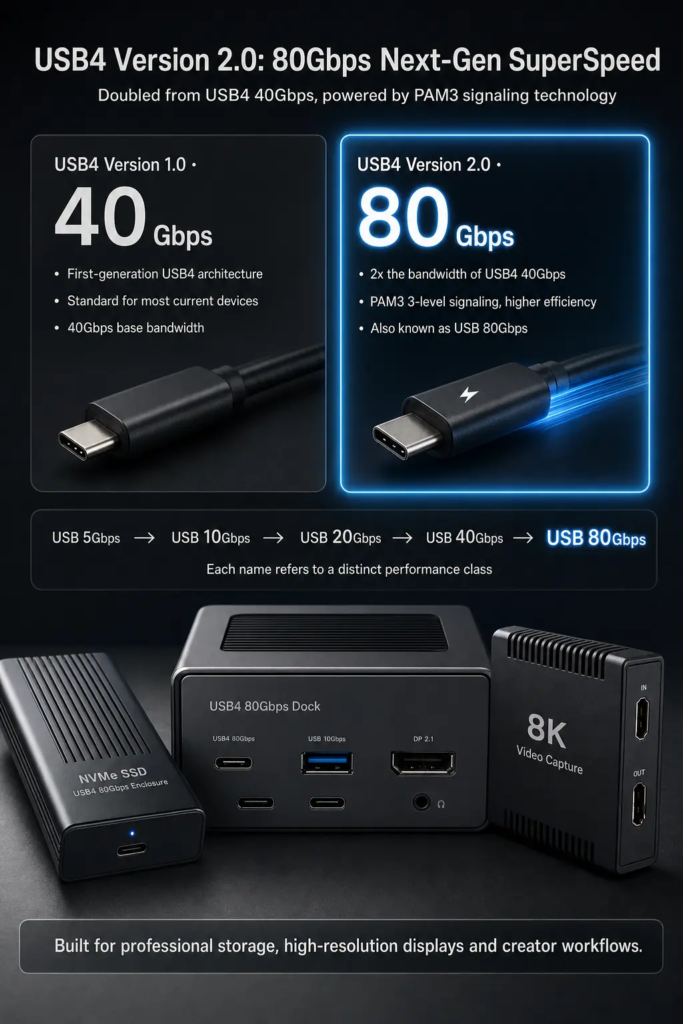
USB4 Version 2.0 is the next major step for high-speed USB-C connections. It is often called USB 80Gbps because its headline feature is a much higher maximum data rate than the first generation of USB4.
For ordinary users, the easiest way to understand it is this: USB4 40Gbps is already fast enough for many docks, external SSDs, and displays. USB4 Version 2.0 raises the ceiling again, making room for even faster external storage, higher-resolution displays, and more demanding professional workflows.
However, USB 80Gbps is not automatic just because a device has a USB-C port. To get the full benefit, the computer, cable, dock or device, and controller hardware all need to support USB4 Version 2.0.
1. What Is USB4 Version 2.0
USB4 Version 2.0 is the second major version of the USB4 specification. The USB Implementers Forum announced it in 2022 as an update designed to provide up to 80Gbps operation over USB Type-C cables and connectors.
The name can appear in several ways:
| Name You May See | Meaning |
|---|---|
| USB4 Version 2.0 | The official specification generation |
| USB 80Gbps | The consumer-friendly performance name |
| USB4 v2 | A shortened informal name |
The most important point is that USB4 Version 2.0 is not just a new label. It is a real technical upgrade over USB4 Version 1.0, which commonly supports up to 40Gbps operation.
2. How It Fits Into USB History
USB has gone through many speed upgrades. USB 3.0 brought 5Gbps. USB4 Version 1.0 brought up to 40Gbps. USB4 Version 2.0 raises the top USB performance class to 80Gbps.
| Standard | Common Performance Name | Maximum Nominal Rate |
|---|---|---|
| USB 3.0 / USB 3.2 Gen 1 | USB 5Gbps | 5Gbps |
| USB 3.2 Gen 2 | USB 10Gbps | 10Gbps |
| USB 3.2 Gen 2×2 | USB 20Gbps | 20Gbps |
| USB4 Version 1.0 | USB 40Gbps | 40Gbps |
| USB4 Version 2.0 | USB 80Gbps | 80Gbps |
It is more accurate to say that USB4 Version 2.0 doubles the top bandwidth of USB4 Version 1.0. It is not true that every USB generation has simply doubled the previous one. The USB naming history is more complicated than that.
3. Why USB4 Version 2.0 Is Faster
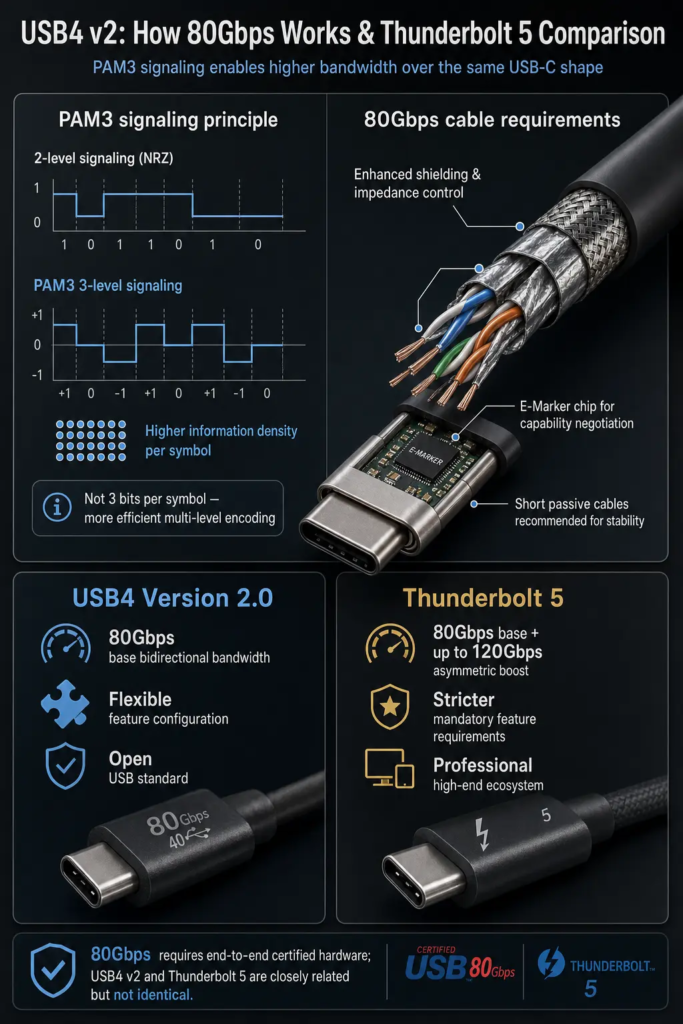
The key technical change is a new physical-layer signaling method called PAM3, short for Pulse Amplitude Modulation with three signal levels.
Older high-speed USB signaling commonly used simpler two-level signaling. PAM3 uses three signal levels, so each signal symbol can carry more information than a simple two-level signal. This helps USB4 Version 2.0 reach much higher bandwidth over USB-C connections.
A common mistake is to say that PAM3 carries “3 bits per symbol.” That is not correct. PAM3 uses three signal levels, and the theoretical information per symbol is about log2(3), or roughly 1.58 bits. The simple takeaway is: PAM3 is more efficient than ordinary two-level signaling, but it is not literally 3 bits per symbol.
4. What Hardware Is Required
USB4 Version 2.0 requires USB Type-C. Older connector shapes such as USB Type-A, USB Type-B, Mini-USB, and Micro-USB do not have the physical lane structure needed for USB 80Gbps operation.
To actually get USB 80Gbps performance, the whole chain must support it:
- The computer or host port must support USB4 Version 2.0 or an equivalent 80Gbps-class controller.
- The external device or dock must support USB4 Version 2.0.
- The cable should be certified for USB 80Gbps operation.
- The device controller, firmware, and operating system must support the required mode.
If one part of the chain only supports USB4 40Gbps, the connection will normally fall back to 40Gbps or another lower supported mode.
5. Cable Requirements
A USB-C cable does not automatically support USB 80Gbps. Some USB-C cables only support charging. Some support USB 2.0 data. Some support 10Gbps, 20Gbps, 40Gbps, or 80Gbps.
For reliable USB4 Version 2.0 performance, look for a cable clearly rated for USB 80Gbps. A cable labeled only as USB4 40Gbps should not be assumed to support USB 80Gbps.
| Cable Label | What It Usually Means |
|---|---|
| USB-C charging cable | May only support charging or USB 2.0 data |
| USB 20Gbps | Designed for USB 3.2 Gen 2×2 speed |
| USB4 40Gbps | Designed for first-generation USB4 speed |
| USB 80Gbps | Designed for USB4 Version 2.0 speed |
The cable also has a role in power delivery. High-speed and high-power USB-C cables use an E-Marker chip that tells the host and device what the cable can safely support.
6. Power Delivery and 240W Charging
USB4 Version 2.0 can work together with USB Power Delivery, including USB PD 3.1 Extended Power Range. USB PD 3.1 can support up to 240W, using up to 48V at 5A.
But this does not mean every USB4 Version 2.0 device automatically supports 240W charging. Data speed and charging power are separate capabilities.
| Feature | What To Know |
|---|---|
| USB 80Gbps | Data speed capability |
| USB PD 240W | Power delivery capability |
| E-Marker cable | Reports cable speed and power capability |
A cable or port may support high-speed data but not 240W charging. Another cable may support high-power charging but not USB 80Gbps data. Always check both the speed rating and the power rating.
7. Real-World Storage Performance
USB 80Gbps is a raw link rate, not a guaranteed file copy speed. Real file transfer speed is lower because of signaling overhead, protocol overhead, PCIe tunneling overhead, SSD controller limits, thermal throttling, and file system behavior.
For external NVMe SSDs and multi-drive storage arrays, USB4 Version 2.0 can allow much higher real-world performance than USB4 40Gbps. In ideal high-end setups, real storage transfer speeds may reach roughly 7GB/s to 8GB/s, but this requires the right host, cable, enclosure, controller, and SSD.
For most basic external drives, USB4 Version 2.0 will not magically make the drive faster. A slow flash drive or a mechanical hard drive will still be limited by the storage device itself.
8. Display Support
USB4 Version 2.0 is closely aligned with DisplayPort 2.1. This makes it useful for high-resolution and high-refresh-rate display setups, especially when used with modern laptops and docking stations.
In the right hardware chain, USB4 Version 2.0 can support demanding display use cases such as 8K displays, high-refresh-rate 4K displays, or multiple monitors. However, the exact resolution and refresh rate depend on many factors, including DisplayPort version, DSC compression support, color depth, HDR mode, the dock chip, the display, and the host GPU.
USB4 does not natively tunnel HDMI. HDMI output from a USB4 dock or adapter usually depends on DisplayPort-to-HDMI conversion inside the dock or adapter. For high-end HDMI 2.1 output, an active conversion chip is usually involved.
9. Relationship With Thunderbolt 5
Thunderbolt 5 and USB4 Version 2.0 are closely related. Both are designed around 80Gbps-class connectivity and both use USB-C connectors. Thunderbolt 5 also aligns with USB4 Version 2.0 and DisplayPort 2.1.
The main difference is that Thunderbolt 5 sets a stricter minimum feature level. It also supports a bandwidth boost mode that can provide up to 120Gbps in one direction for display-heavy workloads.
| Feature | USB4 Version 2.0 | Thunderbolt 5 |
|---|---|---|
| Connector | USB Type-C | USB Type-C |
| Base bandwidth class | USB 80Gbps | 80Gbps bidirectional |
| 120Gbps mode | Possible in asymmetric USB4 v2 operation, depends on implementation | Defined as Bandwidth Boost for display-heavy use |
| Feature requirements | More flexible | Stricter minimum requirements |
In simple terms, USB4 Version 2.0 is the open USB standard for 80Gbps-class connections. Thunderbolt 5 is a stricter, more feature-defined implementation built for high-end systems and accessories.
10. Current Device Support
USB4 Version 2.0 and USB 80Gbps are still early in the market compared with USB4 40Gbps. Many current laptops, docks, and SSD enclosures still top out at 40Gbps.
One important correction: Apple M3, M3 Pro, and M3 Max MacBook Pro models are listed by Apple as supporting Thunderbolt 4 and USB4 up to 40Gbps, not USB4 80Gbps. They should not be described as USB4 Version 2.0 or Thunderbolt 5 platforms.
For AMD platforms, do not assume that “Ryzen 7000” automatically means USB4 80Gbps. Some motherboards and laptops may support USB4 through specific controllers, but support depends on the exact model and controller. Always check the product specification page.
As of now, USB 80Gbps support is mainly expected on newer high-end platforms, Thunderbolt 5 systems, specialized docking stations, and high-performance external storage devices.
11. Who Actually Needs USB 80Gbps
Most users do not need USB 80Gbps yet. If you mainly use a mouse, keyboard, printer, phone cable, or normal external hard drive, USB 80Gbps will not make a noticeable difference.
USB4 Version 2.0 matters most for people who move very large files or use high-bandwidth devices every day.
- Video editors working with 4K, 6K, or 8K footage
- Photographers moving large RAW libraries
- Users with external NVMe SSDs or RAID storage arrays
- People using high-end USB-C docks with multiple displays
- Workstations that need fast external storage, display, and charging over one cable
For general users, USB4 40Gbps or USB 10Gbps may already be enough. USB 80Gbps is mainly for high-end workflows where external devices need to behave almost like internal hardware.
Summary
USB4 Version 2.0, also known as USB 80Gbps, is a major upgrade to the USB4 ecosystem. It doubles the top bandwidth class of USB4 Version 1.0 and brings USB-C closer to the performance level needed for professional storage, high-end docks, and advanced display setups.
Its main technical improvement is PAM3 signaling, which helps move more data through the same general USB-C connector system. It also works alongside DisplayPort 2.1, USB Power Delivery, and the broader USB4 tunneling architecture.
The most important practical point is compatibility. USB 80Gbps only works when the host, device, cable, and controller all support it. A USB-C connector alone does not guarantee USB4, USB 80Gbps, Thunderbolt 5, high-power charging, or advanced display output.
For most everyday users, USB4 40Gbps is already powerful. USB4 Version 2.0 is aimed at high-end users who need faster external SSDs, larger display setups, and cleaner single-cable workstations.