
Many people plug a USB-C charger into their phone, and after a while, they feel the back is warm to the touch and start to worry: Is my phone broken? Could something go wrong while it’s charging? Actually, heating during charging is not always a fault, but it should not be completely ignored either.
To be clear first, this content only applies to wired USB-C charging for mobile phones, which can be referenced for both Android phones and iPhones with USB-C ports; we will not expand on wireless charging, disassembly repair, or deep chemical principles of batteries. If you encounter situations such as charging overheating, port heating, heating during fast charging, heating while charging and using, or charger heating, you can read on.
First Make a Safety Judgment: Which Heating Can Be Observed, and Which Must Stop Charging
Before talking about the reasons, let’s put the most important safety red line first: some heating can be observed, but some situations require stopping charging immediately without hesitation.
If the phone body is bulging or deformed, has a burnt smell, smokes, the USB-C port is melted, the cable plug is blackened, there are sparks when plugging in, or there is a tingling electric shock sensation when touching, unplug the charger immediately, place it away from flammable materials, and do not attempt to charge again.
If you have replaced several sets of chargers and cables that are confirmed to be functional, but the phone still gets abnormally hot during charging, or restarts repeatedly, goes black, cannot charge at all, and the system keeps popping up high temperature prompts, go to an official or reliable repair shop for inspection as soon as possible.
If the whole body is just slightly warm, has no burnt smell or bulging, does not interrupt charging, and the temperature slowly drops after stopping use, it is most likely normal, and you can first troubleshoot the causes by yourself.
How to Distinguish Normal and Abnormal Heating
To judge whether heating is normal, just remember three core characteristics:
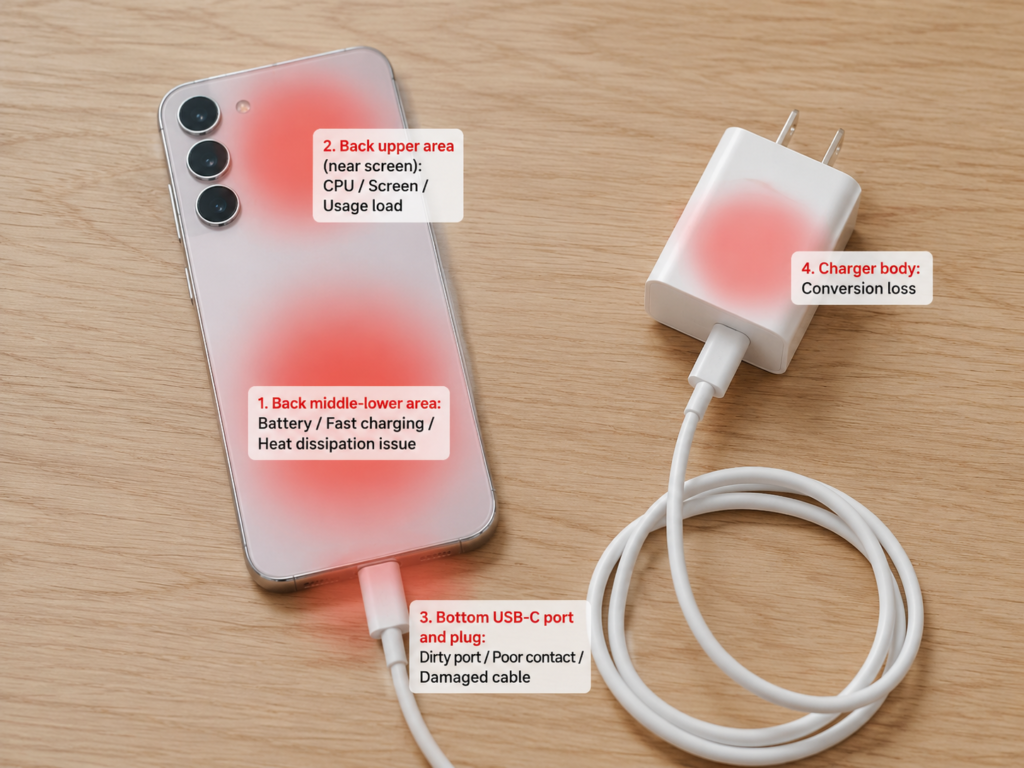
First, the heating location: it is mainly in the battery area on the back of the phone, that is, the middle and lower part of the body, the temperature is relatively uniform, and there is no particularly hot single point.
Second, the tactile standard: in a normal temperature environment, it is hot but can be held normally, not so hot that you cannot hold it; the approximate temperature reference is 38-43°C, but the shell material of different phones (glass, metal, plastic) and ambient temperature will affect tactile perception, do not fixate on the number, take “can be held normally, no local hot spots” as the standard.
Third, the continuous pattern: it is most obvious during the low-battery fast charging stage, and when the battery is nearly full, the charging power decreases, and the temperature usually drops slowly. Of course, in high-temperature environments, when the screen is on, or when the background load is high, even a normal phone will get hotter, which is a superposition effect and not abnormal.
Conversely, be alert to abnormal heating if these situations occur:
So hot that you cannot hold it continuously for more than 5 seconds, or there are obvious local hot spots; the system pops up warnings such as “high temperature”, “charging paused”, “charging restricted”; accompanied by symptoms such as inability to charge, battery level decreasing while charging, fast power drain, automatic restart, black screen, intermittent charging; still continues to get hot after stopping high-load use and moving to a cool and ventilated environment, or still heats for a long time after being fully charged; the USB-C port, cable plug, or charger is obviously hotter in a certain part, accompanied by peculiar smell, deformation, looseness or blackening.
If you do not want to remember so many characteristics, use the 3-level tactile method for quick judgment:
- Slightly warm: Can be held normally, no system warning and abnormal smell, just observe first.
- Hot: Uncomfortable to hold, stop using while charging first, remove the case, ventilate, and replace accessories for troubleshooting.
- Abnormally hot: Local hot spots, burnt smell, bulging, charging interruption, restart, immediately unplug the charger and send for repair or replace accessories.
There is also a little trick: looking at the heating location, you can roughly guess the priority troubleshooting direction. If the whole back of the phone is hot, priority is given to checking battery charging, high fast charging power, and poor environmental heat dissipation; if the upper part of the back or near the screen is hot, priority is given to checking usage loads such as CPU, screen, network, games, and video calls; if the USB-C port or cable plug is hot, priority is given to suspecting a dirty port, poor contact, damaged cable, liquid or metal foreign objects; if the charger shell is hot, it is mostly conversion loss, if there is no peculiar smell, deformation, or abnormal noise, slight heating is not necessarily a fault; power bank heating may come from boost conversion and its own heat dissipation, and inferior or aging power banks are more prone to abnormal heating.
Principle in Plain Language: Why Phone Charging Always Generates Heat
Some people may ask, why can’t charging be cool? Actually, the reason is very simple: energy conversion cannot be 100% efficient, and there will always be a part lost as heat.
Electricity travels from the wall socket to the phone battery, passing through the charger, data cable, USB-C port, power management circuit inside the phone, and finally reaches the battery. Every link has resistance and conversion loss — just like a water pipe joint always leaks a little water, except that what “leaks” here is heat. So “a little heat during charging” itself is not a fault; the key is whether the heat is too high, concentrated, or accompanied by abnormal symptoms.
Specifically, heat mainly comes from three places:
First, the battery itself: there are chemical reactions inside the battery during charging, plus the internal resistance of the battery itself; the larger the current and the higher the internal resistance, the more obvious the heating.
Second, the charging management circuit: the electricity input from the charger cannot be directly used by the battery, it must be converted by the circuit into the voltage and current that the battery can accept, and this conversion process also generates heat.
Third, superposition of usage load: the screen being on, processor running, and network connection all generate heat. If you use the phone while charging, the two parts of heat are superimposed, and naturally it will be hotter.
Why USB-C Fast Charging Is More Prone to Heating
Many people feel that the phone gets very hot during fast charging; is this normal? In fact, the essence of fast charging is to transmit more electrical energy in a short time, with higher power, and the heating is usually more obvious — just like turning on a large faucet to catch water, the splash will be bigger.
But don’t worry, regular USB-C fast charging is “negotiated”: the charger and the phone will negotiate power through fast charging protocols such as PD, and the phone will only draw power according to its own supported capacity, and will not be forced to take excess power. Moreover, fast charging is not always at full speed: the power is highest and charging is fastest in the low-battery stage, and it will gradually slow down after reaching medium to high battery level. The specific deceleration point will be affected by the model, battery temperature, ambient temperature, and battery health. If the temperature is too high, the phone will also actively reduce the charging power, and even pause charging in severe cases, which are all normal protection mechanisms.
Some phones use more advanced internal charging designs (such as dual-cell, charge pump) which can reduce part of the heating, but the basic rule that “high power brings more heat” remains unchanged.
Why Using While Charging Is Particularly Prone to Heating
When playing while charging, the phone heats up faster, and the reason is also very intuitive: charging inputs energy and generates heat, and using the phone consumes energy and generates heat; the two parts of heat are superimposed, so of course the temperature rises quickly.
Especially when playing large games, navigating, making video calls, or turning on hotspots, the CPU/GPU, screen, network, and positioning are all working under high load, power consumption is particularly high, and heating is more obvious. At this time, if the phone automatically reduces brightness, reduces performance, or even slows down charging speed, don’t think it’s broken — it’s cooling itself down, which is a normal protection mechanism.
Common Normal Heating Causes: Most Cases Don’t Need Repair
Most charging heating is normal and doesn’t need repair at all. There are several common situations:
The first is normal temperature rise during the fast charging stage. It is most obvious during low-battery fast charging, especially for models advertised as 30-minute fast charge. When using original or high-power regular chargers, it is definitely easier to feel hot than 5W or 10W slow charging. When the temperature gradually drops after the battery is nearly full, it means the charging management function is normal. Of course, if the temperature gets higher and higher, there are local hot spots, or charging is intermittent, it cannot be simply regarded as normal fast charging.
The second is superposition of usage load. Not only active operations such as playing large games, watching 4K videos, navigating, making video calls, turning on hotspots, and shooting videos will generate heat, but also many invisible “hidden loads”: for example, indexing data after system update, background downloading, cloud synchronization, photo sorting, app update, and continuous positioning operation will keep the processor working; superimposed with the heat of charging, the phone will get hot. Especially when charging with the screen on, the power consumption and heating of the screen itself are very obvious, coupled with high brightness, high refresh rate, and outdoor strong light environment, it will heat up faster. For a newly bought phone or a phone that has just been upgraded, the first few charges may be hotter due to background data migration, backup restoration, and app optimization, and it will return to normal after the background tasks are completed.
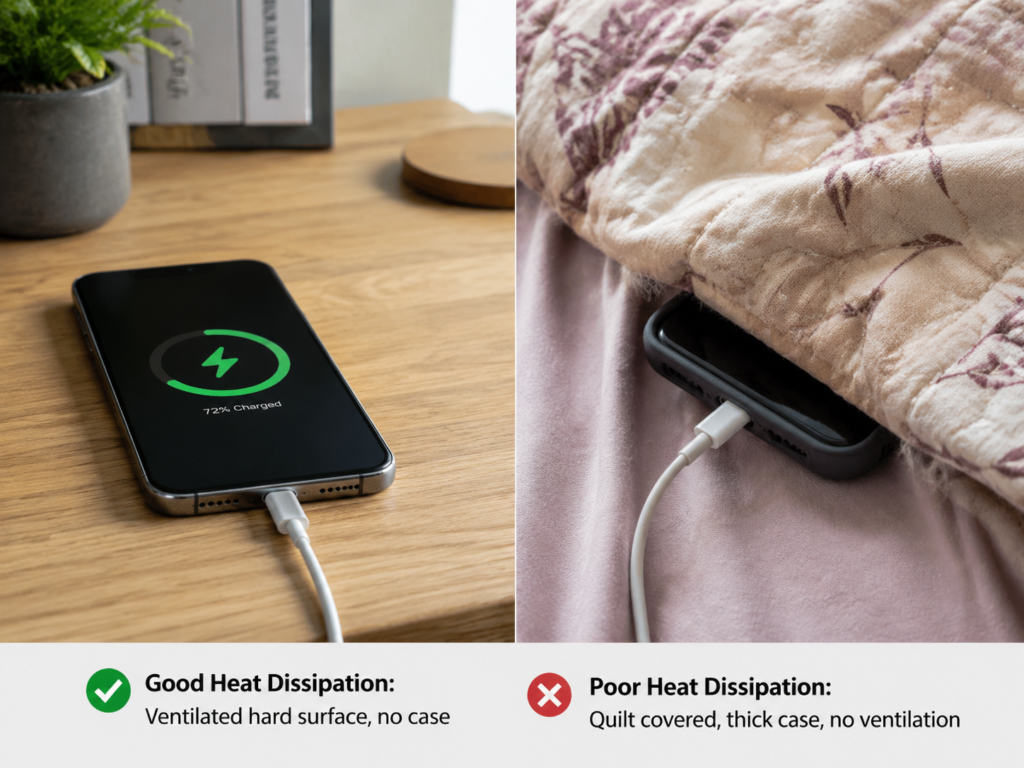
The third is poor environmental heat dissipation conditions. If charging in summer outdoors, in a car exposed to the sun, next to a heater, or in a closed and stuffy space, the ambient temperature is already high, and the heat of the phone cannot be dissipated, so it will naturally be hotter. Incorrect placement will also affect heat dissipation: pressing the phone on a quilt, pillow, sofa gap, or plush mat, these items will hinder heat dissipation, and heat will accumulate there and the temperature will rise. Phone cases also have an impact: overly thick phone cases, metal cases, and cases with magnetic accessories may all reduce heat dissipation efficiency. It’s easy to judge whether it’s a heat dissipation problem: remove the case and put it on a ventilated hard desktop; if the temperature drops significantly within 10-15 minutes, it’s a heat dissipation problem, not a phone fault.
The fourth is normal differences brought by regular accessories. Original high-power fast charging heads are hotter than ordinary slow charging heads; after all, the output power is large and the loss is also more, but as long as there is no burnt smell, abnormal noise, or deformation, it is normal. Regular third-party chargers can usually be used normally as long as the protocol, power, and safety certification are compliant. When a multi-port charger charges multiple devices at the same time, changes in power distribution may make the charger hotter or change the charging speed, which is also normal. When charging a phone with a power bank, both the power bank and the phone may heat up; if the power bank is bulging, has a peculiar smell, or the shell is abnormally hot, you should stop using it.
Abnormal Heating Causes That Require Vigilance
Of course, not all heating is normal, and the following situations require increased vigilance:
The first is unqualified or damaged USB-C chargers. Inferior chargers may have problems such as unstable output, insufficient protection, false power labeling, and poor heat dissipation, which are not only prone to heating, but may also damage the phone. Damaged chargers may have abnormal heating, abnormal noise, burnt smell, shell deformation, and loose pins, and must be stopped immediately. There are also accessories with poor protocol compatibility, which will repeatedly negotiate power and charge intermittently, leading to heating and unstable charging. The judgment method is very simple: if the situation improves significantly after replacing with an original or reliable brand charger, the original charger should be stopped.
The second is faulty or mismatched USB-C data cables. Don’t underestimate this cable. Peeling of the cable, bending damage, loose plug, and oxidized contacts will all cause increased contact resistance and local heating of the cable plug or port. Low-specification or falsely labeled cables may not be able to stably carry the corresponding fast charging power, manifested as slow charging, heating, and intermittence. However, low-power regular cables usually only limit the power and are not dangerous; what really needs to be vigilant about are damaged, falsely labeled, and poorly contacted cables. If heating decreases after replacing with an intact, regular cable that supports the corresponding power, it means the original cable should be replaced.
The third is poor contact or foreign objects in the USB-C port. The phone is put in a pocket every day, so dust and lint are easy to accumulate in the port, resulting in the plug not being inserted deeply, unstable contact, intermittent charging, and heating. If metal debris or liquid enters, or the port is corroded, it may cause a short circuit, and the port will quickly heat up locally, which is very dangerous. Oxidized contacts, loose port, and wobbly plug will also lead to increased impedance and intermittent charging. If shaking the cable plug slightly causes charging interruption, or the area near the port is hotter than other parts of the body, priority is given to checking the port.
The fourth is battery aging or damage. After the battery is used for a long time, has many charge cycles, and the health degree drops significantly, the internal resistance will increase, and it is more prone to heating during charging. If the battery health is lower than 80%, and battery life is significantly worse, and charging heating becomes heavier, you can consider replacing the battery. If the phone has been dropped, got water in, bulged, or the back panel is lifted, it may indicate that the battery or internal structure is damaged, and it must be checked in time. However, it should be noted that occasional heating does not mean the battery is broken; continuous abnormal heating accompanied by significant battery life decline is more indicative.
The fifth is internal software and hardware problems of the phone. Abnormal power management chips or charging-related components may lead to unstable current control, causing abnormal heating. In terms of software, system bugs or abnormal app wake-up will keep the CPU under high load during charging, which will also cause heating. Moisture or corrosion of the charging port flex cable and motherboard may also cause local heating and intermittent charging. However, such situations are relatively rare; generally, after eliminating problems such as accessories, environment, and background apps, then consider hardware repair.
Home Troubleshooting Steps: From Zero Cost to Confirming Whether to Send for Repair
Don’t panic when you encounter charging heating; follow the steps below to troubleshoot step by step, most problems can be solved at home, and basically cost nothing:
Step 1: Eliminate normal heating conditions
First confirm whether it is in the low-battery fast charging stage, whether you are using the phone while charging, and whether the ambient temperature is too high. Remove the phone case, place it on a ventilated hard desktop, lock the screen and let it charge for 10-15 minutes, and turn off high-load functions such as games, navigation, hotspots, and video calls at the same time. If the temperature drops significantly, most are load or heat dissipation problems.
Step 2: Do a low-load charging test
Restart the phone before charging to eliminate temporary background abnormalities. You can turn on airplane mode or turn off mobile network, Bluetooth, and hotspot, and charge with the screen locked for observation. You can also check the battery power consumption ranking to find apps that consume abnormal power. If it is obviously not hot under low load, it means the problem is mostly from usage load or background apps.
Step 3: Troubleshoot the charger and data cable
Replace with an original or reliable brand USB-C charger for testing, then replace with an intact, undamaged data cable that supports the corresponding fast charging power for testing. Try to avoid using unbranded low-price chargers, peeled cables, and cables with loose plugs. If the situation improves significantly after replacing accessories, stop using the original accessories.
Step 4: Check the USB-C port
Be sure to cut off the power before checking, and it is best to turn off the phone before checking. Use a flashlight to observe whether there is lint, dust, blackening, corrosion, or liquid traces in the port. If there is only dust and lint, you can gently clean it with a dry soft brush; never use metal needles, blades, or paper clips to dig hard, and do not spray liquid cleaners, otherwise it is easy to damage the port or even cause a short circuit. If liquid, metal debris, burning, melting, or obvious looseness is found, do not continue charging, send for repair directly.
Step 5: Troubleshoot system and app problems
Update to the official stable system version to fix possible charging and temperature control problems. Uninstall or restrict the background permissions of apps that consume abnormal power. If you have just completed system upgrade, data migration, or photo cloud synchronization, wait for the background tasks to complete before observing. If the system prompts that the temperature is too high, pause charging and cool down as prompted, do not force fast charging to continue.
Step 6: Judge whether repair is needed
Check the battery health or battery status prompt; if the health is low, battery life is significantly shortened, and charging heating is serious, you can consider replacing the battery. If it is still abnormally hot with multiple sets of reliable accessories, low load, and ventilated environment, send it to an official or reliable repair shop for inspection. If there are symptoms such as bulging, burnt smell, smoking, port melting, electric shock sensation, or repeated restarts, stop charging immediately and send for repair.
Practical Tips to Reduce Phone Charging Heating
Usually as long as you pay attention to some small details, you can greatly reduce the situation of charging heating:
Choose a Suitable USB-C Charger
Try to choose chargers from regular brands, with safety certification, and supporting the phone’s fast charging protocol. If the phone supports PD fast charging, priority is given to chargers that support USB PD. High-power chargers themselves are not equal to danger; regular products will negotiate power with the phone; unbranded falsely labeled high-power products are the risk points. If the charger has a burnt smell, abnormal noise, shell deformation, loose pins, or is abnormally hot, stop using it immediately.
Choose and Maintain USB-C Data Cables
Choose regular cables that support the corresponding current/power, especially for high-power fast charging phones. Higher cable power will not force the phone to accept higher power, but inferior falsely labeled cables still have risks. The protocols supported by USB-C to USB-C and USB-A to USB-C may be different, and the charging speed and heating performance will also be different. If the cable is peeled, has severe creases, loose port, or blackened plug, replace it in time, don’t make do with it.
Improve the Charging Environment
When charging, place it on a desktop, tile, metal stand or other positions that are more conducive to heat dissipation; do not press the charging phone under a quilt, pillow, clothing or sofa gap. After high-temperature exposure, let the phone naturally cool down to room temperature before charging. When you need fast charging, keep the screen locked and still, which can not only speed up the charging speed, but also reduce superimposed heat.
Optimize Charging Habits
Try to avoid playing large games, long-time navigation, video calls, and turning on hotspots while charging. When you are not in a hurry, you can use a lower power charger, or turn off the fast charging function, and the heating will usually be lighter. Turn on the system’s own functions such as “optimized charging”, “battery protection”, and “charging limit” to reduce the pressure on the battery from long-term full charge. Just charge it as you use it daily; you don’t have to use it until it’s dead every time, as frequent deep discharge will increase the battery burden instead.
Reduce System Load During Charging
Reduce the screen brightness during charging, and turn off the high refresh rate if necessary. Turn off unnecessary hotspots, positioning, Bluetooth, and background refresh. Pause background tasks such as large downloads, cloud synchronization, and batch app updates. When the phone is obviously hot, lock the screen and let it rest first; don’t continue high-load use while cooling down.
Common Misconceptions and Safety Red Lines
Clarification of Common Misconceptions
- Misconception 1: As long as there is heating during charging, the phone is broken
Truth: Energy conversion inevitably generates heat; if it conforms to normal characteristics and can cool down by itself, usually no repair is needed. - Misconception 2: Fast charging will definitely damage the battery and must never be used
Truth: Regular fast charging has protocol negotiation and temperature control protection; only long-term fast charging in high-temperature environments is more likely to increase battery loss. - Misconception 3: High-power USB-C chargers will damage the phone
Truth: Regular chargers and phones will negotiate power, and the phone only takes the power it supports; risks mainly come from inferior, falsely labeled, and damaged accessories. - Misconception 4: Charger heating means there is a problem with the phone
Truth: The charger’s own conversion also generates heat, which is more obvious when working at high power; abnormal judgment depends on whether there is a burnt smell, deformation, abnormal noise, or it is so hot that it cannot be touched. - Misconception 5: Charging all night will definitely overcharge and explode
Truth: Modern phones will control the current after being fully charged, and will not continue high-current overcharging; what is really not recommended is the situation of long-term full charge and poor heat dissipation. - Misconception 6: If it can charge, it means the cable and port are fine
Truth: Poor contact may also charge while being intermittent and heating; especially pay attention to the local heating of the USB-C port and cable plug. - Misconception 7: Ice compress or putting in the refrigerator can cool down quickly and safely
Truth: Cold and heat shock and condensed water may damage the phone or cause a short circuit, and natural ventilation should be used to cool down.
Dangerous Operations That Must Never Be Done
- Do not continue to use chargers or data cables that have burnt smell, damage, deformation, or abnormal heating.
- Do not use metal needles, blades, or paper clips to dig hard into the USB-C port.
- Do not put a hot phone in the refrigerator, next to ice water, or apply ice directly.
- Do not play while charging under a quilt, pillow, or clothing.
- Do not continue to try charging after finding bulging, smoking, or port melting.
When You Can Continue to Observe
Only slightly warm during the low-battery fast charging stage, and the temperature drops after locking the screen and resting; obvious cooling after removing the case, ventilating, and stopping high load; returns to normal after replacing reliable accessories; no burnt smell, bulging, charging interruption, restart, or system temperature warning — these situations can be observed first, don’t be too nervous.
When You Must Stop Charging and Send for Repair
The phone body is bulging, deformed, or the back cover is lifted; the USB-C port or cable plug has sparks, melting, blackening, or burnt smell; repeated restarts, black screen, or complete inability to charge during charging; the system frequently prompts that the temperature is too high and pauses charging; still abnormally hot with multiple sets of reliable accessories, low load, and ventilated environment — don’t hesitate when these situations occur, stop charging immediately and send for repair.
Quick Judgment Table: Phenomenon Corresponding to Cause and Treatment
For everyone’s quick reference, here is a simple judgment table:
| Heating Phenomenon | Common Causes | First Treatment | Situations to Be Alerted |
|---|---|---|---|
| The whole back of the phone is slightly warm | Fast charging, battery charging, battery aging, poor environmental heat dissipation | Remove the case, ventilate, lock the screen and rest, observe whether the temperature drops as the battery level increases | Still continues to be hot after full charge, or accompanied by significantly worse battery life |
| The upper part of the phone/near the screen is hot | Games, videos, navigation, hotspots, background tasks, high screen brightness | Turn off high-load apps, reduce brightness, restart and test again | Still continues to be hot in low-load screen-locked state |
| USB-C port or cable plug is locally hot | Dirty port, damaged cable, loose plug, high contact resistance, foreign objects | Cut off power and check the port, replace cable and charger for testing | Burnt smell, blackening, melting, intermittent charging, stop using immediately and send for repair |
| Charger shell is hot | Charger conversion loss, high-power output, multi-port simultaneous use | Place in a ventilated place, avoid covering, replace with a reliable charger for comparison | So hot that it cannot be touched, abnormal noise, burnt smell, shell deformation |
| Battery level decreases while charging or charging is very slow and hot | High load while charging, insufficient charger power, abnormal cable, poor port contact, system charging restriction | Lock the screen and rest, replace charger and cable, clean up background | Still unable to charge normally after multiple tests, need to detect the battery or charging circuit |
Summary
Generally speaking, USB-C charging heating of mobile phones is a very common phenomenon; most of the time it is normal, don’t be too nervous, but you can’t ignore the safety signals either.
After reading this content, you should be able to distinguish normal slight warmth, hotness that needs troubleshooting, and abnormal hotness that requires stopping charging; be able to judge the priority troubleshooting direction according to the heating location; be able to troubleshoot by yourself in the order of “safety judgment → reduce load → improve heat dissipation → replace accessories → check port → check system → repair judgment”; you can also understand the basic principle of fast charging heating, and will not misjudge it as a fault as soon as there is heating. Most importantly, you can identify safety red lines such as bulging, burnt smell, melting, sparks, repeated restarts, and inability to charge. Usually, through compliant accessories, good heat dissipation, reducing use while charging, and optimizing battery settings, you can greatly reduce the probability of daily charging heating, and use it with more peace of mind.