
Have you ever had this experience: after charging your MacBook or Steam Deck for half an hour, you reach for the charger and it’s so hot you almost drop it, and your first thought is, “Is it going to explode? Did I buy a defective product?”
Especially now that USB-C chargers power almost all digital devices—phones, tablets, handheld consoles, earbuds, even thin and light laptops—with power ranging from over 10 watts to hundreds of watts, any heat buildup can easily cause panic. First, a reassuring note: the vast majority of USB-C charger heat is normal, not a quality issue, and definitely not randomly dangerous. What you really need to watch out for is overheating accompanied by abnormal symptoms, which is rare but important to recognize. Learning to tell the difference between normal warmth and dangerous overheating will save you from wasting money on replacement accessories and help you avoid safety risks.
First, Figure Out: Is Your Charger’s Heat Normal?
To judge whether heat is a problem, don’t just rely on how hot it feels to the touch; consider the usage scenario, the location of the heat, and accompanying symptoms together.
Typical Signs of Normal Heat
Heat during the fast charging phase is a very common phenomenon, especially when the device has a low battery. In an environment with a room temperature of around 25°C and good ventilation, the casing temperature of a properly certified charger during full-power fast charging is usually between 40-55°C—it feels noticeably warm to the touch, but can still be held for a short time, with no burning smell, smoke, sparking, or casing deformation.
Heat also follows a clear phase pattern: when the device’s battery goes from low to around 50%, it usually runs at full fast charging power, and heat is most noticeable; when the battery approaches 80%, the vast majority of devices will actively reduce charging power, and the charger’s temperature will drop accordingly.
The degree of heat also varies by usage scenario: charging a laptop is usually hotter than charging a phone or tablet; a multi-port charger charging multiple devices at the same time is hotter than single-port charging; even if no device is connected and it’s just plugged into an outlet, it’s normal for the charger to be slightly warm—the internal standby circuit is still working, so it will only be slightly above room temperature, not hot to the touch.
Note that temperature values are only a reference based on experience; different brands’ casing materials (metal/plastic), power ratings, ambient temperatures, and temperature measurement methods will all affect results. Ultimately, judgment should be based on whether there are abnormal signals.
Warning Signs to Watch For
If the following situations occur, the heat may be abnormal and further troubleshooting is needed:
- Under the same device, cable, and environment conditions, the charger is significantly hotter than before with no clear cause;
- Charging speed is significantly slower, or charging cuts out repeatedly, frequently dropping from fast charge to slow charge;
- Not only the charger is hot, but the USB-C cable head, device port, outlet, or plug also get hot;
- It is already noticeably hot to the touch when no device is connected (no-load) or when only charging low-power devices like earbuds or smartwatches (low load);
- When the same device is charged with another legitimate certified charger, it does not get hot—only this charger heats up abnormally;
- The charger makes a slight high-pitched buzzing sound (called “coil whine” in the industry); this alone is not necessarily dangerous, but if it is accompanied by increased heat, a burning smell, or charging cutouts, you should be alert.
Danger Signs That Require Immediate Discontinuation
If any of the following situations occur, don’t hesitate—unplug the power immediately and stop using it:
- There is a burning smell, smoke, sparking, or obvious abnormal noise: this means internal components may be damaged, and continued use poses a fire risk;
- The casing is bulging, cracked, deformed, discolored, or feels sticky: this is most likely due to internal overheating causing damage to the casing or components, and it must never be used again;
- After charging for a while in a room-temperature, ventilated environment, it is so hot that you can’t hold it for more than 2 seconds: the temperature is far beyond the normal range;
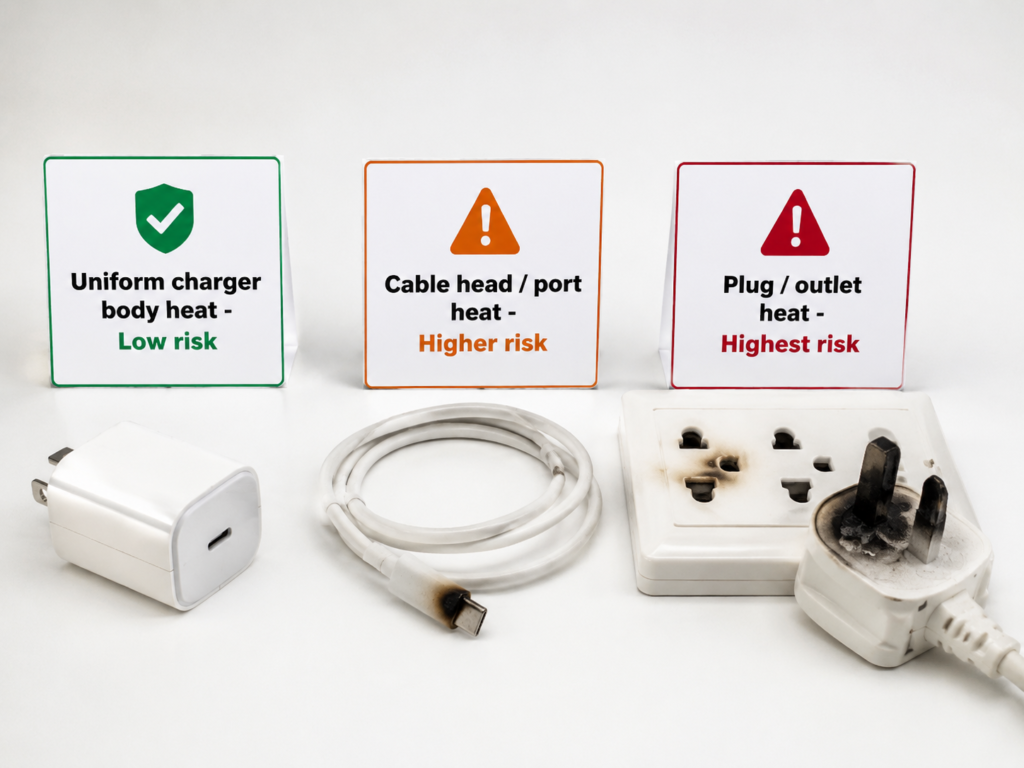
- The USB-C cable head, device port, outlet, or plug is extremely hot in a localized area: localized heat is mostly caused by poor contact, which is much more dangerous than uniform heat across the entire charger;
- The device being charged is also abnormally hot, and shows signs of screen flickering, unresponsive touch, repeated restarts, or battery bulging: there may be a problem with the charging management or battery, and continued charging may damage the device;
- The wall outlet, power strip, or adapter is hot: this is a problem on the power supply end. Prioritize stopping use of this power location, and do not plug in any devices to test.
To help you judge quickly, here is a simple comparison table:
| Judgment Dimension | Normal Heat | Abnormal Heat |
|---|---|---|
| Heat Phase | Noticeable during low-battery fast charging phase, gradually cools down after 80% charge | Hot throughout the entire process, even hot when no-load |
| Heat Location | Uniform heat across the charger body | Localized heat at cable head, port, or outlet |
| Accompanying Symptoms | No odor, no charging cutouts, device operates normally | Burning smell, repeated charging cutouts, device abnormalities |
| Feel to Touch | Can be held, warm but not painful | Cannot be held for more than 2 seconds, painfully hot |
Where Is It Hottest? Corresponding Problems
The location of the heat tells you more than the heat itself. You can first feel around to find the heat source:
- Uniform heat across the charger body: The most common type, mostly caused by high-power output, poor heat dissipation conditions, small size, low conversion efficiency, or internal aging. The risk is relatively low;
- Heat at the USB-C cable head/device port: Usually caused by insufficient cable specifications, loose port, dust buildup and oxidation, or abnormal pins. The risk is higher than heat from the charger body, and should be addressed first;
- Heat at the plug/outlet/power strip: Mostly caused by poor outlet contact, overloaded power strip, or poor-quality adapter. This is a power supply end problem with higher risk, so power supply safety should be checked first;
- Heat from the device being charged itself: May be caused by using the device while charging, high background load, battery aging, or system updates. This is easily misjudged as a charger malfunction.
5 Common Misconceptions for Beginners
Many people’s first reaction to charger heat is wrong. Let’s clear up these misconceptions first:
- Heat = poor quality? Wrong. Fast charging requires electrical energy conversion, and where there is loss, there will be heat. Normal heat is unavoidable and not a quality issue.
- Higher power = hotter? Wrong. The degree of heat depends on actual output power, load rate, conversion efficiency, and heat dissipation design, not just the rated power. For example, a 65W charger charging a 20W phone only uses 20W in practice, and may be cooler than a 25W charger working at full load.
- Original chargers don’t get hot? Wrong. Original high-power fast chargers also get hot, but they usually have more complete temperature control and protection mechanisms, with higher safety redundancy.
- Slight warmth when no-load is a malfunction? Wrong. The standby circuit consumes a small amount of electricity, so slight warmth is normal; but if it is hot to the touch when no-load, has odor or abnormal noise, or continues to heat up, that is a malfunction.
- Fast charging means no problem? Wrong. Even if the charging speed is normal, if it is accompanied by hot ports, charging cutouts, or odor, there is still a safety risk.
Why Do Chargers Always Get Hot?
Actually, the principle is very simple: the core is losses in electrical energy conversion—no electrical appliance can convert 100% of electricity into the desired energy; there will always be a portion wasted as heat.
Core Reason: Electrical Energy Conversion Cannot Be 100% Efficient
The job of a USB-C charger is to convert alternating current (AC) from a wall outlet into direct current (DC) that phones and computers can use. This conversion process cannot be 100% efficient, just like a car burning gasoline—some energy is always wasted as heat. Almost all of the energy wasted by a charger turns into heat.
There is a simple concept called “conversion efficiency”, which is the power output to the device divided by the power drawn from the outlet. The conversion efficiency of legitimate fast chargers is usually between 85% and 95%, and the remaining 5% to 15% of energy is mostly dissipated as heat.
For example: if your 13-inch MacBook Air actually gets 65W of charging power, and the charger’s efficiency is 90%, then the power drawn from the outlet is about 72W, of which about 7W turns into heat. If the charger is small in size, its casing will get noticeably hot when dissipating this 7W of heat.
4 Core Variables That Affect Heat
Even for 65W chargers, some feel warm and some get very hot, mainly affected by these four factors:
- Actual output power: The higher the power required by the device, the greater the total loss, and usually the more heat;
- Conversion efficiency: The higher the efficiency, the less energy is wasted as heat at the same output power;
- Heat dissipation design: The charger’s size, casing material, internal layout, filled thermal conductive material, and temperature control strategy all affect surface temperature;
- Usage environment: High temperature, enclosed spaces, being covered, crowded power strips, and proximity to other heat sources will prevent heat from dissipating, causing it to build up and get hotter.
Why Do USB-C Chargers Feel Hotter?
Old chargers from before didn’t seem to get this hot. Why do USB-C chargers often get hot? There are four main reasons:
- Wide power range: USB-C chargers have power ratings from over 10W to tens of watts, 100W, 140W, or even higher. The higher the power, the more noticeable the temperature rise;
- Compatible with many devices: The same charger may power phones, tablets, Switch, and laptops. Different devices have very different power requirements, so heat performance naturally varies;
- Getting smaller and smaller: The now-popular gallium nitride (abbreviated as GaN, a new type of semiconductor material) chargers do have higher efficiency, but their small size means limited heat dissipation area. The same amount of heat concentrated on a smaller casing feels hotter to the touch;
- Large fluctuations in fast charging curve: High-power fast charging at low battery, power reduction when near full charge—users will clearly notice “the first half is very hot, the second half cools down”, creating a stronger contrast.
These Types of Heat Are Nothing to Worry About—Adjustments Can Improve Them
Most of the time, a hot charger is not broken—it’s just being used incorrectly. A few adjustments can fix it, so there’s no need to be nervous.
Natural Heat from High-Power Fast Charging
This is the normal fast charging heat we mentioned earlier: when fast charging a phone with low battery, charging a tablet at high power, or charging a laptop via USB PD, it is completely normal for the charger body to get hot. When a multi-port charger is connected to multiple devices at the same time, the total output power increases, and heat also increases; the temperature will drop when fewer devices are connected.
Conversely, when a high-power charger charges low-power devices like earbuds or smartwatches, the actual output power is very low, so it may not be hotter.
Heat Buildup Caused by Poor Heat Dissipation Conditions
Many times it’s not that the charger itself is hot, but that the heat can’t dissipate, building up and getting hotter. Common situations include:
- High ambient temperature: summer, direct sunlight in a car, next to a heater, rooms without air conditioning;
- Covered by objects: pressed under bedding, pillows, clothes, books—heat can’t escape;
- Incorrect placement: placed on carpets, sofas, beds, in closed storage boxes, in corners, or narrow gaps—these places are all “insulating”;
- Other heat sources nearby: piled together with routers, computer cases, multiple adapters—heating each other;
- Using unsuitable adapters or crowded power strips: this both affects heat dissipation and may affect contact stability.
Sustained Heat Caused by High Device Load
If you play games, edit videos, use navigation, make video calls, or turn on a hotspot while charging, the device consumes a lot of power while charging, so the charger has to continuously output higher power. The heating time naturally becomes longer, and the temperature will also be higher.
In addition to these obvious high-load scenarios, system updates, photo syncing, cloud backups, background downloads, and high screen brightness will also extend the high-load charging phase.
Judging whether this is the cause is simple: leave the device idle with the screen off for 15-30 minutes. If the charger’s temperature drops significantly, it’s mostly caused by high device load, not a problem with the charger.
Slight Heat When No-Load or on Standby
The slight no-load heat mentioned earlier is also normal—when the charger is plugged into an outlet with no device connected, the internal standby circuit is still working, so it will only be slightly above room temperature. If it is hot to the touch when no-load, or if other legitimate chargers of the same type don’t get hot when no-load and only this one is abnormally hot, then it falls into the category of a malfunction.
These Types of Heat Are Actually Problematic—Troubleshoot or Replace
If adjusting the usage method still leaves it hot, or even causes abnormal symptoms, then there may really be a problem. Common causes fall into these categories.
Charger’s Own Quality, Damage, or Aging
If you are using a no-name product with no clear brand, no safety certification, and no parameter labeling, or with falsely rated power and shoddy workmanship, then severe heat is likely due to its own low efficiency and insufficient protection.
When buying a charger, prioritize products that meet the safety certification standards of your region: for example, CE and UKCA for the EU/UK, FCC and UL for North America, PSE for Japan, SAA for Australia, CCC for the Chinese market, etc. Certification requirements vary by region, so don’t assume it’s fine just because you see one mark.
Even legitimate products will age with prolonged use: long-term full-load operation, long-term use in enclosed high-temperature environments, humid environments, and frequent drops or impacts will accelerate the aging of internal components. Chargers that have been dropped, exposed to water, dampened, have loose prongs, or cracked casings may have affected internal insulation and component condition, and may also experience abnormal heat.
Don’t judge aging just by how many years it has been used; consider the symptoms: much hotter than before, hot even when no-load, repeated charging cutouts, odor, significant drop in charging efficiency—these are all signs of aging. Also note that ordinary users should not take apart the charger to clean dust or repair it; there are high-voltage capacitors inside, which pose an electric shock risk. Only clean dust from the casing, prongs, and around the ports.
Poor Contact of USB-C Cable or Port
This is a very common cause of heat, and the risk is higher than heat from the charger body itself.
First is insufficient rated power of the cable: ordinary 3A USB-C cables can only carry a maximum of about 60W of power (20V×3A); for high-power charging over 60W, a 5A cable with an E-Marker chip (a small chip hidden in the cable head that tells the charger how much power it can handle) is usually required to carry 100W or even higher power. For high-power scenarios like 100W, 140W, 240W, be sure to confirm the cable’s rated power, 5A current carrying capacity, and certification information. Don’t trust vague marketing terms like “fast charging cable” or “high current”.
Second is cable damage: damaged outer insulation, severe bending, internal broken strands, loose connectors—all will increase resistance and cause localized heat.
Then there are port issues: dust buildup, foreign objects, oxidation, or liquid exposure inside the USB-C port will cause poor contact; deformed port pins, loose plugging/unplugging, wobbly plugs will also cause heat, charging cutouts, or even corrosion.
As soon as localized heat occurs at the cable head or port, you must prioritize stopping use of this cable, check the port, and do not continue using it.
Fast Charging Protocol Incompatibility or Unstable Negotiation
USB-C fast charging has many protocols: the universal USB PD (the most common universal fast charging standard for USB-C), PPS (an extended version of PD that can adjust power more precisely), Qualcomm’s QC, and each brand’s own proprietary fast charging protocols. There are compatibility differences between different protocols.
The most common manifestations of protocol incompatibility are: inability to enter fast charging, low power, repeated charging cutouts, and charging prompts flickering back and forth. But note: protocol incompatibility itself does not necessarily cause severe heat—abnormal temperature rise is only likely when accompanied by repeated reconnections, load fluctuations, inferior accessories, or poor contact.
When troubleshooting, first replace with legitimate cables and outlets, and consider protocol compatibility last—don’t blame the protocol right away.
Abnormality of the Device Being Charged
Sometimes the root cause of heat is the device being charged, not the charger:
- Battery aging: decreased battery health and increased internal resistance make the device itself prone to heat during charging;
- Abnormal charging management: problems with the device’s internal charging chip, port, or battery protection module may cause power fluctuations and charging cutouts;
- Abnormal software power consumption: background programs, system errors, malware, sync tasks cause the device to consistently consume high power;
- Device port issues: dust, water exposure, or looseness in the USB-C port of a phone or computer will also cause localized heat at the port.
The judgment method is simple: use the same charger to charge another normal device. If it doesn’t get hot, then the problem is with the original device, and you need to troubleshoot the device’s battery, system, or port.
Problems with Outlets, Power Strips, or Power Supply Environment
Problems on the power supply end are easily overlooked, but actually pose the highest risk:
- Poor outlet contact: loose copper contacts in wall outlets, loose plugs, aged outlets will generate heat at the contact points;
- Overloaded power strip: plugging high-power devices like electric heaters, rice cookers, computer hosts, and multiple adapters into the same power strip at the same time may cause heat or even unstable voltage;
- Poor-quality adapters: travel universal adapters and cheap adapters often have small contact areas and poor materials, making them prone to heat;
- Wall wiring problems: old wiring in old houses, loose and blackened outlets require a professional electrician to handle—don’t mess with them yourself.
As soon as you find that the outlet, plug, or power strip is hot, you must prioritize addressing the power supply end, and do not continue testing the charger.
4 Steps to Locate the Cause of Heat Without Disassembling
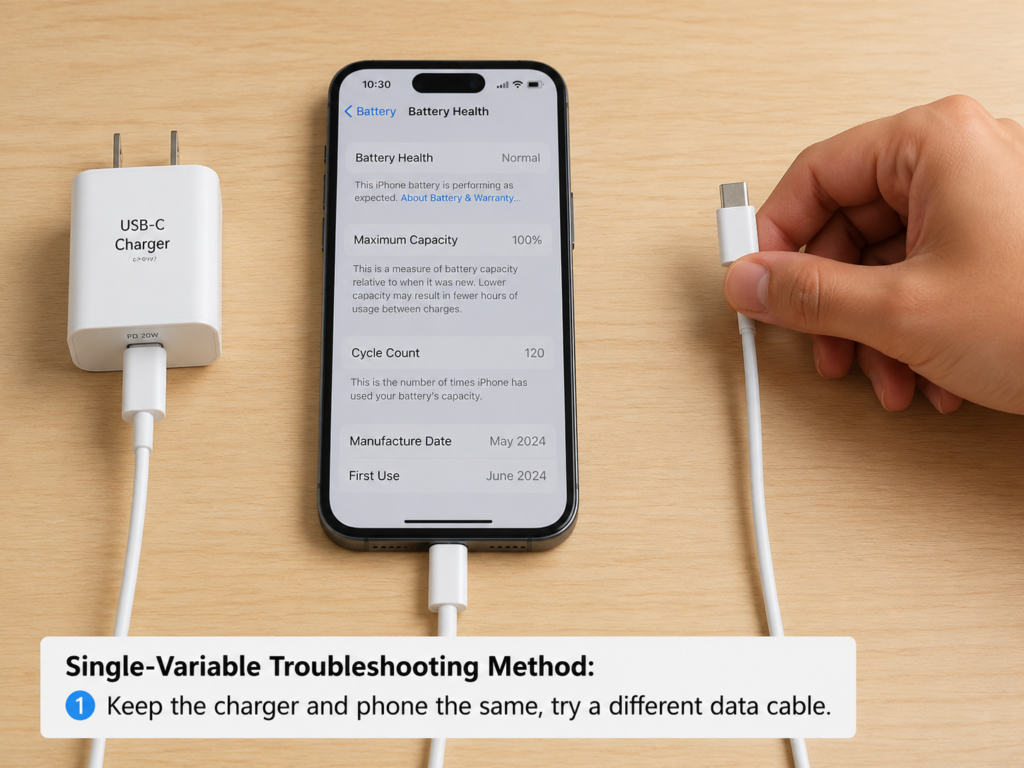
If you’re not sure where the problem is, you can use the “single-variable troubleshooting method” to find the cause step by step. No disassembly is required, and ordinary users can do it.
Step 1: First Eliminate Safety Risks
Before troubleshooting, put safety first:
- If there is already a burning smell, smoke, sparking, casing deformation, or hot port/outlet, cut power and stop using immediately—do not test further;
- Do not test in flammable or poorly ventilated environments such as under blankets, in piles of paper, on carpets, sofas, or in direct sunlight in a car;
- Never take apart the charger; there is high voltage inside, posing an electric shock risk;
- If the outlet or power strip is hot, first switch to an independent wall outlet, and stop using the suspicious power strip or adapter.
Step 2: Restore the Simplest Test Scenario
First remove all interfering factors and restore the most standard test environment:
- Environment: a hard desk with a temperature of around 25°C and good ventilation, away from sunlight, heaters, and other heat-generating devices;
- Accessories: keep only one charger, one cable, one device—remove all adapters, docking stations, and other devices;
- Device state: close high-power-consuming tasks like games, navigation, videos, hotspots, and system updates, leave idle with screen off;
- Duration: charge for 15-30 minutes, observe whether the temperature is stable, and whether there are charging cutouts, odor, or port heat.
If you have an infrared thermometer or a USB-C tester with power display, you can use it to assist judgment, but ordinary users don’t need to buy one specifically; also, infrared temperature measurement for metal-cased chargers will be inaccurate because metal reflects light, so don’t worry too much about the numerical value.
Step 3: Change Only One Variable at a Time
If it’s still abnormal after testing, change only one thing at a time while keeping everything else the same—this way you can accurately find the cause:
- Change the cable: test with a legitimate USB-C cable with sufficient rated power. If the temperature drops significantly, then the original cable or port contact is the problem;
- Change the charger: charge the same device with a legitimate charger of the same power or protocol. If the new charger works normally, then the original charger is the problem;
- Change the device: charge another normal device with the original charger. If only the original device gets hot, then the problem is with the device;
- Change the outlet: switch to an independent wall outlet, unplug other high-power devices from the same power strip. If the temperature drops, then the problem is with the power strip, adapter, or outlet;
- Change the usage method: switch from using while charging to idle with screen off. If the temperature drops significantly, then it’s caused by high device load.
Step 4: Make a Judgment Based on the Results
After changing variables, you can compare with the conclusions below to find the cause:
- Hot when battery is low, cools down when near full charge: normal fast charging heat, no need to worry;
- Hot when using while charging, cools down after idle with screen off: caused by high device load, just adjust usage habits;
- Improves after changing cable: insufficient cable specifications, damaged cable, or poor port contact;
- Improves after changing outlet: problem with the outlet, power strip, or adapter;
- Hot when no-load, hot at low load, significantly hotter than other legitimate chargers in the same environment: high probability of the charger itself being faulty;
- Localized hotness at cable head, port, or plug: stop testing immediately, discontinue use, and troubleshoot accessories or the power supply end.
Want to Understand the Logic Behind It? These Points Will Help You Avoid Misjudgment
If you want to understand more deeply and avoid misjudgment in the future, you can look at these advanced knowledge points. You don’t need to memorize them, just understand them.
Power, Load Rate, and Efficiency Curve
Many people think “higher power = hotter”, but that’s actually wrong. The key is load rate—simply put, it’s the actual output power of the charger divided by its rated maximum power, equivalent to “the ratio of actual workload to full load”. For example, a 65W charger charging a phone at 20W has a load rate of only about 30%; although the rated power is high, the actual heat may be lower than a 25W charger at full load (100% load rate).
In addition, the conversion efficiency of a charger is not a fixed value; efficiency varies under different loads: most chargers have the highest efficiency at medium to high loads (for example, 50%-80% load rate), and efficiency is slightly lower at low loads, but because the total power is small, the total heat is still very low.
The final temperature rise is determined jointly by power loss, size, casing material, internal heat dissipation, ambient temperature, and temperature control strategy—not just by a single parameter.
Why Do GaN Gallium Nitride Chargers Feel Hotter?
Many people buy GaN chargers and find they are hotter than old chargers, so they feel cheated—but that’s not actually the case.
GaN (gallium nitride) devices do improve conversion efficiency and reduce charger size, but that doesn’t mean they don’t generate heat at all. Precisely because of their small size, the heat dissipation area is also small, and the same amount of heat concentrated on a smaller casing feels more noticeable to the touch.
There’s another common misconception: metal-cased chargers feel hotter, so people think they’re worse. Actually, metal conducts heat quickly, so it’s more effectively conducting internal heat out; plastic-cased chargers may not feel as hot, but that doesn’t mean the internal temperature is low.
To judge whether a GaN charger is safe, don’t just rely on how it feels. Judge based on whether there are charging cutouts, odor, deformation, port heat, and whether it actively reduces power.
The Relationship Between Fast Charging Protocols and Heat
Let’s talk about the protocol questions people often ask:
- USB PD is the most common universal fast charging protocol for USB-C, with relatively the best compatibility;
- PPS is an extension of USB PD that can adjust voltage and current more precisely. When paired with devices that support PPS, it may be more efficient and stable;
- QC and each brand’s proprietary fast charging protocols may charge faster on corresponding brand devices, but when mixed, they may only charge at low power or be unable to fast charge.
Remember: the most common result of protocol mismatch is slow charging or charging cutouts, which does not directly cause severe heat. Don’t blame protocol incompatibility as soon as it gets hot. In addition, when a new device is plugged into a multi-port charger, power will be reallocated, and short-term charging cutouts or temperature fluctuations are normal. Only long-term repeated charging cutouts require troubleshooting.
Key Common Sense About Cable Specifications
Cables may seem unremarkable, but they actually have a big impact on heat. Just remember a few key points:
- Ordinary 3A cables are suitable for up to about 60W scenarios; exceeding that may cause heat;
- For above 60W, prioritize 5A cables with E-Marker, which support up to 100W;
- For high-power scenarios above 100W, be sure to check the cable’s clear rating and certification;
- The longer, thinner, and lower quality the cable, the greater the resistance and the higher the risk of heat;
- During high-power charging, as soon as there is heat at the cable head or plug, or loose contact, it must be addressed first.
Temperature Control Protection and Power Reduction
Legitimate chargers usually have protection mechanisms such as over-temperature, over-current, over-voltage, and short circuit. When the temperature rises to the threshold, the charger will automatically reduce output power, so you may encounter “it gets hot while charging, then the charging speed slows down”—this is actually normal temperature control protection, not a malfunction.
Occasional power reduction is normal, but if there are repeated charging cutouts, sustained overheating, or odor, that is not normal. Inferior chargers often lack reliable protection, so the risk is much higher when abnormal heat occurs.
How to Reduce Charger Heat? Practical Tips from Purchase to Use
Actually, most heat problems can be avoided as long as you choose the right accessories and use the right methods. Here are a few practical tips for you.
Purchase Tips
- Choose products from legitimate brands that meet local safety certification standards. Don’t buy cheap, unbranded products with no certification or parameters;
- Power just needs to match the device’s needs; don’t blindly pursue the highest power—enough is enough;
- When buying chargers for high-power devices like laptops or handheld consoles, confirm that they support the corresponding USB PD/PPS profiles;
- When buying a multi-port charger, look at the total power and single-port power allocation rules; don’t just look at the marketing of single-port maximum power;
- High-power chargers with prices significantly lower than legitimate products of the same specification most likely have falsely rated power or reduced configurations—don’t buy them.
Cable Tips
- The rated power of the cable should not be lower than your actual charging needs;
- For scenarios above 60W, prioritize 5A cables with E-Marker; for above 100W, be even more sure to confirm the rating and certification;
- When the cable’s outer insulation is damaged, the connector is loose, plugging/unplugging is unstable, or the cable head gets hot, replace it in time—don’t make do with it;
- Do not use adapters, magnetic heads, or multiple adapter cables of unknown origin for long-term high-power fast charging—the risk is very high.
Usage Tips
- When fast charging, try to place the charger on a ventilated hard surface, such as a desk;
- Do not cover the charger; do not place it under blankets, pillows, carpets, or clothes;
- In high-temperature environments (such as direct sunlight in a car, direct outdoor sunlight), try to reduce full-load fast charging;
- Try not to use high-load scenarios like games, navigation, or video calls while charging; pause if possible;
- When charging with multiple ports at the same time, don’t pile several high-power devices and chargers together, as this affects heat dissipation.
Maintenance Tips
- Regularly check the USB-C cable head, device port, and charger prongs for dust, oxidation, deformation, or looseness;
- Dust on the casing and prongs can be wiped with a dry soft cloth; dust inside the port can be gently brushed with a dry soft brush—don’t blow with your mouth;
- Never use sharp metal objects to clean live ports, and do not clean while plugged in;
- After the charger is exposed to water, cracked from dropping, or has a deformed casing, do not continue using it—safety first.
When to Adjust, Replace, or Immediately Discontinue Use?
Finally, here’s a clear decision-making standard for you, so you don’t have to guess:
Situations Where Adjusting Usage Method Is Enough
- Only hot during the low-battery fast charging phase, cools down significantly when near full charge;
- Only hot when charging high-power devices like laptops or tablets, with no abnormalities such as odor, charging cutouts, or port heat;
- Temperature drops significantly after moving to a ventilated place and removing coverings;
- Hot when using while charging, cools down significantly after idle with screen off;
- Hot when charging with multiple ports at the same time, improves significantly after reducing the number of devices.
Situations Where Replacing Cables or Accessories Is Recommended
- Noticeable heat at the USB-C cable head or port;
- Damaged cable, loose connector, unstable plugging/unplugging;
- Using ordinary low-specification cables for high-power devices;
- Heat improves significantly after replacing with legitimate high-specification cables;
- Abnormal heat occurs after using inferior power strips, travel adapters, or magnetic adapters.
Situations Where Replacing the Charger Is Recommended
- Noticeably hot to the touch when no-load or at low load;
- Still abnormally hot after changing the cable, device, and outlet;
- Significantly hotter than similar legitimate chargers in the same environment and with the same device;
- Used for many years, with simultaneous symptoms like charging cutouts, odor, casing deformation, and significant increase in heat;
- Unbranded, uncertified, no parameters, or obviously falsely rated power.
Situations That Require Immediate Discontinuation and No Further Testing
- Burning smell, smoke, sparking, sparks;
- Casing bulging, cracking, deformation, discoloration, stickiness;
- Localized hotness at the wall outlet, power strip, plug, or USB-C port;
- Device is abnormally hot during charging, with screen flickering, unresponsive touch, repeated restarts;
- Charger exposed to water, cracked from dropping, loose prongs;
- Ordinary users should not disassemble for repair; directly replace with a legitimate product, or contact the brand’s after-sales service.
Frequently Asked Questions
Can I Continue Using a Very Hot Charger?
If it’s just uniform heat across the charger body during the fast charging phase, with no odor, charging cutouts, or hot ports, and it cools down when near full charge, you can usually continue to observe. If it’s so hot you can’t hold it for a short time, or is accompanied by burning smell, deformation, charging cutouts, or port heat, stop using it immediately.
Is It Normal for GaN Gallium Nitride Chargers to Get Hot?
Yes, it’s normal. GaN chargers are characterized by small size, high power, small heat dissipation area, and more concentrated heat, so they feel hotter to the touch. But GaN doesn’t mean absolute safety—if danger signs appear, you still need to stop using it immediately.
Why Is the Cable Head Hotter Than the Charger?
Mostly related to insufficient cable specifications, loose ports, dust buildup and oxidation, or increased contact resistance. The risk of localized heat at the cable head or port is higher than heat from the charger body. It’s recommended to change the cable first and check the device port at the same time.
Why Is the Charger Hotter When Using the Device While Charging?
The device consumes a lot of power while charging, so the charger needs to continuously output higher power, and the heating time becomes longer. Scenarios like games, navigation, video calls, hotspots, and system updates will make heat more noticeable.
What If the Outlet Also Gets Hot?
Immediately stop using this outlet, power strip, or adapter, and switch to an independent wall outlet to test. If the wall outlet itself is blackened, loose, or continuously hot, be sure to have a professional electrician check it—don’t handle it yourself.
Will a High-Power Charger Get Hotter When Charging a Phone?
Not necessarily. During USB-C charging, the charger and device negotiate power, and the phone only draws power according to its own supported capacity. For example, a 65W or 100W charger charging a 10W-30W phone has a very low actual load, so it may not get hot at all.
Core Summary
USB-C charger heat is not necessarily a malfunction; heat during the fast charging phase is a very common phenomenon. The key point of judgment is never “whether it’s hot”, but “whether it’s abnormally hot, whether it’s localized heat, and whether it’s accompanied by danger signs such as odor/charging cutouts/deformation”.
Special note: localized heat at the cable head, port, or outlet is much more dangerous than uniform heat across the charger body, and must be addressed first.
When troubleshooting, use the “single-variable method”, changing only one thing at a time: change the cable, change the charger, change the device, change the outlet, change the usage method—it’s easy to find the cause.
As long as you choose a legitimate charger, match the cable specifications, maintain ventilation, and avoid high-load use while charging, you can reduce the vast majority of heat problems.