
When buying a USB-C charger, you must have seen confusing labels like PD 3.0, PD 3.1, 100W, 240W, and EPR. Even among PD chargers, those labeled 3.1 are often much more expensive than 3.0 ones. Many people wonder: is the extra cost worth it? Is PD 3.1 definitely faster at charging?
In fact, most users don’t need to pay for the high-power function of PD 3.1 at all, while those who really need it often waste money and fail to reach full power because they didn’t buy the right cable or confirm device support. Today we will thoroughly explain the differences between PD 3.0 and PD 3.1, from basic concepts to practical scenarios, and then to purchasing pitfalls. After reading this, you will be able to judge which one to buy by yourself.
Conclusion First: What Exactly Is the Difference Between PD 3.0 and PD 3.1
For friends in a hurry, here is a straightforward conclusion:
PD 3.0 is the current mainstream USB-C fast charging standard for up to 100W, covering almost all mobile phones, tablets, handheld consoles, ordinary thin and light laptops, and most peripherals.
PD 3.1 is not a brand-new standard that overthrows PD 3.0, but adds Extended Power Range (EPR for short) on the basis of fully retaining fast charging capabilities within 100W, raising the theoretical maximum power of USB-C PD from 100W to 240W.
What really determines the charging speed is never the version number, but whether your device, charger, and charging cable all support the corresponding power level. For the vast majority of mobile phone and tablet users, PD 3.1 will not charge faster than PD 3.0; the EPR function of PD 3.1 only has practical value when using high-power devices with USB-C input such as 140W, 180W, and 240W.
How to quickly judge whether you need PD 3.1? It’s very simple: if the maximum USB-C PD input power of your device does not exceed 100W, then choosing a PD 3.0 or a PD/PPS charger within 100W is sufficient; only when the device clearly marks support for 140W/180W/240W USB-C PD input do you need a PD 3.1 EPR charger and the corresponding 240W cable. If you mainly charge mobile phones, earphones, watches, tablets, and handheld consoles, just prioritize PD/PPS support and actual power, and there is no need to blindly chase the PD 3.1 version number.
Let’s clarify the scope of today’s comparison in advance: we are talking about the USB Power Delivery standard officially formulated by USB-IF, only for USB-C port fast charging of consumer-grade devices, not involving old interfaces like Lightning and Micro-USB, nor including private fast charging of mobile phone manufacturers, dedicated round/square port power supplies for laptops, and various modified power induction devices. The following basic comparisons default to compliant products. Factors that affect actual speed such as temperature, battery level, and multi-port power distribution will be discussed in detail separately.
Pre-requisite for Beginners: First Understand What USB PD Is
If you are new to PD fast charging, you might as well spend a few minutes understanding a few basic concepts first, and the following content will be much easier to understand.
A Plain Explanation of the USB PD Fast Charging Protocol
The full name of USB PD is USB Power Delivery. You can think of it as a set of general rules of “negotiate before charging”: when charging, the charger, device, and cable will first “communicate” to confirm the voltage, current, and power that all three can accept, and start power supply only after reaching an agreement. It’s not that the charger can output as much as it wants, but the device makes a request according to its own needs, and the charger responds within its own capabilities. This can greatly reduce the risks of overvoltage, overcurrent, and wrong charging.
Here we must correct a common cognitive misunderstanding for many beginners: USB-C is just the shape of the interface, and PD is the capability of the charging protocol. Having a USB-C port does not mean that it must support PD fast charging. Just like the same USB-C interface, some can only be used to transfer data and slowly charge earphones, while some can output 100W to power a laptop. The two are completely different things.
The Difference Between PD and Private Fast Charging
Next, we need to distinguish between PD fast charging and manufacturer’s private fast charging.
PD is like Mandarin, which is commonly used around the world. Whether it is Apple, Android phones, laptops, monitors, docks, or power banks, as long as they support the PD protocol, they can be charged with the same PD charger, and they can work normally across brands. Private fast charging is more like a local dialect. For example, the 120W, 150W, and 200W fast charging promoted by some mobile phone manufacturers can usually only trigger full speed with the brand’s original or specific ecosystem accessories. If you use a PD charger of another brand, it may only run at a general power of tens of watts.
Many mobile phones’ advertised “hundred-watt fast charging” often refers to the peak power of the private protocol, and the power of general USB PD may be much lower. When purchasing, you must clearly distinguish between “supports a certain brand’s fast charging” and “supports USB PD output”, and don’t be fooled by the big numbers on the promotional page.
Version Relationship Between PD 3.0 and PD 3.1
Let’s talk about the version relationship between PD 3.0 and PD 3.1.
PD 3.0 became popular in the mid-to-late 2010s, and is currently the mainstream USB-C fast charging standard for consumer electronics within 100W. The PPS fine voltage regulation function we are familiar with was also gradually popularized along with the PD 3.0 system.
PD 3.1 is an important upgrade released by USB-IF in 2021. The biggest change is the addition of the EPR extended power range, which raises the power limit of USB-C PD from 100W to 240W. It does not overthrow PD 3.0 and start over, but expands support for high-power scenarios on the basis of fully retaining all capabilities of PD 3.0 within 100W.
You may also see the term SPR, which stands for Standard Power Range. This is a commonly used power division method after the release of PD 3.1: SPR refers to the power range within 100W, which is basically consistent with the capabilities of PD 3.0; EPR is the extended part above 100W, which is newly added by PD 3.1. For ease of understanding, we will also use SPR and EPR to distinguish different power intervals later.
In other words, for devices within 100W, using a PD 3.0 charger and a PD 3.1 charger usually will not produce a difference in charging speed due to the version number — because the SPR capabilities of the two are the same.
4 Things Beginners Most Easily Misunderstand
People who are new to PD fast charging are most likely to fall into these four pitfalls. Let’s clarify them in advance:
First, PD 3.1 is not necessarily faster to charge than PD 3.0. Only when your device supports EPR power above 100W can PD 3.1 play its role; otherwise, there is no difference from PD 3.0.
Second, being labeled PD 3.1 does not mean it must be 240W. Some products just label the original PD 3.0 capability within 100W as the SPR version of PD 3.1, which is essentially still 100W, purely riding the popularity of the version number.
Third, having a USB-C interface does not mean supporting PD fast charging. The interface form and the fast charging protocol are two different things. The specific supported power depends on the official parameters of the device.
Fourth, a high-power PD 3.1 charger will not burn out your phone. Compliant PD devices will negotiate before supplying power. The phone will only draw power according to the power it supports, and the charger will not force high voltage. There is no need to worry about safety issues.
Core Parameter Comparison: PD 3.0 vs PD 3.1
Now that we understand the basic concepts, let’s compare the core parameters of PD 3.0 and PD 3.1 in detail. For your convenience, we have first compiled an overview table, and then we will break down each item one by one.
| Comparison Item | PD 3.0 | PD 3.1 |
|---|---|---|
| Core Positioning | USB-C PD fast charging standard for up to 100W | Retains all capabilities within 100W, adds support for EPR high power above 100W |
| Power Limit | Maximum 20V 5A, total 100W | Maximum 48V 5A, total 240W |
| Power Range | Corresponds to SPR standard power range (within 100W) | SPR (within 100W) + EPR extended power range (up to 240W) |
| Typical Fixed Voltages | 5V as the basic gear, common 9V/15V/20V, 12V is common but not mandatory | Retains all SPR gears, adds 28V/36V/48V EPR high-voltage gears |
| Adjustable Voltage | Supports PPS (Programmable Power Supply) (optional), mostly used for low-voltage fine voltage regulation of mobile phones/tablets | Retains PPS, adds EPR AVS high-voltage adjustable capability |
| Cable Requirements | 3A cable for 60W, 5A E-Marker cable for 100W | Consistent with PD 3.0 for within 100W, 240W EPR cable required for above 100W |
| Typical Applicable Devices | Mobile phones, tablets, handheld consoles, thin and light laptops, ordinary monitors | 140W/180W/240W laptops, high-power monitors, docks |
| Is It Definitely Faster? | – | Not necessarily, depends on whether the device supports EPR high power |
| Identification Keywords | PD, PD 3.0, PPS, 65W, 100W | PD 3.1, EPR, 140W, 180W, 240W, 28V/36V/48V |
Power Range Comparison: The True Meaning of 100W vs 240W
Let’s first talk about the power difference that everyone is most concerned about: what exactly is the difference between 100W and 240W?
The maximum power of PD 3.0 is 100W, which is usually achieved by 20V voltage and 5A current. The 18W, 20W, 30W, 45W, 65W, and 100W PD chargers we see daily all belong to the power range of PD 3.0.
PD 3.1 is divided into two levels: the lower level is the SPR standard power range, that is, the part within 100W, which is fully compatible with PD 3.0; the upper level is the EPR extended power range, covering the interval from above 100W to 240W, with three typical fixed gears: 28V 5A (max 140W), 36V 5A (max 180W), 48V 5A (max 240W).
You must remember here: there are three necessary conditions to trigger EPR high power — the device supports EPR input, the charger provides the corresponding EPR voltage gear, and the cable supports EPR/240W. All three are indispensable. Let’s take a practical example: if you have a laptop that supports 140W USB-C PD 3.1 EPR, but it is paired with a 100W PD 3.0 charger, then it can only charge at a maximum of 100W or lower, and cannot reach 140W.
Voltage Gear Comparison: Don’t Confuse Fixed PDO, PPS, and AVS
Next, let’s talk about voltage gears. Many people can’t tell the difference between fixed voltage, PPS, and AVS. Let’s explain them one by one.
First is the fixed voltage gear, which are several fixed voltage values that the charger can stably output. The device will select the most suitable one from the gears supported by both itself and the charger. For example, the common 5V, 9V, 15V, and 20V all belong to this category. Among the fixed voltages of PD 3.0, 5V is the basic gear that all PD chargers must support. 9V, 15V, and 20V are configured according to the power level of the charger. Although 12V is also seen in many products, it is not a core mandatory gear of modern USB PD.
Then there is PPS, which stands for Programmable Power Supply. This is an optional function in the PD 3.0 system, and not all PD 3.0 chargers support it. PPS can continuously adjust the voltage within a certain range (usually around 3.3V to 21V), instead of only selecting fixed gears. It is mostly used for fine voltage regulation of devices such as mobile phones and tablets, which can reduce the loss and heat of internal voltage reduction of the device and improve charging efficiency. So when buying an Android phone charger, don’t just look at whether it has PD, but also check whether it supports PPS.
The voltage gears of PD 3.1 first fully retain all fixed voltage gears and PPS functions of PD 3.0, and then add three high-voltage fixed gears of 28V, 36V, and 48V in the EPR part. This is also a key clue to judge whether a product really supports EPR. In addition, EPR also has an adjustable voltage function called AVS, which stands for Adjustable Voltage Supply. It can continuously adjust the voltage between about 15V and the corresponding maximum EPR voltage, mainly for high-power devices above 100W, such as laptops and workstations.
For ordinary users, just remember: devices such as mobile phones, tablets, and handheld consoles usually only use SPR and PPS capabilities, and the EPR high voltage and AVS functions of PD 3.1 cannot be triggered at all, so they will not make charging faster.
Cable Requirement Comparison: Cables Are the Most Easily Overlooked Bottleneck
Cables are the charging bottleneck that many people most easily overlook. Many people buy high-power chargers but still use old cables, resulting in failure to reach full power, and they think the charger is not good.
Our common USB-C to USB-C cables can be divided into three categories according to charging capability:
The first type is ordinary 3A cables, which usually only support up to 60W power, and may not have an E-Marker chip (that is, an identification chip in the cable, used to tell the charger and device the maximum current and power that this cable can withstand). This type of cable is suitable for charging mobile phones, tablets, and low-power devices.
The second type is 5A E-Marker cables, which support up to 100W SPR power, that is, the upper limit of PD 3.0, and are suitable for use with laptops and chargers within 100W.
The third type is 240W EPR cables, which are specially used for PD 3.1 EPR scenarios above 100W, and are usually labeled 240W, EPR, 50V/5A or 48V/5A.
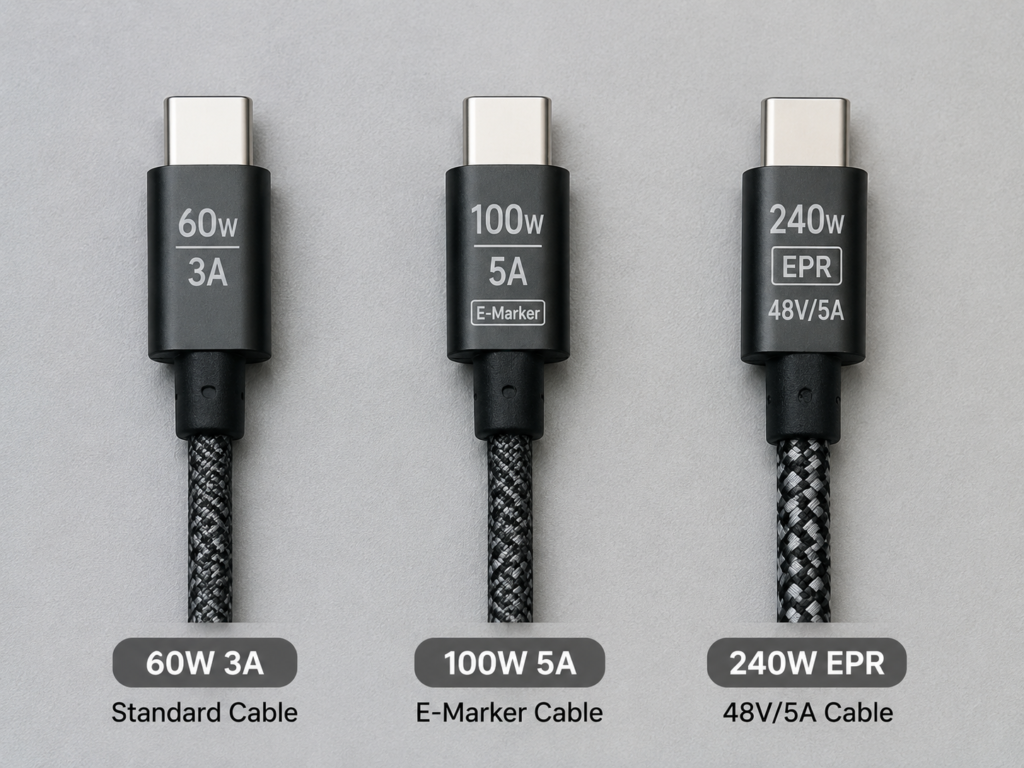
There is a very easy pitfall here: ordinary 100W 5A E-Marker cables, even with an E-Marker chip, usually only support 20V/5A SPR power, and cannot withstand the EPR high voltage of 28V, 36V, and 48V. So even if your charger and device both support 140W EPR, you can’t reach full power with an old 100W cable.
In the PD negotiation logic, the charger and device will first read the capability of the cable. If the cable does not meet the requirements, the high-power gear will not be activated, and high voltage will not be forced to cause danger. In terms of compatibility, 240W EPR cables are backward compatible and can be used to charge low-power devices such as mobile phones and tablets without problems.
There is also a very important knowledge point: charging power and data transmission rate are two completely independent indicators. Many 240W EPR cables only have USB 2.0 data transmission speed, which is very slow for transferring large files; conversely, high-speed data cables labeled USB 3.x or Thunderbolt do not necessarily support 240W EPR charging. When choosing a cable, be sure to check the parameters of charging power and data rate separately, and don’t think that a thick cable that supports high power must be able to transmit high-speed data.
The core principle of choosing a cable is: look at the clearly marked power, voltage, current, and E-Marker/EPR instructions of the product, and prioritize products with reliable brands, clear specifications, and even USB-IF certification. Don’t just look at the thickness, color of the cable, or the words “fast charging cable” in the merchant’s title.
Compatibility Comparison: Can Higher Version Chargers Charge Lower Version Devices?
Many people ask: can a higher version PD charger charge a lower version device? Will it burn out?
The answer is very clear: compliant PD 3.1 chargers are usually backward compatible with common SPR capabilities of PD 3.0 and PD 2.0. When charging a PD 3.0 device, it will automatically negotiate to the low-voltage gear supported by both parties, and will not directly output EPR high voltage above 28V. There is no need to worry about safety issues at all.
Conversely, a PD 3.0 charger can also be used normally to charge a PD 3.1 device, but it cannot trigger EPR gears above 100W, and can only charge at a power within 100W, which will be slower, but will not damage the device.
As long as the charger, device, and cable all comply with the USB PD specification, damage will usually not be caused by different versions. What is really prone to problems are inferior cables with falsely marked parameters, no-name chargers, damaged interfaces, non-compliant adapters, or compatibility issues with private protocols.
The Truth About Charging Speed: Why PD 3.1 Is Not Necessarily Faster Than PD 3.0
After reading this, you may ask: since PD 3.1 has a higher upper limit, why do I feel that the charging speed hasn’t changed after buying it? That’s because charging speed is never determined by the charger alone. There are many factors that limit the actual power. Let’s explain them one by one.
The Upper Limit of Charging Speed Is Determined by the Device
First of all, the upper limit of charging speed is always determined by the device.
Every device has a power management chip inside, which has already set the maximum input power. No matter how strong the charger is, it cannot “force feed” electricity beyond this upper limit. For example: a mobile phone that only supports up to 30W PD, even if you plug in a 240W PD 3.1 charger, will only charge at about 30W, not faster. Conversely, a laptop that supports 140W EPR, when using a 100W PD 3.0 charger, can only run up to within 100W.
So the first step in buying a charger is always to first find out the official USB-C PD input power of your device, and then choose the corresponding charger and cable, not the other way around.
Battery Level Stage Affects Actual Power
Secondly, the battery level stage will directly affect the actual charging power.
Generally speaking, in the low battery stage (for example, below 20%), the device will allow higher charging power, and it is easier to approach the advertised peak power; in the medium to high battery stage (for example, 50%-80%), the device will gradually reduce the charging power to reduce heat and battery stress; when approaching full charge (for example, above 90%), the power will drop significantly, entering a trickle state of low-power supplementary charging to protect battery life.
The “up to XX watts” on the manufacturer’s promotional page usually refers to the short-term peak power in the low battery stage, and does not mean that this power can be maintained throughout the process from 0% to 100%. Don’t be misled by the peak number.
Temperature Limits Fast Charging Speed
Third, temperature is a major killer of fast charging.
Whether it is a mobile phone, laptop, battery, or charger, cable, when the temperature is too high, the system will actively reduce the charging power to protect the hardware. For example, if you play large games, edit 4K videos, or run rendering software while charging, the device itself is consuming power and generating heat under high load, and the actual charging speed may be significantly reduced, or even the battery may drain while charging.
In addition, high temperature environment in summer, too thick protective case, and placing on a soft cushion desktop that does not dissipate heat will shorten the duration of peak power and slow down the average charging speed. High-power chargers only provide a higher upper limit of capability, and cannot bypass the device’s temperature control strategy. It is not that the higher the power, the faster the charging.
Power Distribution of Multi-Port Chargers Will Change the Result
Finally, the power distribution of multi-port chargers will also change the actual charging speed.
Many people buy multi-port PD chargers, thinking that each port can reach the advertised maximum power, but that’s not the case. For example, for a multi-port charger marked “single port max 140W, total power 200W”, when you plug in two devices at the same time, the power will be redistributed, possibly 100W + 65W. The original high-power port will not be able to reach 140W, and there may be a short disconnection and reconnection when plugging and unplugging.
When buying a multi-port charger, you can’t just look at the single-port maximum power and total power, but also clearly look at the power distribution table when multiple ports output at the same time. In addition, some high-power gears are only supported by specific USB-C ports. When buying, pay attention to the mark next to the interface or the instructions in the manual.
Real Scenario Comparison: Can Your Device Use PD 3.1?
After talking about the principles, let’s combine actual usage scenarios to see whether your device can use PD 3.1.
Mobile Phones, Tablets, Handheld Consoles, Wireless Charging Scenarios
For these types of devices, PD 3.0 is basically sufficient to cover all common needs. The PD charging power of iPhones is generally at the 20W-30W level, depending on the model; although many Android phones advertise fast charging of more than 100W, most rely on private protocols, and the power of general PD/PPS is still mostly within 100W; the PD input power of tablets, handheld consoles, and wireless charging bases usually does not exceed 100W.
PD 3.1 hardly brings any improvement in charging speed for these devices — because they cannot trigger the high-voltage gears of EPR at all, and can only use the SPR capability within 100W, which is no different from PD 3.0.
Purchasing suggestion: If you mainly charge mobile phones, tablets, and handheld consoles, just prioritize choosing a 30W-65W or within 100W charger that supports PD/PPS, has appropriate power, and is from a compliant brand. There is no need to spend extra money on PD 3.1.
Thin and Light Laptops, 2-in-1 Computers Scenarios
PD 3.0 can already cover the vast majority of mainstream thin and light laptops, and the PD input power of these devices is mostly concentrated between 45W and 100W. If your laptop only supports USB-C input within 100W, then the charging speed of using a PD 3.1 charger and a PD 3.0 charger is usually the same, and there will be no obvious difference.
Only when the laptop officially clearly marks that the USB-C PD input power exceeds 100W, such as 140W PD charging, do you need PD 3.1 EPR. For example, some MacBook Pro models support 140W USB-C PD 3.1 EPR charging, but models of different years, different chips, and different interfaces have different support capabilities. Be sure to refer to the official technical specifications, and don’t take it for granted.
The judgment method is very simple: go to the official parameter page of the laptop, the original adapter parameters, or the manual, and find the description of “USB-C Power Delivery input power”. Only when it exceeds 100W do you need to consider PD 3.1.
High-Performance Laptops, Gaming Laptops, Mobile Workstations Scenarios
The 100W power of PD 3.0 may only meet the charging demand under light load for these types of devices. In high-load scenarios such as playing games or running rendering, the battery may drain while using, or the system may limit performance.
PD 3.1 can support higher PD input of 140W, 180W, and 240W, which is more suitable for creative laptops, mobile workstations, and some high-performance thin and light laptops that clearly support USB-C PD 3.1 EPR. But pay attention to an important boundary: the vast majority of traditional gaming laptops still use the manufacturer’s private round/square port high-power adapter, and the USB-C port may only support supplementary charging or low-performance mode power supply. Don’t think that buying a 240W PD charger can replace the original power supply.
Purchasing conclusion: Only when the device clearly marks support for USB-C PD 3.1 EPR input does it make sense to buy a PD 3.1 EPR charger and 240W cable, otherwise it is a waste of money.
Monitors, Docks, Peripheral Power Supply Scenarios
The 100W power of PD 3.0 can already meet the demand of ordinary portable monitors and basic docks for reverse power supply to thin and light laptops, which is sufficient for daily office use.
The value of PD 3.1 is that it allows monitors and docks to provide power to high-power laptops above 100W, without the need to plug in the laptop’s power adapter additionally, making the desktop tidier. But before buying, be sure to confirm several parameters: is this USB-C port input, output, or bidirectional power supply? What is the nominal PD output power? Does it support EPR high-voltage gears? Will the power supply be reduced when video, data, and power supply work at the same time?
Also note: Thunderbolt docks, USB4 docks, and external GPU docks do not necessarily support PD 3.1 EPR. It still depends on the specific power supply parameters. Don’t assume that “Thunderbolt” or “USB4” means high-power power supply by default.
Power Banks, Car Chargers, Multi-Device Universal Charging Scenarios
PD 3.0 products are suitable for charging mobile phones, tablets, handheld consoles, and thin and light laptops within 100W. These devices can basically be charged at full speed or close to full speed, with high cost performance.
PD 3.1 products are suitable for users who want to use one charger to cover mobile phones, tablets, thin and light laptops, and laptops above 100W. When on a business trip, you can bring one less bulky original power supply, which is more convenient.
But pay attention to two details: for power banks, you can’t just look at the output power, but also look at the nominal capacity, rated energy, single-port output power, and input power of bidirectional fast charging. It’s not that a 240W label means it’s easy to use. Some power banks with 240W output have small capacity and may run out of power after charging a high-power laptop once. For car chargers, the car’s cigarette lighter interface, voltage platform, wiring harness, and heat dissipation conditions will all affect the stability of high-power output. Don’t blindly pursue excessively high power.
To sum up: when there are no devices above 100W, PD 3.0 has higher cost performance; when you already have or plan to buy high-power USB-C devices, it’s not too late to consider PD 3.1 EPR.
Quick Identification Method: How to Tell If a Product Is Really PD 3.1 EPR
Since PD 3.1 has so many pitfalls, how to quickly judge whether a product really supports PD 3.1 EPR, rather than a gimmick riding the version number’s popularity? We will teach you a few simple methods.
Check the Charger: Don’t Just Look at “PD 3.1”, Look at the Output Gears
First, look at the charger. Don’t just look at the words “PD 3.1” on the packaging, but look at the specific output gears.
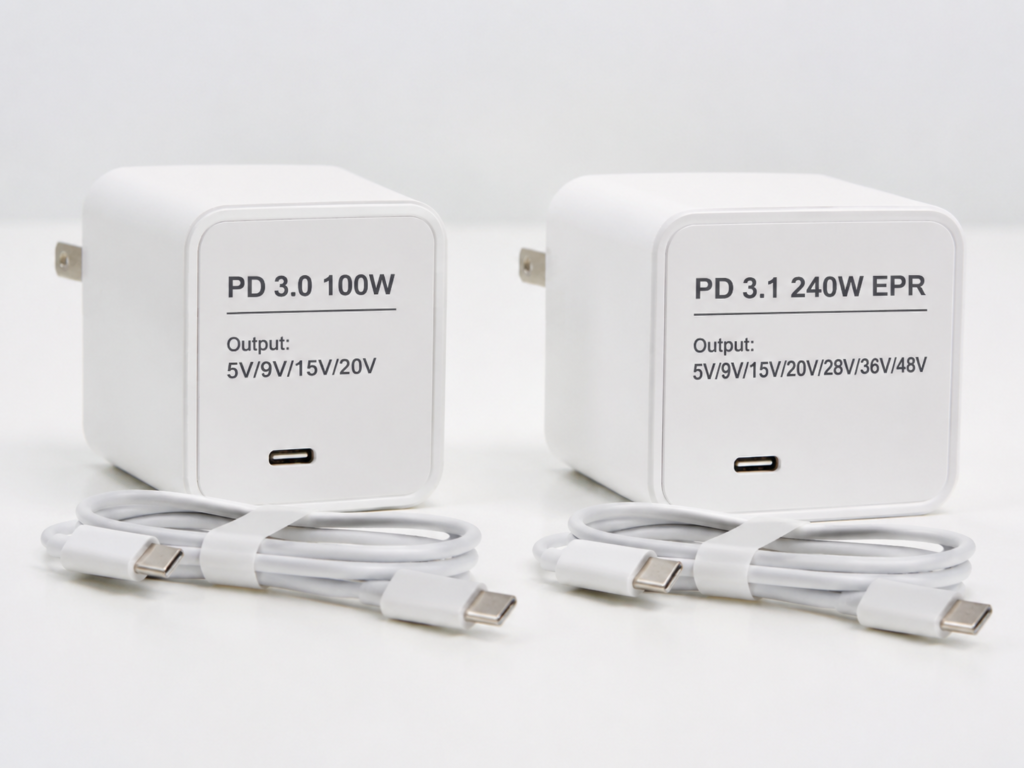
If the output parameters of the charger only have 5V, 9V, 15V, 20V, even if it is labeled PD 3.1, it is essentially still SPR capability within 100W, and the actual experience is no different from PD 3.0. There is no need to spend extra money for the version number.
How to judge whether it is real EPR? See if there are corresponding high-voltage gears: for a 140W EPR charger, there must be a 28V gear in the parameters, such as 28V 5A; 180W EPR must have a 36V gear; 240W EPR must have a 48V gear.
There is another common pitfall: total power 240W is not equal to single port 240W. For example, a four-port charger with a total power of 240W is completely different from a single USB-C port with 240W. Be sure to see clearly the maximum power of a single port and the corresponding voltage gears.
Check the Device: Confirm the USB-C PD Input Power
Second, look at the device and confirm its USB-C PD input power.
For devices such as mobile phones and tablets, just look at the maximum PD/PPS input power in the official parameters. The vast majority do not need PD 3.1 EPR.
For devices such as laptops and workstations, go to the official parameter page to find the description of USB-C PD input power, and see if it is marked with EPR, or if the power exceeds 100W. Mac users can check the identified power adapter power in “System Information/System Report – Power”; for Windows users, prioritize checking the manufacturer’s official power management software, control center, or product specification page. The power display in system settings may not be accurate.
If you want to test it yourself, you can use a compliant USB-C power meter to check the real-time voltage, current, and power, but note that the tester itself also needs to support EPR high voltage, otherwise the measurement may be inaccurate, or even affect the normal power negotiation.
The judgment rule is very simple: if the device’s PD input is 100W or below, PD 3.0 is usually sufficient; if it exceeds 100W, all three of the device, charger, and cable must support PD 3.1 EPR to reach full power.
Check the Cable: Look for Power, Voltage, and EPR Marks
Third, look at the cable, and look for the power, voltage, and EPR marks.
60W cables are usually labeled 3A, 60W, suitable for mobile phones, tablets, and some low-power thin and light laptops;
100W cables are usually labeled 5A, 100W, E-Marker, suitable for PD devices within 100W;
240W EPR cables are usually labeled 240W, EPR, 50V/5A or 48V/5A, suitable for PD 3.1 EPR devices above 100W.
Don’t use the thickness, color of the cable, or the “fast charging cable” in the merchant’s title as the basis for judgment. These are unreliable. Prioritize choosing products with clearly marked power parameters, reliable brands, USB-IF certification, or clear specification descriptions.
Three Steps to Judge Whether Full Power Charging Is Possible
Finally, we will teach you a three-step judgment method to quickly confirm whether full power charging is possible:
Step 1: First check the maximum USB-C PD input power of the device, and confirm whether it supports EPR;
Step 2: Check whether the target single port of the charger provides the corresponding power and voltage gears. For example, 140W usually requires 28V 5A capability;
Step 3: Confirm the power level of the cable. For above 100W, a 240W EPR cable must be used.
The final actual charging upper limit is determined by the one with the lowest capability among the device, charger, and cable, which is the barrel effect. In addition, factors such as high battery level, excessive temperature, multi-port power distribution, system speed limit, and private protocol incompatibility will further reduce the actual charging power.
Common Misconceptions and Pitfall Avoidance Guide
Finally, we have compiled some common misconceptions and pitfall avoidance suggestions to help you spend less wrong money.
Version Cognition Misconceptions
Let’s first talk about common misconceptions about version cognition:
First, is PD 3.1 definitely faster to charge than PD 3.0? Wrong. For devices within 100W, there is usually no difference in charging speed between the two. Only when the device supports EPR above 100W will there be a speed difference.
Second, is PD 3.0 already obsolete? Wrong. Now a large number of mobile phones, tablets, and thin and light laptops have PD input within 100W. PD 3.0 is still the mainstream, and the technology is very mature with high cost performance.
Third, are all functions of PD 3.1 better than PD 3.0? Wrong. The core upgrade of PD 3.1 is only EPR high power. The PPS fine voltage regulation commonly used in mobile phones is originally an optional function of PD 3.0, not an exclusive selling point of PD 3.1.
Fourth, does a USB-C interface equal PD fast charging? Wrong. The interface form and the fast charging protocol are two different things. The specific supported power must be based on official parameters.
Certification and Labeling Misconceptions
Let’s talk about the misconceptions about certification and labeling:
First, does a PD 3.1 product with USB-IF certification definitely support 240W EPR? Wrong. Certification only means that the product meets the corresponding specification requirements. The specific supported power and voltage gears still depend on the product’s parameter table. Some certified PD 3.1 products may only support 100W SPR.
Second, if a cable is labeled 240W/EPR, is it definitely a high-speed data cable? Wrong. Charging power and data rate are two independent indicators. Many 240W EPR cables only have USB 2.0 data transmission speed, which is very slow for transferring large files.
Third, if a product is labeled PD 3.1, is it more advanced than PD 3.0 products? Wrong. Many products labeled PD 3.1 only support SPR capability within 100W, and there is almost no difference in actual use from PD 3.0, just riding the popularity of the version number.
Purchasing Pitfall Avoidance
When purchasing, remember these key points to avoid pitfalls:
Don’t just look at the version number. If the maximum power of a PD 3.1 product is only 100W, it is no different from PD 3.0 for the vast majority of users, and there is no need to spend extra money.
Don’t just look at the total power. A high total power of a multi-port charger does not mean that the single port you want to use has high power. Be sure to look at the single-port maximum power and multi-port distribution table.
Don’t ignore the cable. For 140W, 180W, and 240W devices, they must be paired with a 240W EPR cable to reach full EPR power. Using a 100W cable won’t work.
Don’t confuse private fast charging with PD 3.1. The 120W, 150W, and 200W fast charging promoted by mobile phones are mostly manufacturer’s private protocols, not general USB PD capabilities. Don’t mix them up.
Don’t treat 240W cables as high-speed data cables. If you need to transfer high-speed data, be sure to check the data transmission specifications of the cable separately, don’t just look at the charging power.
Don’t blindly buy excessive specifications. If you don’t have devices above 100W, compliant PD 3.0 products of 65W or 100W are usually more cost-effective, and there is no need to pay for functions you can’t use.
Usage Problem Troubleshooting
If you encounter problems during use, you can troubleshoot according to the following ideas:
If the PD 3.1 charger doesn’t charge your phone faster, first check what the PD/PPS power upper limit of the phone is, whether it is in a high battery stage, whether there is severe heat, and whether the cable is normal.
If the PD 3.1 charger can’t reach full power for the computer, first check whether the computer supports EPR, whether the charger has the corresponding 28V/36V/48V gears, whether the cable is a 240W EPR cable, and whether multiple ports are used at the same time causing power distribution.
If you still only get 100W after changing to a 240W cable, it is most likely that the charger or device does not support EPR. The cable is only one part of the three-piece set, and changing the cable alone won’t speed up charging.
If the charging cuts off and then recovers during high-power charging, it may be power redistribution after multi-port plugging and unplugging, or the charger’s overheat protection, or it may be abnormal cable identification. You can try changing the port or cable.
Some people also ask whether PD 3.1 is more harmful to the battery? In fact, compliant PD devices will negotiate the gear before supplying power, and will not force high voltage output. Battery life is more affected by temperature, charging strategy, and cycle times, and has no direct relationship with the PD version.
Purchasing Decision: How to Choose Between PD 3.0 and PD 3.1
After talking so much, which one should you choose, PD 3.0 or PD 3.1? We have compiled clear purchasing suggestions for you.
Situations Where PD 3.0 Is Sufficient
If you meet the following situations, choosing PD 3.0 is completely sufficient, and you don’t need to spend extra money:
Mainly powering mobile phones, earphones, watches, tablets, handheld consoles, and wireless charging bases;
The USB-C PD input power of the laptop is 100W or below;
Limited budget, hoping to buy a more cost-effective 65W or 100W charger;
Already have a reliable PD 3.0 charger and 100W cable, and no devices above 100W.
Situations Where PD 3.1 Is Worth Choosing
If you meet the following situations, you can consider choosing PD 3.1:
Have laptops, workstations, monitors, or docks that clearly support 140W, 180W, or 240W USB-C PD input;
Hope to use one charger to cover mobile phones, tablets, thin and light laptops, and high-power computers above 100W at the same time;
Travel frequently, want to reduce the number of original large power adapters to carry, and the device supports USB-C PD 3.1 EPR;
Plan to buy high-power USB-C devices in the next 1-2 years, and can prepare in advance if the budget allows.
Quick Purchase Reference by Device Type
We have also compiled a quick purchase reference by device type:
Mobile phone/tablet/handheld console users: prioritize choosing a 30W-65W PD/PPS charger. Android users can additionally pay attention to PPS gears or support for the corresponding brand’s private protocol.
Thin and light laptop/2-in-1 users: choose a 65W-100W PD charger, paired with a 60W or 100W E-Marker cable.
Users with laptops above 140W: choose a PD 3.1 EPR charger with the corresponding power, paired with a 240W EPR cable. Be sure to confirm in advance that the device supports USB-C EPR input.
Multi-device users: focus on single-port maximum power, multi-port output distribution table, number of interfaces, volume, heat generation, and certification. Don’t just look at total power.
Budget Tiered Suggestions
If you choose according to budget, you can refer to this tier:
Low-budget users or users who only charge mobile phones: a 30W-45W PD/PPS charger can meet most daily needs.
Tablet, handheld console, thin and light laptop users: 65W is a very versatile sweet spot power, which can basically cover the vast majority of portable devices.
Users with thin and light laptops plus multiple devices: a 100W multi-port PD charger is more suitable for one charger for multiple uses, but it must be paired with a 100W 5A E-Marker cable.
High-power laptop users: 140W/180W/240W PD 3.1 EPR products are worth investing in, and at the same time, be sure to upgrade the cable to 240W EPR.
Core Logic of Cost Performance
Finally, let’s talk about the core logic of cost performance:
Always look at your own device needs first, then look at the charger version. Don’t pay for functions you can’t use;
Under the premise of sufficient power, compliance, safety, and stability are much more important than the version number;
Without devices above 100W, PD 3.1 is not a rigid demand;
If you have needs above 100W, just buying a charger is not enough. The cable and device must also support EPR. All three are indispensable.
Quick Reference Table and Summary
Finally, we have compiled a quick reference table for you to quickly check what to choose for your device.
| Your Device | Recommended Choice | Is PD 3.1 EPR Needed? |
|---|---|---|
| Mobile phones, earphones, watches | 20W-45W PD/PPS | Usually not needed |
| Tablets, handheld consoles | 30W-65W PD/PPS | Usually not needed |
| Ordinary thin and light laptops | 65W-100W PD | Usually not needed |
| Multiple devices within 100W | 100W multi-port PD charger | Usually not needed |
| 140W laptop | PD 3.1 EPR 140W charger + 240W EPR cable | Needed |
| 180W/240W high-power devices | PD 3.1 EPR charger with corresponding power + 240W EPR cable | Needed |
After reading this article, you should be able to clearly judge these five things:
First, the biggest difference between PD 3.0 and PD 3.1 is that PD 3.1 adds the EPR extended power range, raising the upper limit of USB-C PD from 100W to 240W, and the capabilities within 100W are basically the same for both.
Second, whether you need PD 3.1 depends on whether the device’s USB-C PD input exceeds 100W. If it doesn’t exceed, there is no need to pay for the EPR function.
Third, how to identify real PD 3.1 EPR? Check whether the charger has 28V/36V/48V high-voltage gears, and whether the cable is labeled 240W/EPR. Just looking at the version number is unreliable.
Fourth, why don’t you feel faster after buying PD 3.1? Because the device’s power upper limit, battery level stage, temperature, multi-port distribution, and cable will all limit the actual charging speed. It’s not that higher charger power means faster charging.
Fifth, remember a simple formula when purchasing: for within 100W, choosing PD 3.0/PD PPS is more cost-effective; for above 100W, choose PD 3.1 EPR, and be sure to pair it with a 240W EPR cable.