
Ever ordered a 20W wireless charger online, only to find it charges half as slow as a wired cable, gets hot enough to double as a hand warmer, or won’t even work with your phone case—you set it down and nothing happens? Whether you’re a regular shopper trying to check if your new charger is worth the money, a content creator making honest reviews, or a small team sourcing products, you need a consistent, evidence-based, actionable testing method. No guesswork, no falling for flashy marketing specs.
This guide is built for two distinct use cases, so you can skip sections that don’t apply to your setup:
- At-home self-testing for consumers: Simple, no-special-tools checks to evaluate safety and real-world performance
- Professional lab testing for reviewers/teams: Standardized, instrument-based testing for formal reviews and product validation
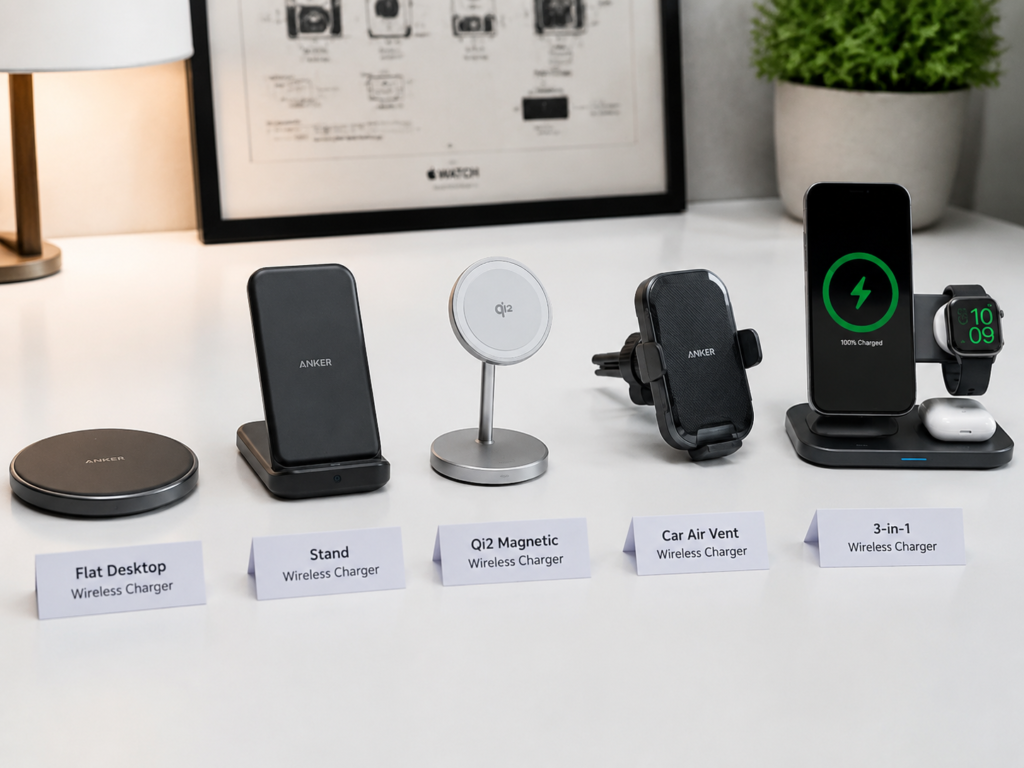
It works for all common wireless charger types: flat desktop chargers, stand chargers, magnetic/Qi2 magnetic chargers, car wireless chargers, and multi-device (phone + watch + earbuds) 3-in-1 chargers. All testing references widely accepted industry standards: WPC Qi/Qi2, IEC 62368-1, FCC Part 15, CE/EMC, and ErP energy efficiency regulations.
⚠️ Critical Safety Note: Dangerous tests including short circuit, overvoltage, and extreme temperature/humidity testing are only for professional laboratory environments. Regular users should never attempt these, as they pose serious risks of electric shock, fire, and injury.
2. Unboxing Initial Screening: 10 Minutes to Tell If a Charger Is Worth Testing Further
Before you dive into full performance tests, do a quick 10-minute unboxing check to weed out obviously bad products. If it fails these basic checks, there’s no point wasting time on more detailed testing.
2.1 Parameter & Certification Verification
First, check the basics to make sure the product is legitimate:
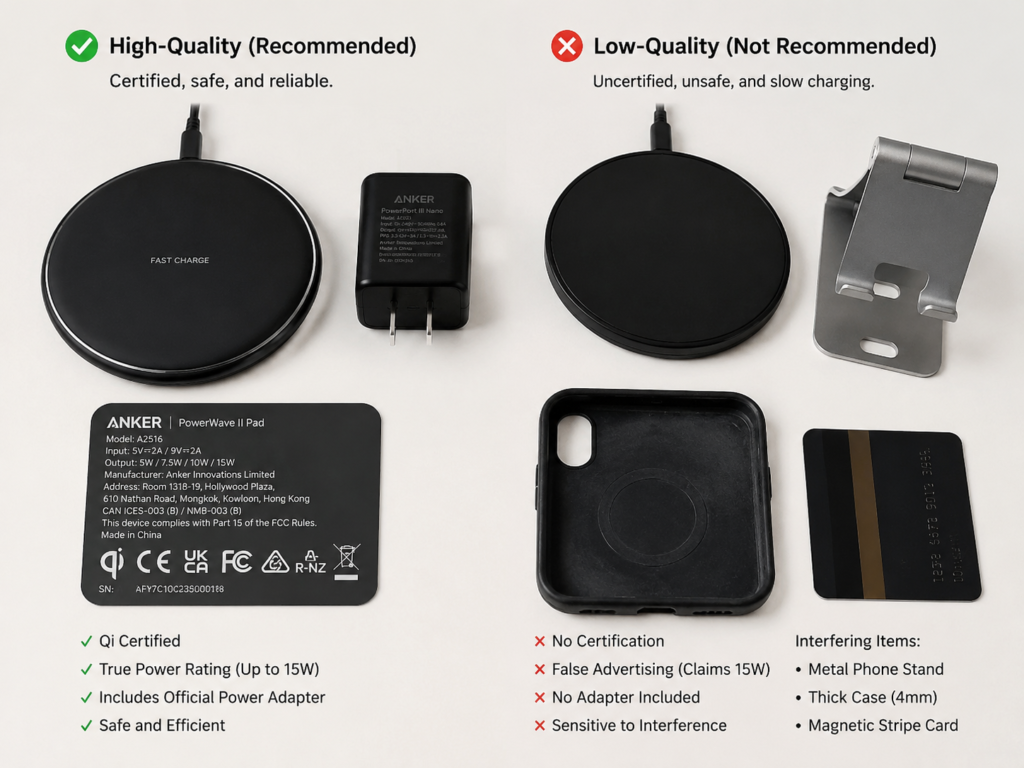
- Nameplate info check: Look for a clear model number, input voltage/current, output power, and manufacturer info on the charger itself. If there’s no brand, no model, or no power specs listed, that’s a huge red flag.
- Cross-check specs: Make sure the specs on the charger, packaging, product website, and retail listing all match. If the box says 20W but the charger’s nameplate says 10W, that’s a clear fake.
- Adapter requirements: Check if the product clearly states what wattage adapter you need to use to get the advertised speed. If it just says “fast charging” with no adapter specs, that’s a bad sign.
- Qi certification verification: If the product claims Qi certification, look up the brand, model, or certification number in the official WPC product database. Check that the product photo, model number, and power tier all match—many brands steal certification numbers from other products.
- Clarification: Qi certification verifies wireless power interoperability, protocol compliance, and mandatory safety functions such as foreign object detection. It does not replace full electrical safety, fire resistance, or environmental reliability testing (such as IEC 62368-1 certification).
2.2 Build & Appearance Check
Next, inspect the physical quality of the charger:
- Check that the casing has even gaps, no sharp edges or burrs, and no strong chemical smells.
- Wiggle the charging port (usually USB-C) to make sure it’s not loose or wobbly.
- Check that the non-slip pad on the bottom (or charging surface) is firmly attached and doesn’t peel off easily.
- Look for a clear marking of the charging coil area, so users know where to place their phone.
- For multi-device chargers: Check that stand angles are stable and don’t tip over easily when you set a phone on them.
2.3 Accessories & Basic Usability
Finally, check the included accessories and basic functionality:
- Does it come with a power adapter? If not, is the required adapter clearly stated? (Many budget chargers skip the adapter to cut costs, which is fine as long as they’re upfront about it.)
- Is the included cable at least 1 meter (3.3 feet) long? Shorter cables are a hassle for desktop or car use.
- Plug it in (no phone on it) and check the indicator light—Is it blindingly bright? If it’s for a bedroom, a super bright light will be annoying at night.
- Listen for any weird high-pitched whine or buzzing from the charger. If you can hear it from a foot away, that’s a quality issue.
- Set your phone on the charger—does it start charging within 1 second? If it takes 5+ seconds or doesn’t charge at all, that’s a compatibility or alignment problem.
3. Core Charging Performance Testing: How Fast Is It, Really?
Once you’ve passed the initial screening, it’s time for the core performance tests—the part everyone cares about: how fast it charges, and how much power it wastes. Don’t just trust the advertised wattage—real-world performance is what matters.
Test consistency note: For comparable results across products, all performance tests should use the same test device, power adapter, cable, and ambient environment. Changing any variable will make side-by-side scores unreliable.
3.1 No-Load Standby Power Test
Most people leave their wireless charger plugged in all the time, so standby power adds up over a year. This test is super simple:
- How to test: Plug the charger in, don’t put a phone on it, wait 5 minutes for the power to stabilize, then record the reading from your plug-in power meter.
- Reference benchmark: ≤0.5W aligns with common low-power standby expectations in most regions
- Excellent performance: ≤0.3W (barely uses any electricity even when plugged in 24/7)
Also, watch for periodic wake-ups—if the light flashes or the power jumps randomly even when there’s no phone on it, that means the circuit design is poor.
3.2 Protocol Trigger & Power Tier Verification
The biggest red flag for a scam charger is advertised power that never actually triggers. This test checks if the charger can really hit the speeds it claims. Test methods vary by protocol:
- Qi Basic Power: Verify that it can stably trigger common Qi tiers: 5W, 7.5W, 10W, and 15W. Use a phone or test receiver that supports each tier to confirm.
- Qi2 / Magnetic Charging:
- The WPC Qi2 standard uses the Magnetic Power Profile to deliver up to 15W charging with automatic alignment.
- Apple MagSafe is a proprietary authentication system built on similar magnetic alignment principles. A charger that triggers the MagSafe animation does not always deliver full 15W power—some only deliver 7.5W. Combine animation checks with power curve analysis and 30-minute charge gain to confirm the actual power tier.
- Android Proprietary Fast Wireless Charging: Samsung, Xiaomi, Huawei, OPPO, vivo and other brands have their own proprietary fast wireless charging protocols. Most require the brand’s official adapter, official cable, and often official wireless charger to trigger the highest power. Always note exactly what accessories you use for this test—low power might be from mismatched accessories, not the charger itself.
3.3 Charging Efficiency Test
Charging efficiency is the percentage of input power that actually reaches the receiver output. The rest is wasted as heat—lower efficiency means more heat and slower effective charging.
Important note: Efficiency values depend heavily on the receiver device, power level, and test setup. Professional lab tests use standardized Qi test receivers to measure wall input to receiver output efficiency. Testing with consumer phones will show lower effective efficiency, as additional loss occurs inside the phone’s charging circuit and battery management system.
3.3.1 Center Alignment Efficiency
Place the phone (or test receiver) perfectly centered on the charger’s coil (the “sweet spot”). Record the total input energy over a set period, and compare it to the receiver output energy to calculate the efficiency ratio.
Note for consumers: Using your phone’s built-in battery percentage will give you a rough estimate, but it’s not super precise because phone battery meters have a margin of error.
3.3.2 Offset Efficiency
No one aligns their phone perfectly every time they set it down, so performance when misaligned is even more important than perfect center performance. Test with the phone offset 5mm (0.2 inches) and 10mm (0.4 inches) from center. Watch for dropped charging, reduced power, or a big jump in heat.
3.3.3 Efficiency Rating Reference
(Measured with standard Qi test receiver, center-aligned, at rated maximum power)
| Test Scenario | Efficiency Performance | Rating |
|---|---|---|
| Center aligned | ≥75% | Excellent |
| Center aligned | 70%–75% | Good |
| Center aligned | <70% | Average |
| 10mm offset | ≥65%, no dropped charging or excessive heat | Excellent offset tolerance |
3.4 Real-Device Charging Speed Test
Watts and efficiency are just numbers—what users actually care about is how long it takes to charge enough to leave the house. We recommend recording these key checkpoints, along with input power and temperature curves:
- Time to charge from 20% to 50% (the common emergency top-up range)
- Time to charge from 20% to 80% (the daily charging sweet spot for most people)
- Total charge gained in 30 minutes
- Full 0% to 100% charge time
- Trickle charge behavior (90%–100%): Watch for dropped charging, intermittent charging, or unusual heat rise. The trickle phase is supposed to be low-current slow charging—if it’s still getting hot here, the charge control logic is bad.
3.5 Multi-Device Co-Charging Power Distribution
If you’re testing a multi-device charger, you have to test how it splits power when multiple devices are charging at the same time. Test three combinations: phone + earbuds, phone + watch, and phone + watch + earbuds. Check if the phone’s charging power drops significantly, if any device stops charging randomly, and if the charger base gets too hot. For example, some 3-in-1 chargers can do 15W to a phone alone, but drop to 5W when all three devices are charging—that’s basically slow charging, and not very useful.
4. Safety & Reliability Testing: Will It Overheat, Damage Your Devices, or Fail?
Safety is non-negotiable for any charging product. A bad wireless charger can overheat, damage your phone, or even cause a fire. These tests range from simple at-home checks to dangerous lab-only tests.
⚠️ Reminder: All electrical protection and extreme environment tests are for professional labs only. Never attempt short circuit, overvoltage, or extreme temperature tests at home.
4.1 Heat Testing
Heat is the most noticeable safety issue for users, and long-term high heat speeds up battery degradation.
Standard test conditions: All temperature benchmarks assume 20–25°C (68–77°F) ambient temperature, no direct forced airflow, and the charger running at maximum rated power. Higher ambient temperatures will naturally result in higher surface temperatures.
4.1.1 Charger Surface Temperature
- How to test: Run the charger at full power for 1 hour, then measure the highest temperature on the charger’s surface (coil area, port area, and bottom).
- Good performance benchmark: Surface temperature ≤45°C (113°F). Anything higher than that is uncomfortable to touch, and a sign of poor heat management.
4.1.2 Phone Back Temperature
- Measure the highest temperature on the back of the phone, right over the charging coil.
- Good for battery health benchmark: ≤42°C (107.6°F). Higher sustained temperatures over time will accelerate battery degradation.
4.1.3 Heat Distribution Check
- Look for obvious hot spots—if one tiny area is way hotter than the rest, that’s a design flaw.
- Note if using a phone case causes a big jump in temperature (a small rise is normal, a 5°C+ jump is a problem).
4.2 Foreign Object Detection (FOD) Test
FOD is the safety feature that stops charging if a metal object (like a coin or key) gets stuck between the charger and your phone. Without working FOD, the metal can get hot enough to cause burns or even a fire.
- Consumer testing warning: Only perform a short observation test (10–15 seconds maximum). Never leave metal objects on an active charger for extended periods, even for testing.
- Test objects for quick checks: Coins, paper clips, keys, small metal pieces, etc.
- Pass criteria: The charger should stop charging or trigger an alert within a few seconds, and the metal object should not become noticeably warm.
- Lab testing: Uses standardized WPC FOD test samples and thermal cameras to measure temperature rise accurately per official protocol.
4.3 Electrical Protection Testing (Lab Only)
These tests verify that the charger won’t fail dangerously if something goes wrong with the power supply or device:
- Overvoltage protection: Does it shut off if the input voltage is too high?
- Undervoltage protection: Does it behave safely if the input voltage is too low?
- Overcurrent protection: Does it limit current if there’s a short or overload?
- Short circuit protection: Does it shut off safely if the output is shorted?
- Overheat protection: Does it reduce power or shut off if it gets too hot?
- Power recovery: Does it work normally after a power outage or unexpected disconnect?
4.4 EMC & Magnetic Interference Observation
This checks if the charger interferes with other electronics, or if magnets (on magnetic chargers) affect other items.
- Casual at-home check: See if the charger causes issues with your WiFi, Bluetooth, NFC, or cellular signal when charging. For car chargers, check if it interferes with navigation, car Bluetooth, or CarPlay/Android Auto.
- Magnetic field safety note: Avoid placing sensitive magnetic storage media directly on an active wireless charger. Modern chip-based bank cards are not at risk of erasure, but old magnetic stripe cards and other magnet-sensitive items should not be left on the charging surface for long periods.
- Note: Casual observation is not a substitute for professional EMC testing, which uses specialized equipment to measure interference levels against official standards.
4.5 Environmental Reliability Testing (Lab Only)
These tests check if the charger works in extreme conditions, which is especially important for car chargers that get hot in the sun.
- High/low temperature operation: Can it start and charge normally at -10°C (14°F) cold, and at 40°C (104°F) / 60°C (140°F) high heat? (Critical for car chargers.)
- Constant humidity test: Does it work normally after 48 hours at 40°C (104°F) and 90% RH?
- Drop & vibration: Does it still work (no damage to casing, ports, or charging function) after a 1-meter (3.3-foot) drop? For car chargers, does the mount stay tight and not rattle after vibration testing?
- Long-term stability: Does it work normally after 8 hours of continuous charging? After 100 repeated place/remove cycles? Check USB-C port durability and (for magnetic chargers) magnet strength decay over time.
5. Compatibility Testing: Does It Work With Your Phone, Earbuds, and Watch?
All the specs in the world don’t matter if the charger doesn’t work with your devices. Compatibility testing covers three areas: device support, protocol support, and case compatibility.
5.1 Qi Standard Device Compatibility
Any Qi-enabled device should charge normally on a Qi-certified charger. Test a range of popular devices to cover most users:
- Latest and popular iPhone models
- Popular Samsung Galaxy models
- Wireless-charging enabled phones from Xiaomi, Huawei, OPPO, vivo, etc.
- Qi-enabled wireless earbuds (like AirPods with wireless charging case, Galaxy Buds, etc.)
- Qi-enabled smartwatches (note: some watches use proprietary charging, even if they’re Qi-based)
You don’t need to test every single phone ever made—just cover the top-selling models from major brands.
5.2 Proprietary Protocol Compatibility
A lot of high-power wireless chargers use proprietary (non-standard Qi) protocols to hit fast speeds, so you need to test these separately:
- Apple devices: Distinguish between basic Qi, Qi2 Magnetic Power Profile, and Apple MagSafe tiers—power and user experience are very different across these tiers.
- Samsung devices: Check if it triggers Samsung’s Fast Wireless Charging tier.
- Android brands (Xiaomi, Huawei, etc.): Check if it triggers the brand’s high-power proprietary fast charge, and if it requires the brand’s official charger, adapter, or special cable to do so. Many third-party wireless chargers only deliver 10W to Android flagships, even if the phone supports 50W or 67W wireless charging—because they don’t support the proprietary protocol.
5.3 Case Charging Compatibility
Almost no one uses their phone without a case, so charging through a case is a make-or-break feature for most users. Test these scenarios:
- No case (bare phone, baseline)
- 2mm (0.08 inch) regular silicone case
- 4mm (0.16 inch) thick case
- Magnetic case
- Phone case with a metal kickstand or metal ring
Rating reference:
- 2mm regular case: Efficiency drop ≤5% is excellent—you won’t notice the difference at all.
- 4mm thick case: If it gets noticeably hotter or stops charging, warn users that thick cases are not compatible.
- Cases with metal kickstands, metal plates, or misaligned magnetic rings: Almost always cause charging failures, big efficiency drops, or unusual overheating. This is a critical warning for users.
6. Real-World Scenario Testing: How Good Is the Daily Experience?
Great specs don’t always mean a great user experience. You have to test how the charger works in real daily use. Different charger types have different key test scenarios.
6.1 Desktop / Bedroom Scenario
For chargers you use on your desk or nightstand, focus on these:
- Can you place your phone on the charger one-handed and get it to align easily?
- If you get a notification (with vibration on), does the phone vibrate off the coil and stop charging?
- Is the indicator light too bright for nighttime use? (A bright light on a bedroom charger is super annoying.)
- If the charger has a cooling fan, is it loud enough to be distracting? (Or worse, keep you up at night.)
- Can you comfortably read notifications, watch videos, or take video calls while charging? (Stand chargers are way better for this than flat ones.)
6.2 Car Wireless Charger Scenario
The core needs for a car charger are: stays put, easy to use, and actually charges your phone while you use it. Test these:
- Does the phone fall off on bumpy roads?
- Is it easy to grab and put back one-handed while driving? (You don’t want to fumble with it while on the road.)
- After 1 hour of turn-by-turn navigation (screen on max brightness), does the battery percentage actually go up? (If it goes down, the charger is too slow.)
- After sitting in a hot car in the sun for an hour, does it still charge normally, or does it shut off from overheating?
- Does the mount block your air vents, dashboard buttons, or view of the road?
6.3 Magnetic Wireless Charger Scenario
The whole point of magnetic chargers is perfect alignment and a secure hold. Test these:
- Does the phone snap into place and auto-align with the coil, no manual adjustment needed?
- Does it stay attached when you use the phone in portrait or landscape mode while charging?
- If you hang it vertically (like on a wall mount), does the phone slide off?
- Pull force reference: A pull force around 20N (roughly enough to lift 2kg / 4.4lbs) is considered strong for consumer magnetic chargers. Real-world holding performance will vary based on phone weight, back glass material, and case surface friction—silicone cases create more friction than smooth glass, so they stay more secure even with the same magnet strength.
6.4 Multi-Device Charger Scenario
The key for multi-device chargers is that all devices charge properly, no fighting for power. Test these:
- Do the phone, watch, and earbuds fit without bumping into each other? (For example, does the watch charger stick out and hit the phone?)
- When all three devices are charging at the same time, does the phone’s charging speed drop a lot?
- Is the watch charging angle right for bedside mode (like Apple Watch’s Nightstand Mode)?
- After 1 hour of charging all three devices, is the charger base still at a safe temperature?
7. Standardized Scoring System & Buying Conclusion Template
Once you’ve run all the tests, how do you give a fair, objective conclusion? Use a standardized scoring system so you’re not just guessing based on feel.
Scoring rule: All products must be tested under identical conditions (same device, same adapter, same ambient temperature) for scores to be comparable. Inconsistent test conditions invalidate side-by-side rankings.
7.1 Weight Distribution
Safety is the bottom line, so it gets the highest weight. Next comes core charging performance and compatibility, then user experience and build quality.
| Review Category | Weight | Key Test Areas |
|---|---|---|
| Safety & Reliability | 30% | Heat performance, FOD function, protection features, long-term stability |
| Charging Performance | 25% | Efficiency, real speed, standby power, multi-device power distribution |
| Compatibility | 20% | Device support, protocol support, case compatibility |
| Real-World Usability | 15% | Daily use experience, ease of use, scenario-specific performance |
| Build Quality & Accessories | 10% | Build details, included accessories, design finish |
7.2 Red Line Penalties
Some issues are unacceptable—either major point deductions, or an immediate fail:
- No clear brand, model, or power specs: Major deduction. If a product won’t even put its basic info on the label, you can’t trust its quality.
- Fake power specs (advertised tier never triggers): Major deduction. This is straight-up false advertising.
- FOD failure (metal objects keep heating up): Immediate fail. Fire hazard.
- Abnormally high full-load temperature with no power reduction protection: Immediate fail. Risk of burns or device damage.
- Burning smell, deformed casing, or overheating port: Immediate fail. Return it immediately.
7.3 Score Rating Scale
- ≥90 points: Highly recommended
- 75–89 points: Worth considering
- 60–74 points: Only for users with very low needs
- <60 points: Not recommended
7.4 How to Write a Useful Buying Conclusion
Whether you’re deciding for yourself or writing a review for others, your conclusion should be clear—no vague “it’s pretty good” takes. Use this structure:
- One-sentence verdict: Say who it’s for, who it’s not for, the biggest pro, and the biggest con. For example: “This magnetic wireless charger is perfect for iPhone users, with perfect auto-alignment and strong hold, but Android users will only get basic 5W charging, so it’s not a good value for them.”
- Core pros and cons: 3 key advantages, 1-2 minor acceptable downsides, and 1 must-know risk point. For example: Pros = Qi2 certified, great heat management, stable case charging; Minor cons = Indicator light is a bit bright, no included adapter; Risk = Metal cases cause abnormal overheating.
- Recommendations by user type:
- iPhone users: Prioritize Qi2/MagSafe compatibility and stable magnetic alignment.
- Android fast charging users: Prioritize chargers that support your brand’s proprietary protocol, or clearly list the exact fast charge tier your phone uses.
- Car charger users: Prioritize high-temperature stability, secure mounting, and reliable charging during navigation.
- Multi-device users: Prioritize balanced power distribution and no random dropouts for watches/earbuds.
- Bedroom users: Prioritize low standby power, low noise, and a dimmable/turn-offable indicator light.
8. Frequently Asked Questions
How can I quickly tell if a wireless charger is good?
Do these 3 quick checks—they’ll weed out 80% of bad chargers: First, verify it has real Qi certification and a full label with model and power specs. Second, set your phone on it—does it start charging within 1 second, and work fine through a 2mm regular case? Third, charge it for 30 minutes, then feel the charger and the back of your phone. Warm is normal; too hot to hold comfortably is bad.
Does Qi certification mean a charger is 100% safe?
Not necessarily. Qi certification is the industry baseline, testing wireless power interoperability, protocol compliance, and mandatory safety features like foreign object detection. It does not cover every safety scenario—like extreme environment reliability or full electrical protection testing. For extra peace of mind, look for additional safety certifications like FCC, CE, or IEC 62368-1, and always check real-world heat and FOD performance.
What’s considered good wireless charging efficiency?
When perfectly centered and measured with a standard test receiver, ≥75% efficiency is excellent, 70%–75% is good, and below 70% is average. Testing with a consumer phone will show lower effective efficiency due to internal phone circuitry losses. If it still charges stably with a 10mm offset and ≥65% efficiency, that means it has great offset tolerance—you won’t have to fumble to align it perfectly every day.
Why does my 15W wireless charger feel slower than advertised?
The advertised 15W is peak power, measured in controlled lab conditions—kind of like a car’s top speed, you almost never hit it in real life. During normal use, charging slows down once the battery hits 50% to protect the battery. It also slows down if your adapter is underpowered, you’re using a thick case, the phone is misaligned, or the charger triggers overheat protection. Plus, wireless charging always has some energy loss: 15W input only translates to about 10-12W actually reaching the receiver, so it’s normal for it to be slower than a 15W wired charger.
What’s a normal temperature for a wireless charger?
In a 20–25°C room, after 1 hour of full-power charging, a surface temperature of ≤45°C (113°F) for the charger, and ≤42°C (107.6°F) for the back of the phone (over the coil), is normal. If it’s too hot to hold comfortably, or has obvious hot spots, the heat management is bad.
Will a phone case affect wireless charging?
Regular silicone, plastic, or leather cases up to 2mm thick barely affect it—efficiency drops less than 5%, so you won’t notice. But thick cases over 4mm, or cases with metal kickstands/metal plates, will cause noticeable issues, up to and including no charging or abnormal overheating.
Can I use metal kickstands, magnetic rings, or car mount metal plates with a wireless charger?
Most of the time, no. Metal blocks the magnetic field used for wireless charging, which reduces efficiency, increases heat, or stops charging entirely. Some magnetic rings are specifically designed for wireless charging, with the ring positioned to avoid the center of the coil—these might work, but always watch for unusual heat. Regular car mount metal plates or metal kickstands should never be placed on the center of the back of your phone (where the charging coil is).
Is wireless charging worse for your battery than wired charging?
As long as it’s a good-quality charger with proper heat management, wireless charging affects battery life about the same as wired charging. Modern phones have battery management systems that control charging current and temperature, so you don’t need to worry too much. It’s cheap, low-quality chargers that run hot that will speed up battery degradation over time.
Why won’t my car wireless charger charge my phone while I’m using navigation?
Navigation uses a lot of power: the screen is on full brightness, plus GPS, Bluetooth, and cellular data are all running—total power use can be 5-10W. If your wireless charger only delivers ~5W real power, it can’t keep up with what the phone is using, so the battery goes down instead of up. Other causes: hot car temperatures triggering overheat protection, misaligned coil, or an underpowered adapter.
Will magnetic wireless chargers erase my bank cards or damage my phone?
Most modern bank cards are chip cards, which store data on a chip, not a magnetic stripe—they won’t be erased. Only old magnetic stripe cards and other magnet-sensitive items should not be left sandwiched between your phone and the magnetic charger for long periods. Phone internal components are designed to be magnet-safe, so a good-quality magnetic charger won’t damage your phone.
At the end of the day, don’t pick a wireless charger based only on advertised wattage. Safety and compatibility always come first, then speed and user experience. Whether you’re testing a charger for yourself at home or doing a professional review, following this framework will help you avoid most common pitfalls and find a charger that actually fits your needs.