
We use USB ports every day without really noticing. We charge our phones, plug in USB drives, connect keyboards and mice, mirror our laptop screens, and use docking stations to link multiple devices. The USB port is everywhere, and yet most people rarely stop to think about how important it is.
Almost everyone has experienced the same frustrations. Drawers are full of messy cables. Sometimes the connector just won’t go in. Chargers from one device often don’t work with another. And even cables that look identical can behave very differently: some charge fast, some charge slowly, and some transfer files quickly while others lag.
USB stands for Universal Serial Bus. It is not a single product created by one company. Instead, it is a global industry standard developed by the USB-IF Association, with companies like Intel and Microsoft playing a leading role. The original idea was simple: create one common interface so devices can connect easily, without complicated setup.
This article explains how USB ports have evolved from 1996 to 2026. It also clears up one of the most common misunderstandings in everyday tech: the shape of a USB connector does not always determine its performance. Even cables that look the same can differ greatly in charging speed, data transfer speed, and video output ability.
By the end of this article, you will understand the differences between common USB ports, which ones are becoming outdated, how to choose the right cable, and which connector works best for your devices.
1. Before USB: When Interfaces Were a Mess
Before USB became popular, connecting devices to computers was complicated. In the 1990s, digital equipment used many different types of ports, and most of them were not compatible with each other. Computers, printers, mice, keyboards, monitors, and chargers often each had their own unique connectors.
Common problems included incompatible ports, devices that could not be unplugged safely while powered on, drivers that had to be installed manually, and desks covered in tangled cables.
To solve this confusion, major technology companies worked together to create a global standard. From the beginning, USB was designed with three goals: to work with many different devices, to support hot swapping, and to be easy enough for ordinary users.
Over the past 30 years, USB has evolved along two main lines.
First, the physical shape has changed. Early ports were large and mainly used on computers. Later, smaller ports were developed for mobile devices. Today, the trend is toward one unified connector that works across almost all equipment.
Second, performance has improved. Transfer speeds have become faster, charging power has increased, and a single cable can now handle more functions than before.
2. A 30-Year Timeline of USB Evolution
A few key years help us understand how USB ports have developed.
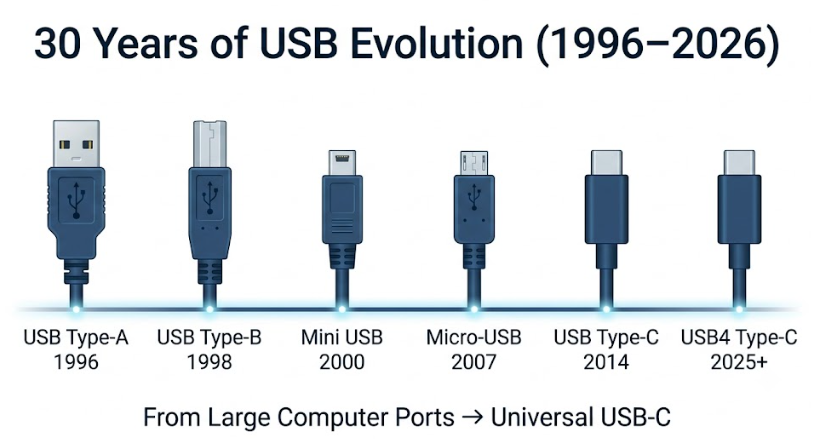
In 1996, the USB 1.0 standard was released, and the Type-A connector entered the market. This is the familiar rectangular USB port that became a standard feature on desktop computers and laptops.
In 1998, the USB 1.1 version was released, and the Type-B connector appeared. It was mostly used for larger peripherals such as printers and scanners.
Around the year 2000, the Mini USB connector was introduced. It was the first truly small USB port for portable devices, and it appeared on early cameras, MP3 players, handheld game consoles, and dash cameras.
In 2007, the Micro-USB connector was released. It was smaller and more durable than Mini USB, and it later became the standard port for Android phones and many small digital devices.
In 2014, the Type-C connector specification was officially published. This was one of the most important steps in USB history, because it was not only smaller but also reversible and much more versatile.
In 2019, the USB4 standard was introduced. From this point onward, high-speed USB standards were built mainly around the Type-C connector.
In 2024, the EU’s common charging port rules took full effect, and smartphones, tablets, and similar devices increasingly included Type-C ports.
From 2025 to 2026, USB4 V2.0 is expected to become more widespread, bringing faster speeds and higher power charging to more devices.
In simple terms, USB has moved from large computer-only ports, through smaller mobile ports, to today’s unified connector that works across almost all digital equipment.
3. Type-A: The Classic Port of the PC Era
Type-A is the most recognizable USB port. It is the rectangular connector commonly found on desktop computers and older laptops. It appeared early and remained the standard host port for many years.
Type-A has an asymmetrical shape, so it can only be inserted in one direction. This is why many people have experienced the frustration of trying to plug it in the wrong way.
Ordinary users can look at the color inside the port as a simple guide. Black usually means USB 2.0, which offers basic speed. Blue usually means USB 3.0 or higher, which provides faster data transfer.
Type-A ports are found on desktop computers, traditional laptops, USB flash drives, keyboards, mice, external hard drives, and docking stations.
Its advantages are clear. It is physically strong, has a long insertion and removal life, is low in cost, and is used worldwide. Many older devices still rely on it.
But it also has clear disadvantages. It is too large for thin and light devices, it cannot be inserted reversibly, and it is mainly designed for host devices to supply power outward, so its ability to support advanced features is limited.
Besides Type-A, there was also Type-B. It had a squarer shape and a more solid build, and it was used for printers, scanners, professional audio equipment, and industrial devices. However, as digital devices became thinner, Type-B gradually disappeared from consumer electronics. Today, it is mostly found on older office equipment and industrial machines.
4. From Mini USB to Micro-USB: The Mobile Transition
As smartphones, MP3 players, cameras, and portable devices became popular, the large Type-A and Type-B ports were no longer suitable for slim designs. The industry began to make USB ports smaller and more mobile-friendly.
Mini USB was an early small-sized USB connector. It was much smaller than Type-A and was used in digital cameras, MP3 players, handheld game consoles, car GPS devices, and early dash cameras. However, it was relatively thin and loose, and its durability was not strong enough, so it was eventually replaced.
Micro-USB appeared later and quickly became the main port for Android phones. It was smaller, more durable, and cheaper to produce, so it was widely used in smartphones, power banks, wireless earbuds, security cameras, e-readers, and smart home devices.
Although Micro-USB was better than Mini USB, it still had limitations. It was not reversible, the small pins inside could easily be bent, and its transfer and charging capabilities had natural limits. When phones began to demand faster charging, larger file transfers, and screen mirroring, Micro-USB could no longer keep up.
These two generations of transition ports show a clear pattern: older interfaces were not unified in shape, offered limited functions, and struggled to meet the growing needs of modern digital life.
5. Type-C: The Unified Port That Changed Everything
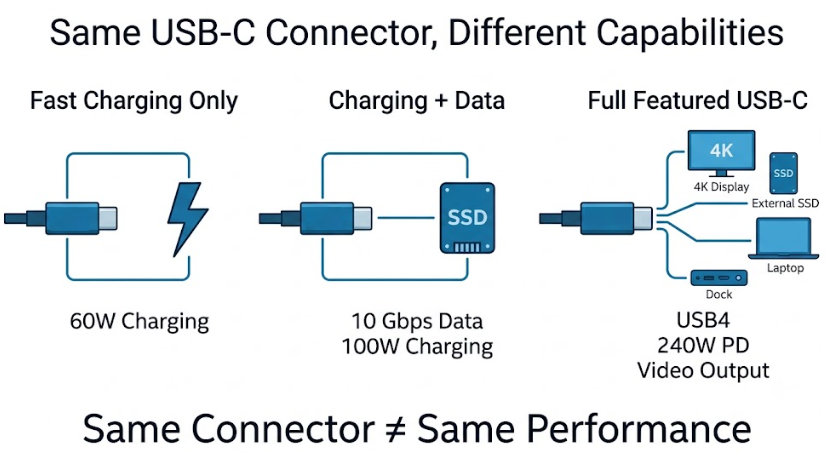
In 2014, the Type-C specification was released. One of the most important things to understand is that Type-C is only a physical connector shape. It does not by itself guarantee a certain transfer speed or charging capability.
This means that not all Type-C cables are the same. Some can only handle basic charging, some can transfer data quickly, and some support fast charging and video output. The difference lies not in the shape of the connector, but in the internal specification and cable quality.
Type-C became the industry standard because it solved many of the problems found in older ports. It has a symmetrical oval shape, so it can be inserted either way. It is small enough for phones, yet also works on thin laptops, desktop computers, monitors, and docking stations. It is also more durable and has a longer lifespan.
In terms of features, Type-C is far more capable than older ports. It supports bidirectional power delivery, so a phone can charge wireless earbuds or other small devices. It can carry high-speed data, support high-power charging, and transmit video and audio through a single cable.
Type-C spread quickly for three main reasons. First, government regulations, such as the EU’s common charging directive, pushed the industry toward unified ports. Second, the entire tech ecosystem began to support it, including Android, Apple, and laptop makers. Third, modern hardware requires stronger connectivity, and high-speed external drives, 4K or 8K monitors, and powerful laptops all benefit from Type-C’s capabilities.
Although some people refer to Type-C by brand-related nicknames, it is actually a global standard and belongs to the entire digital industry, not to a single company.
6. How to Choose the Right USB Interface
Ordinary users do not need to memorize every technical parameter. The key is to focus on practical needs.
If you still use older devices, such as old Android phones, power banks, cameras, printers, or USB flash drives, you may still encounter Micro-USB, Type-A, or Type-B ports. In this case, match the cable to the device’s existing port.
If you are using newer devices, especially smartphones, tablets, thin laptops, monitors, and docking stations released after 2019, Type-C is usually the most reasonable choice.
When buying cables, do not look only at the connector shape. Even with Type-C, performance can vary greatly. It is important to check whether the cable supports fast charging, what its maximum power rating is, how fast it can transfer data, whether it supports video output, and whether it matches your device’s needs.
Be especially careful with low-quality Type-C cables. They may look like Type-C on the outside but only support basic charging or slow data transfer. For fast charging, high-speed transfer, or video mirroring, always check the actual specifications.
7. Why USB Interfaces Keep Changing
USB has evolved over 30 years not because connectors simply needed a new look, but because user needs and hardware environments changed.
First, digital devices have become thinner and lighter. Large old ports no longer fit into slim phones and laptops, so connectors had to shrink.
Second, users want fewer cables. If charging, data transfer, and screen mirroring each require a separate cable, desks become messy and inconvenient. A unified port reduces redundant cables and lowers costs.
Third, the industry needs a common standard. In the past, different brands and devices used different ports, which caused waste and confusion. USB was meant to establish a more universal connection system.
Finally, remember this important point: physical connector shape is not the same as transfer protocol. Two Type-C cables can look identical but perform very differently. Some only support slow charging, while others support high-power charging, fast data transfer, and video output.
8. Why Type-C Became the Global Standard
Type-C did not become mainstream because one single company forced it to happen. It became popular because it solved long-standing problems in the industry.
First, policy helped push standardization. The EU’s common charging rules made Type-C more widely accepted across consumer electronics.
Second, the ecosystem became unified. When both Android and Apple devices moved toward Type-C, the global standard became much clearer.
Third, charging power requirements increased. Laptops, high-performance phones, and portable devices need faster charging, and older ports could no longer keep up.
Fourth, high-speed peripherals became more common. 4K and 8K monitors, fast external SSDs, and docking stations all require stronger data and video capabilities, which Type-C can provide.
9. Will USB Interfaces Keep Changing in the Future?
For the foreseeable future, Type-C will likely remain the main standard. Its physical shape is unlikely to change significantly. Most future upgrades will happen in internal protocols and performance.
Type-A will not disappear immediately. Desktop computers, USB flash drives, keyboards, mice, industrial equipment, and older devices will continue to support it for a long time. However, new devices will increasingly center around Type-C.
In terms of protocol, USB4 will become more common, with faster speeds and higher power delivery. Higher bandwidth, higher power, and more reliable all-in-one connectivity will be the main direction.
Looking further ahead, invisible ports, wireless connections, and the internet of things may continue to develop. But for many years to come, Type-C will remain a central standard in the world of wired connections.
10. Practical Tips for Buying USB Cables
When buying a USB cable, first consider the type of device you own. Older devices should be matched with their original port type, while new devices should generally use Type-C.
If you only need basic charging and file transfer, make sure the connector matches. If you need fast charging, large file transfer, monitor mirroring, or docking station use, check the cable specifications more carefully.
Focus on these points: whether it supports fast charging protocols, its maximum power rating, its transfer speed, whether it supports video output, and whether it is suitable for laptops, phones, or monitors.
Do not be misled by appearance. A Type-C connector does not guarantee fast charging or video output. Real performance depends on the internal specification.
11. Frequently Asked Questions
Is Type-C the same as USB 3.2?
No. Type-C is a connector shape, while USB 3.2 is a transfer protocol. They are not automatically related. A Type-C port can support different protocols and different speeds.
Does every Type-C port support fast charging?
No. Fast charging requires the device, the cable, and the charger to support the same protocol. A Type-C port alone does not guarantee fast charging.
Can all Type-C cables output video?
No. Only cables that support video output specifications can connect to monitors or TVs.
What is the difference between Type-C and Thunderbolt 3 or Thunderbolt 4?
They may share the same physical connector, but they differ in protocol, transfer speed, and expansion capability. Thunderbolt 3 and Thunderbolt 4 generally offer higher performance and are suitable for high-speed peripherals and docking stations.
Why do Type-C cables have different speeds?
Because the connector shape is the same, but the internal transfer protocol can be different. Some cables only support slow transfer, while others support high-speed transfer.
Will USB Type-A disappear completely?
Not in the near future. Desktop computers, USB drives, keyboards, mice, industrial equipment, and older devices will continue to use Type-A. However, Type-C is becoming the main standard for new devices.
Which devices can use 240W USB PD charging?
Only devices that support the corresponding fast charging protocol and power range can use it safely. Always make sure the cable, charger, and device are compatible.
12. Final Summary
The evolution of USB over 30 years follows a clear path: from large computer ports like Type-A and Type-B, through mobile transition ports like Mini USB and Micro-USB, to the unified and versatile Type-C.
Every change in USB has followed four basic goals: smaller size, faster transfer, higher power, and better user experience.
Type-C is not just a new connector shape. It represents an attempt to unify charging, data, video, and audio into a single cable. It reduces cable clutter and makes device connections simpler.
For ordinary users, the most important rule is this: choose compliant Type-C devices and cables, but do not judge performance by the connector shape alone. Always check the actual charging, transfer, and video capabilities.