
1. Introduction: Why Identical-Looking USB-C Cables Perform So Differently
Today, USB-C ports are found on nearly all digital devices, from phones and laptops to tablets and earbuds. But many people run into a confusing problem: two USB-C cables that look exactly the same can have wildly different capabilities — one can fast-charge a laptop and deliver 4K video, while the other only charges slowly and cannot even transfer large files.
USB-C cables on the market vary widely in quality and performance, with the same connector shape but very different capability limits. The core component that creates this gap is the tiny E-Marker chip hidden inside the cable. Though barely noticeable, it directly determines a cable’s charging speed, data transfer rate, and overall functionality.
2. Basics: What Is an E-Marker Chip?
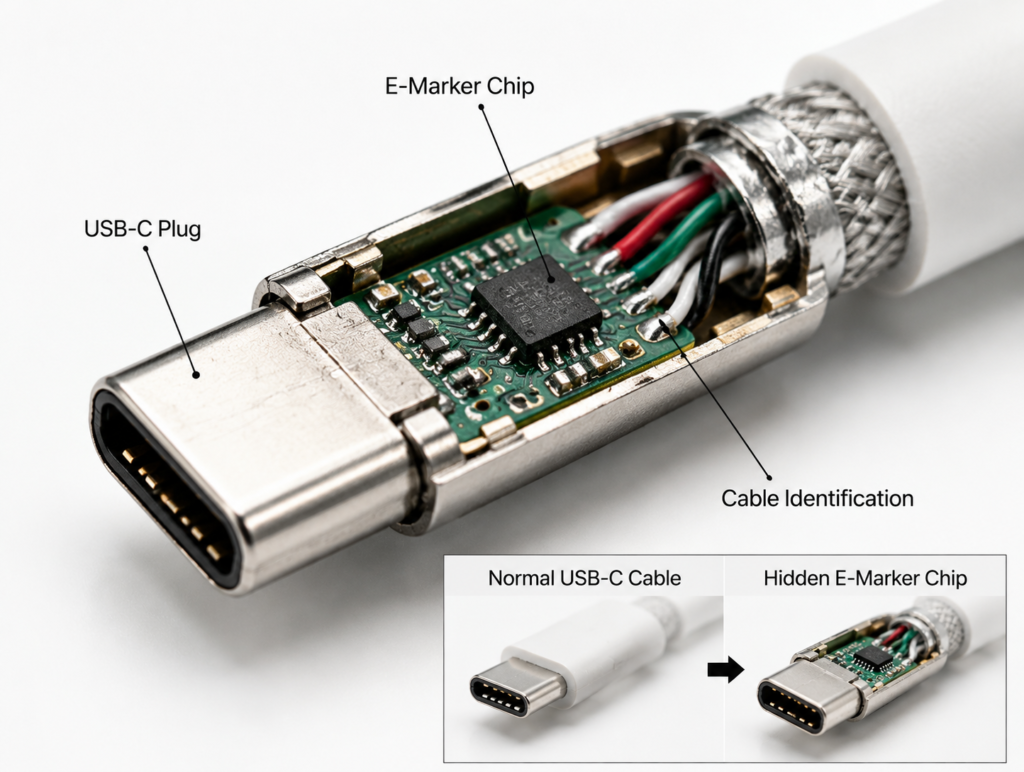
Definition: The Electronic ID Tag for Cables
E-Marker stands for Electronically Marked Cable. Think of it as an electronic ID card for the cable. It is a tiny chip that stores all of the cable’s specifications, which devices can read to understand what the cable is capable of.
Physical Location: A Mini Chip Inside the USB-C Plug
The E-Marker chip is not located in the middle of the cable. It is mounted on the circuit board inside the USB-C male plug — the end you insert into your device. Because it is so small, it is completely invisible from the outside, which is why many people do not know it exists.
Core Role: The Information Hub of the USB-C Ecosystem
In the full USB-C ecosystem, chargers, devices, and cables all need to work together. The E-Marker acts as the cable’s spokesperson, telling chargers and devices what the cable can handle, so all three can negotiate a safe and appropriate operating mode.
Single-Chip vs. Dual-Chip Cable Designs
Most standard fast-charging cables only have one E-Marker chip inside one of the plugs, which is enough for basic identification. High-end full-featured cables and Thunderbolt cables usually have one chip in each plug — a dual-chip design — for bidirectional recognition, better compatibility, and greater reliability.
3. Why E-Marker Chips Are Necessary for Fast Charging and High-Speed Data
How USB PD Negotiates Power
USB Power Delivery (PD) fast charging works on a negotiation system: chargers do not immediately output their maximum power. Instead, they first communicate with the device and the cable to confirm the highest power level all three support, then deliver the matching voltage and current. If the cable cannot prove it can handle high current, the charger will not output high power.
The 60W Threshold and Mandatory Requirement
According to official USB specifications, all USB-C cables default to supporting up to 3A of current. At 20V, that equals a maximum power of 60W — this is the upper limit achievable without an E-Marker chip.
To support 5A current and deliver 100W or more power, cables must include an E-Marker chip to prove to the charger that they can safely carry the higher current. This is a mandatory specification, not an optional design choice for manufacturers.
What Happens Without an E-Marker: Automatic Performance Throttling
If you use a regular cable without an E-Marker with a 100W charger and laptop, the charger will not detect the cable’s high-power capability. It will automatically limit output to 60W or less. Even if both your charger and device support 100W charging, a simple cable can hold back performance — this is a very common reason for slower-than-expected charging.
The Official USB-IF Standard Behind It All
None of the E-Marker rules are made up by individual manufacturers. They are defined by the USB Implementers Forum (USB-IF), the official standards body. All compliant USB-C fast-charging and high-speed cables must follow these rules, which is what ensures compatibility across different brands of devices.
4. How an E-Marker Chip Identifies Cables
Communication Basics: CC Pins and VCONN Power
Inside every USB-C port are dedicated CC (Configuration Channel) pins, which are the dedicated communication lines for the E-Marker and the device.
The E-Marker chip does not need its own battery. The device supplies power to the chip through the CC pin via VCONN power. As soon as you plug the cable in, the chip powers on automatically, and it shuts off when unplugged — it uses extremely little energy.
Full Identification Process: Insert Detection → Wake-Up → Capability Report → Mode Negotiation
The whole identification process happens in an instant, completely invisible to the user:
- Insert detection: The device detects that a cable has been plugged in and identifies its orientation.
- Chip wake-up: The device sends VCONN power through the CC pin to turn on the E-Marker chip.
- Capability report: The E-Marker sends its stored cable specifications to the device.
- Mode negotiation: The device combines the capabilities of the charger and cable to set the final charging power and data transfer mode.
Key Information Stored in the Chip
Think of the data inside an E-Marker as a resume for the cable. It mainly covers four categories:
- Power capacity: Supported maximum current and voltage levels, such as 3A/5A or 20V/48V.
- Data transfer speed rating: Whether it only supports USB 2.0, or higher speeds like USB 3.2, USB4, or Thunderbolt 4.
- Extended feature flags: Support for video output, Alt Mode, and other special functions.
- Vendor and product details: Manufacturer ID, product model, cable length, and more.
5. Cable Categories: What Types of Cables Use E-Marker Chips
By Power Rating
We can sort cables with E-Marker chips into three main power tiers:
| Cable Power Tier | E-Marker Required | Maximum Capacity | Typical Use Case |
|---|---|---|---|
| Basic charging cable | No | Up to 60W (20V/3A) | Daily phone charging, powering small accessories |
| Standard PD fast-charging cable | Yes | Up to 100W (20V/5A) | Fast charging for thin laptops and tablets |
| EPR ultra-high-power cable | Yes (PD 3.1 specific) | Up to 240W (48V/5A) | Gaming laptops, workstations, high-power devices |
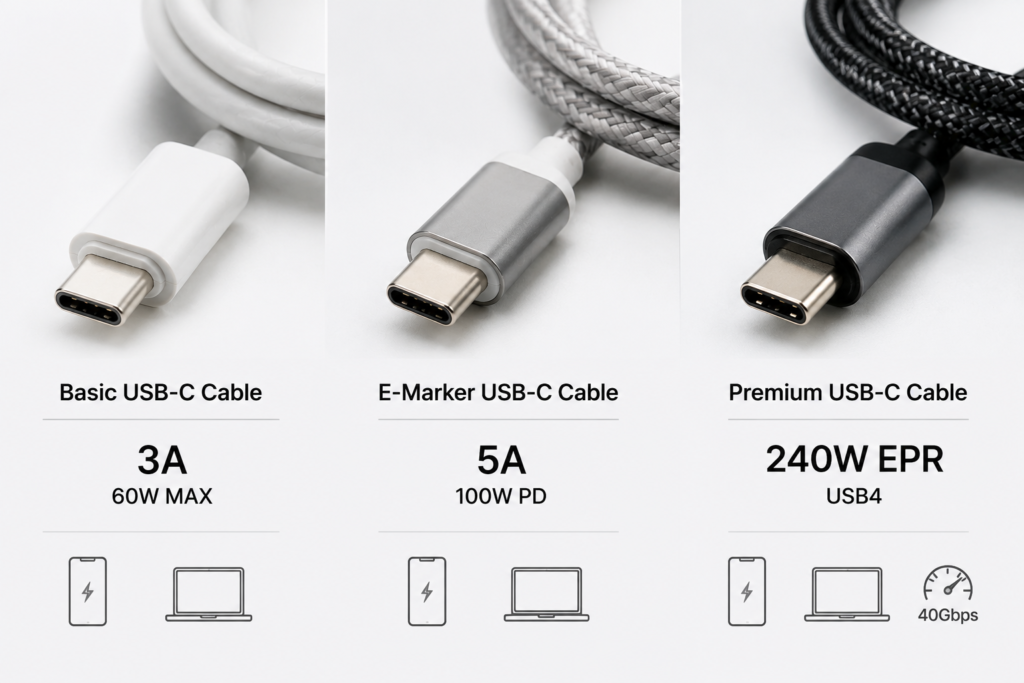
By Data Capability
Besides power, E-Marker chips also label data transfer capabilities. The three most common types are:
- Charging-only cables: Only support USB 2.0, for charging and basic data, the lowest cost option.
- 10Gbps high-speed data cables: Support USB 3.2 Gen 2, for transferring large files and connecting standard docks.
- USB4/Thunderbolt 4 40Gbps full-featured cables: Support the fastest data transfer and video output, the highest-performance consumer cables available.
Passive vs. Active Cables
- Passive cables: Only contain wires and an E-Marker, no extra signal-boosting chips. Low cost, ideal for short distances.
- Active cables: Include signal amplification/re-timing chips in addition to an E-Marker, maintaining stable high-speed signals over longer distances. Common in 2m+ Thunderbolt and USB4 cables, and more expensive.
6. Major Chip Manufacturers and Solutions
Leading International Manufacturers
International E-Marker chip solutions have a longer history and are widely recognized for compliance and reliability. Key manufacturers include Texas Instruments (TI), NXP, and STMicroelectronics (ST), mostly used in premium branded cables and certified products.
Cost-Effective Domestic Solutions
In recent years, domestic Chinese chips have developed rapidly, offering strong value and dominating the mid-range and entry-level cable market. Major brands include Hynetek, Injoinic, WCH, and Southchip. Many of their products are also USB-IF certified and fully suitable for daily use.
High-End USB4/Thunderbolt Specific Chips
For ultra-high-speed cables like USB4 and Thunderbolt 4, stricter protocol support is required, so fewer solutions exist. Alongside high-end options from international manufacturers, a small number of domestic brands also offer compliant chips, mainly used in premium full-featured cables.
7. How to Tell If a USB-C Cable Has an E-Marker
Check the Specs: Key Labels on Packaging and Product Listings
This is the easiest method. Look at the cable’s packaging or product page. If it says “5A current”, “100W PD charging”, “USB4”, or “Thunderbolt 3/4”, it almost certainly has an E-Marker chip. If it only lists “3A” or “up to 60W”, it usually does not.
Use a Tester: Read Chip Data With Professional Tools
With a professional USB tester (such as POWER-Z models), you can plug in the cable and directly read all the information stored in the E-Marker, including current, voltage, and protocol support. This gives the most accurate results and is great for more tech-savvy users.
Estimate by Actual Charging Power
If you have a device and charger that support 100W+ fast charging, check the actual charging power when using the cable. If it consistently reaches 80W or higher, the cable likely has an E-Marker. If it tops out around 50–60W, it probably does not.
Disassemble to See the Chip Physically
If you take apart the plastic shell of a USB-C plug, you can see directly whether there is an E-Marker chip on the internal circuit board. However, this will destroy the cable, so it is not recommended for most users — it is mainly for verification and review purposes.
8. Buying Guide: Common Myths and Tips
Common Misconceptions
Myth 1: All USB-C cables have an E-Marker
This is the most widespread misunderstanding. In reality, many cheap basic charging cables, and the cables included with earbuds or small devices, do not have an E-Marker and only support up to 3A/60W.
Myth 2: An E-Marker means the cable is high quality
An E-Marker is just an identification chip — it does not guarantee good build quality, materials, or durability. Some low-quality cables include a cheap E-Marker and even fake their specs, with wire cores that cannot actually handle the advertised current, creating safety risks.
Myth 3: The E-Marker directly controls charging speed
The E-Marker only reports what the cable can handle — it does not make charging faster on its own. Final charging speed is limited by the weakest link among the charger, device, and cable. The E-Marker simply prevents the cable from becoming a bottleneck.
Myth 4: Longer cables are the ones that need E-Markers
Whether a cable needs an E-Marker depends only on its power and speed ratings, not its length. Even a 10cm short cable must have an E-Marker if it is rated for 5A/100W. Conversely, a 1m basic 3A cable does not need one.
Buying Recommendations for Different Uses
- Only charging phones, earbuds, or other small devices: A standard 3A cable is fine, no need to pay extra for an E-Marker.
- Fast-charging thin laptops/tablets, or using standard docks: Choose a 5A/100W cable with an E-Marker.
- Using Thunderbolt devices, high-speed SSDs, or 4K/8K monitors: Choose a full-featured USB4/Thunderbolt cable with an E-Marker.
Risks of Fake or Low-Quality E-Marker Cables
Low-quality cables often have E-Markers with fake specs — for example, labeling a 3A cable as 5A. When the charger outputs 5A, the thin wire core overheats severely, accelerating wear at best and causing insulation melt, short circuits, or even fire at worst. Always buy from reputable brands.
9. Frequently Asked Questions (FAQ)
Can I use a 100W charger with a cable that has no E-Marker?
Yes, it will work normally and will not damage your device. The charger will automatically detect the cable’s limits and restrict output to 60W or less — you just will not get full 100W fast charging speeds.
Can an E-Marker chip break? What happens if it does?
Yes, it can fail. Repeated plugging/unplugging, water damage, high heat, or port shorts can all break the chip. When it fails, the device will no longer recognize the cable’s high-power capabilities and will drop down to basic power levels — for example, 100W charging will drop to 60W slow charging.
Why do some very short cables still have an E-Marker?
Because it is required by the specification. Any cable rated for 5A current or 100W+ power must include an E-Marker to label its capabilities, no matter how short it is. Length is not a factor.
Is the E-Marker in the male plug or the female socket?
It is almost always installed on the circuit board inside the USB-C male plug. Female sockets (ports) generally do not include an E-Marker chip.
Can I modify or re-program the information on an E-Marker?
Regular users cannot do this. You need specialized programming tools and support for the specific chip’s protocol. Legitimate cables have their parameters set at the factory. Modifying parameters yourself (such as changing 3A to 5A) can cause the cable to overload, creating serious safety risks.
10. Future Trends for E-Marker Technology
Higher Power: Supporting New PD Standards
With the spread of USB PD 3.1, 240W charging is already available. In the future, E-Marker chips will support even higher voltage and current levels to work with more powerful devices like gaming laptops and small appliances.
Faster Speeds: Support for 80Gbps and Beyond
The USB4 Version 2.0 standard already pushes speeds up to 80Gbps, and faster protocols are on the way. E-Marker chips will be upgraded to label these higher speed ratings, matching the next generation of high-speed cables.
Better Integration: Smaller Size and Lower Power Consumption
Chips will continue to get smaller and integrate more features, while using even less power. This will leave more room inside compact plugs and reduce unnecessary energy waste.
Stronger Security: Stricter Certification and Protection
Future E-Markers will include more security verification features to stop fake chips with falsified specs from reaching the market. They will also have better voltage resistance and electrostatic protection for safer overall use.
11. Conclusion
The E-Marker chip is an essential foundational component of the modern USB-C ecosystem. It gives otherwise identical-looking USB-C cables clear capability labels, and is the foundation for high-power fast charging and high-speed data transfer.
Understanding how E-Marker works helps you avoid most common pitfalls when buying cables, pick the right product for your needs, and get full performance from your devices. At the same time, standardized E-Marker rules ensure compatibility and safety across the entire USB-C ecosystem — a tiny technology that makes a huge difference.