
1. Introduction: Why Do USB-C Ports Break So Easily?
Today, USB-C ports are found on nearly every digital device: smartphones, tablets, laptops, power banks, monitors, and more. A single port handles charging, data transfer, video output, and other functions. This high frequency of use, combined with varied real-world conditions, makes USB-C ports one of the most prone-to-wear parts on any device.
Common signs of a damaged USB-C port include: loose connections that fall out easily, intermittent charging, fast charging failure, slow or failed data transfers, difficulty plugging in the cable, and bent or discolored internal pins.
Broadly speaking, port damage falls into four main categories: physical/mechanical damage, electrical and accessory risks, gradual wear from environment and habits, and design/manufacturing differences.
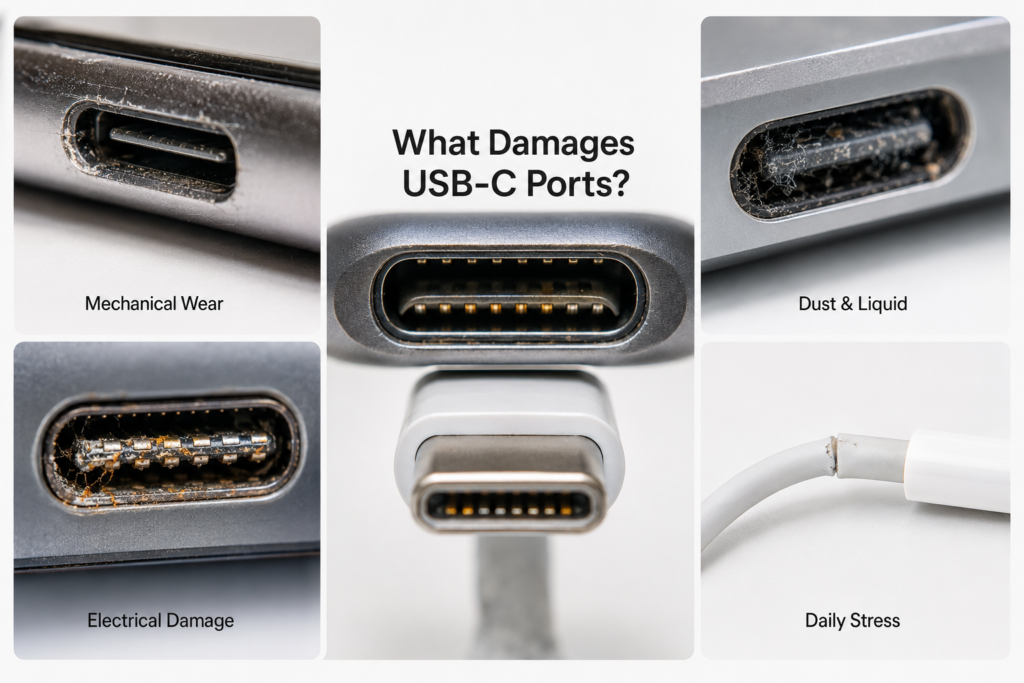
2. Physical & Mechanical Damage: The Most Visible Causes
Mechanical damage is the most common type of failure, and it is almost always linked to improper handling.
- Angled insertion and forceful plugging: Many people insert cables at an angle, or force the plug in when misaligned. This can bend the internal metal pins, or even snap the central plastic tab inside the port.
- Cable yanking and bending stress: Pulling your device while charging, or yanking the cable instead of grasping the plug to unplug, puts constant side stress on the port. Over time, this can loosen the solder joints holding the port to the motherboard, causing the entire port to wiggle.
- Drops and impacts: If you drop your device while a cable is plugged in, the plug acts like a lever that pries against the port. This can bend the port housing, or even tear the solder pads right off the motherboard, causing permanent damage.
- Wear from frequent plugging: With daily, repeated plugging and unplugging, the metal spring contacts inside the port compress and release over and over. Over time, they lose their tension and the contact surfaces wear thin, leading to unreliable connections.
- Debris buildup and pin displacement: Lint, dust, and small particles easily get inside ports when devices are carried in pockets or bags. Built-up debris not only stops the plug from seating fully, but can also push internal pins out of alignment.
3. Electrical & Accessory Risks: Hidden Damage You Can’t See
This type of damage often leaves no visible mark on the outside, but can completely disable the port — and in severe cases, damage the device’s motherboard.
- Overvoltage/overcurrent from uncertified cables and chargers: Cheap, uncertified chargers and cables lack proper protection circuits. Their unstable voltage and current output can burn through the port’s internal contacts, and in extreme cases cause melting or charring.
- Electrostatic discharge (ESD) component damage: In dry environments, the human body builds up static electricity. A quick static zap when plugging in a cable can fry tiny chips inside the port, leaving no visible damage but rendering the port useless.
- Communication pin failures: The dedicated pins inside the port that handle fast-charging negotiation and device recognition can become damaged or corroded. When this happens, fast charging stops working, or your computer may no longer recognize connected devices.
- Overheating cycle from poor contact: Worn or corroded contacts have higher electrical resistance, which generates extra heat when power flows through. This heat speeds up further wear and corrosion, creating a vicious cycle that quickly ruins the port.
4. Environment & Daily Habits: Gradual, Cumulative Wear
Many port failures are not caused by one single accident, but by months of bad habits and exposure to harsh conditions.
- Dust and lint buildup over time: During daily carry, dust and fabric lint slowly build up inside the port. As the layer gets thicker, the cable plug cannot seat fully, and the contact area shrinks dramatically.
- Liquid exposure causing corrosion and short circuits: Spilled drinks, use in rain, or sweat seeping into the port can all introduce moisture. At minimum, this causes oxidation and rust on metal contacts; at worst, it creates a short circuit between pins.
- Stress fatigue from constant cable connection: Leaving a cable plugged in long-term, with the cable always bent or hanging under its own weight, puts steady stress on the port structure. Over time, this leads to looseness and unreliable connections.
- High temperatures accelerating aging: Hot environments — like a phone left in a sun-heated car, or sustained heat from high-power fast charging — speed up the degradation of plastic parts and make metal springs lose their tension faster.
5. Design & Manufacturing Differences: Built-In Durability Varies
Not all USB-C ports are built the same. Durability varies a lot between devices, depending on design choices and build quality.
- Weak mounting and solder joint strength: Some thin, lightweight devices only use surface solder to attach the port to the motherboard, with no extra reinforcement. These ports have very low resistance to pulling and impact, and can come loose easily.
- Thin or low-quality contact plating: High-quality ports use thick gold plating for better wear resistance and corrosion protection. Cheaper ports have very thin plating that wears off quickly, leading to fast oxidation and poor connections.
- Lack of dust and water sealing: Basic ports with no sealing let dust and moisture enter easily. Devices with an official IP dust/water resistance rating have much better-sealed ports that last longer.
- Ultra-thin design tradeoffs: To make devices slimmer, some products shrink the support structure around the port. This reduces the port’s ability to withstand bending and impact forces.
6. Common Misconceptions Cleared Up
Many wrong beliefs about USB-C durability lead people to accidentally damage their ports faster.
- Myth 1: Reversible design means you can’t break the port Reversible plugging just means you don’t have to flip the cable over. Angled insertion and forceful plugging will still break the internal tab and pins just as easily.
- Myth 2: Original brand accessories can never damage the port Official accessories meet standard specifications, but they are not damage-proof. Worn-out accessories, mismatched setups, or rough handling can still harm your port over time.
- Myth 3: A loose port is just a minor annoyance A loose port doesn’t just feel annoying — it makes poor contact worse, causes extra heat buildup, and can lead to full solder joint failure, short circuits, or even motherboard damage if ignored.
- Myth 4: High-wattage chargers will always burn out your port Genuine, compliant high-power chargers automatically negotiate the correct power level with your device. They will never force unsafe voltage. Only cheap, non-standard chargers carry a burn-out risk.
7. Daily Care & Maintenance: Practical Ways to Extend Port Life
With a few good habits, you can greatly extend the lifespan of your USB-C ports.
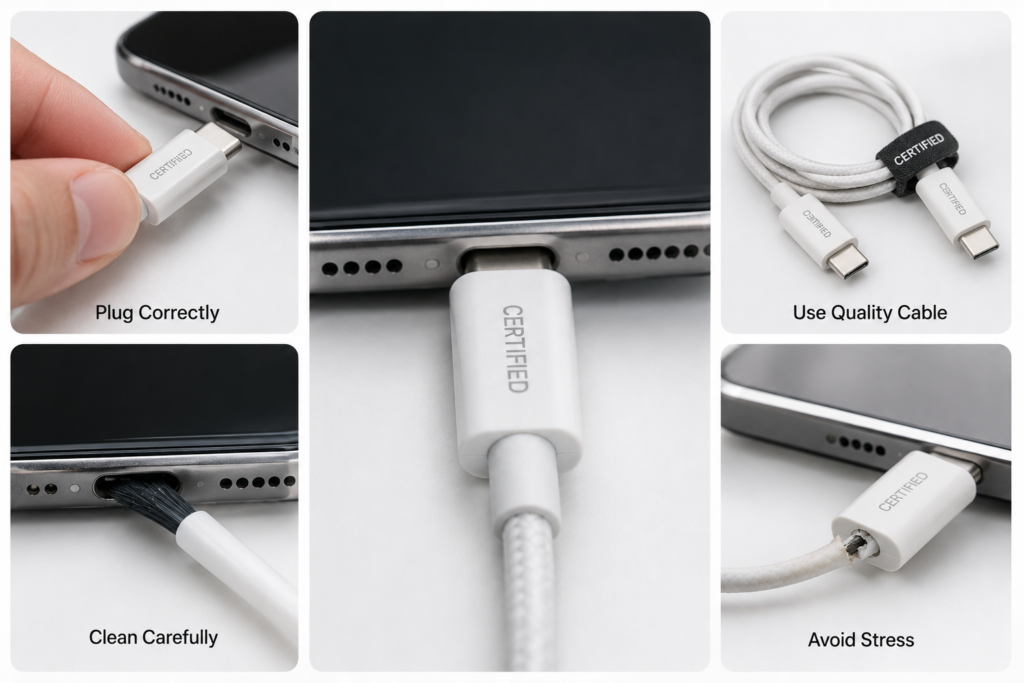
- Use proper plugging and unplugging technique: Align the plug straight with the port, push it in gently, and always grasp the plug body — not the cable — when unplugging, to reduce side stress.
- Choose certified, reputable charging accessories: Stick to well-known brands and certified chargers and cables, to avoid the electrical risks of cheap, untested products.
- Clean your ports the right way (and avoid bad practices): Gently remove dust and lint with a soft brush or a bulb air blower. Never poke inside with metal pins or toothpicks, and never pour liquid directly into the port.
- Be careful in special use cases: Avoid putting tension on the cable when using your device in a car or on the go. Don’t leave heavy docks or adapters plugged into thin laptops long-term, as they put constant weight on the port.
8. Conclusion
USB-C port damage is almost never caused by just one thing — it is usually a combination of physical stress, accessory quality, environmental conditions, and build quality. By following proper handling habits, using certified accessories, and doing simple, regular cleaning, you can significantly reduce the chance of damage and keep your USB-C ports working reliably for much longer.
Table 1: Common USB-C Port Symptoms & Their Likely Causes
| Symptom | Most Likely Causes |
|---|---|
| Loose connection, plug falls out easily | Loose solder joints, worn spring contacts, debris buildup |
| Intermittent charging | Worn/corroded contacts, dust/lint blockage, loose port |
| Fast charging not working | Communication pin damage, incompatible cable, poor contact |
| Failed or slow data transfer | High-speed pin damage, internal corrosion, bent port structure |
| Unusual port overheating | High resistance from poor contact, bad accessory, minor short circuit |
| No charging / device not recognized at all | Burned port, broken solder joints, severe corrosion, ESD component damage |
Table 2: Do’s and Don’ts for USB-C Port Care
| Situation | Do | Don’t |
|---|---|---|
| Plugging / Unplugging | Grip the plug, align straight, insert smoothly | Jam it in at an angle, yank the cable to unplug |
| Choosing Accessories | Pick reputable brands with official certification | Buy ultra-cheap, unbranded, uncertified cables/chargers |
| Cleaning | Use a soft brush or air blower to remove loose dust | Poke with metal objects, pour liquid directly inside |
| Daily Use | Avoid constant cable bending or hanging weight | Tug the cable while using, hang heavy items on the cable |