
Introduction: Why USB-C Changed How We Charge Our Phones
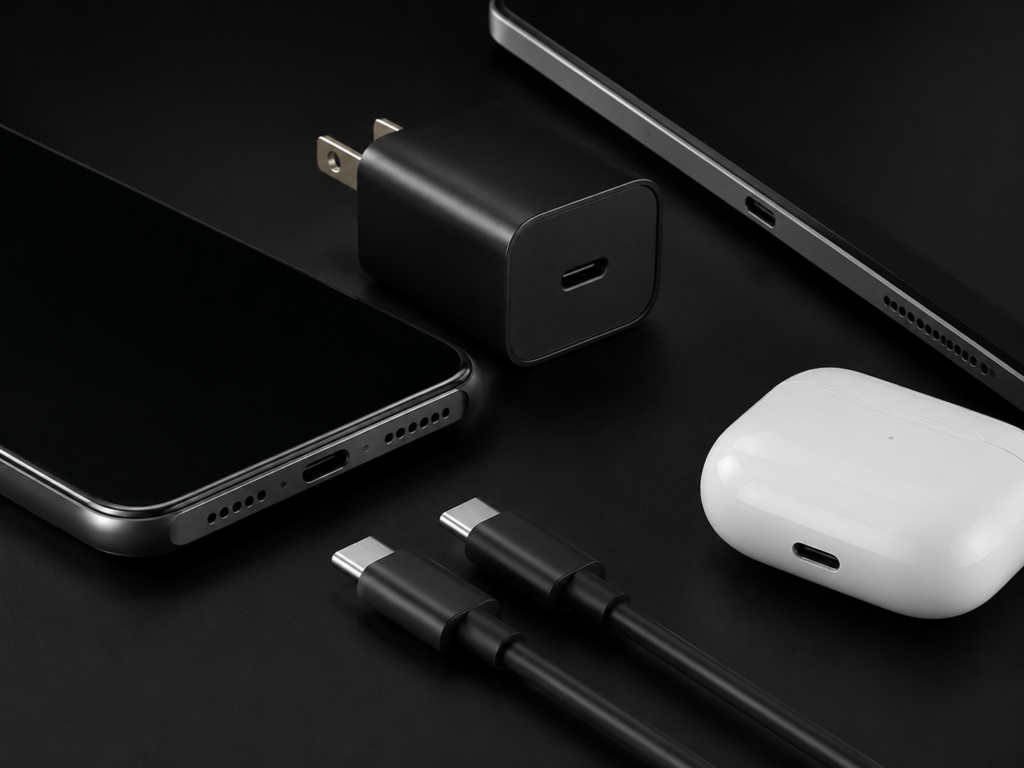
If you have bought a smartphone in the past few years, you have almost certainly seen the small, oval USB-C port on the bottom. What began as a better connector has slowly grown into a universal charging language spoken by phones, tablets, laptops and even game consoles.
Not long ago, every brand seemed to use its own charging port. Android phones relied on the one-way Micro-USB. Apple devices used the proprietary Lightning connector. Today, USB-C has replaced nearly all of them, and for good reason: it is reversible, durable, and capable of far more than just charging.
This guide breaks down everything from basic electrical terms to real-world buying advice, so you can charge your phone safely, quickly, and without wasting money on accessories you do not need.
1. What Is USB-C, and Why Is It Everywhere?
1.1 The Basics: More Than Just a Reversible Plug
USB-C, short for USB Type-C, is a physical connector standard developed and maintained by the USB Implementers Forum (USB-IF).
At first glance, its most obvious feature is its symmetrical oval shape — you can plug it in either way, no fumbling in the dark required. A standard USB-C connector includes up to 24 contact pins in total, but device manufacturers only enable the pins needed for their specific feature set. A single port can handle charging, data transfer, and video output, depending on how the device is designed.
Important note: Not every USB-C port supports every feature. All USB-C ports can charge and transfer basic data, but video output or ultra-fast data speeds require additional hardware support like DisplayPort Alt Mode, Thunderbolt, or USB4.
USB-C connectors are engineered for standardized durability testing and are rated for thousands of insertion and removal cycles. Real-world lifespan depends on the port’s mechanical design, build quality, and daily usage conditions — a well-implemented port can easily last the entire life of your phone.
1.2 Inside the Port: What the Main Pins Actually Do
You do not need to memorize every pin, but knowing the main groups helps explain why USB-C is so versatile:
- VBUS & GND: The power lanes. VBUS carries the charging current, and GND completes the circuit.
- CC pins: Think of these as a dedicated communication line between your charger and phone. They detect which way you plugged in the cable, identify devices, and negotiate how much power to send.
- D+ / D-: USB 2.0 data pins used for basic file transfers and simple accessories. Most budget charging cables only use these.
- TX / RX pairs: High-speed data lanes used for USB 3.2, video output, and Thunderbolt connections.
1.3 From Micro-USB to USB-C: A Short History
To understand why USB-C felt like such a leap forward, it helps to see what came before:
- Micro-USB era: The standard for early Android phones. It only worked one way, and most devices topped out at 5–15W charging. A few proprietary fast-charge systems pushed to around 18W, but they were never universal.
- Lightning era: Apple’s compact, reversible connector was ahead of its time, but it remained a closed, Apple-only standard with limited power headroom and a more limited third-party accessory ecosystem.
- USB-C era: A single open standard works across every brand. It supports far higher power, faster data, and video — all in one cable.
1.4 How Regulation Pushed USB-C to Become Universal
The biggest shift toward a one-cable future did not come only from tech companies — it came from lawmakers.
The European Union’s common charger directive went into effect on December 28, 2024. All new smartphones, tablets, digital cameras, headphones, handheld game consoles, portable speakers, e-readers, keyboards, mice, and portable navigation devices sold in the EU must include a USB-C charging port. Laptops will fall under the same requirement starting April 28, 2026.
India has announced similar rules taking effect in 2025. Apple’s switch to USB-C on the iPhone 15 lineup was partly driven by this global regulatory wave.
For consumers, the result is simple: fewer cables cluttering your drawer, less electronic waste, and one charger that works for almost everything you own.
1.5 What This Means for You as a User
- One cable works across phones, tablets, laptops and accessories, making travel much lighter
- Charging speed ceilings are far higher than older connectors, so daily top-ups take less time
- Broad compatibility means you do not need to buy new accessories every time you switch brands
2. How USB-C Charging Actually Works
2.1 The Journey of Electricity: From Wall to Battery
Charging your phone looks simple — plug in a cable and walk away. Behind the scenes, a whole chain of components works together:
- Wall charger (power adapter): Converts high-voltage AC from the wall into low-voltage DC the phone can use.
- USB-C cable: Carries power and data between the charger and phone.
- Power Management IC (PMIC): The “smart manager” inside your phone. It controls how much current flows in, monitors temperature, and protects the battery.
- Battery: Stores the electrical energy as chemical energy for later use.
The PMIC is the reason you cannot “force” more power into a phone. It decides how much electricity to accept, not the charger.
2.2 Voltage, Current, and Power: Explained Like Water Pipes
You do not need an engineering degree to understand charging speed. Three terms matter most:
- Voltage (V): Think of it as water pressure in a pipe. Higher voltage pushes electricity harder.
- Current (A): Think of it as the width of the pipe. More current means more electricity flows per second.
- Power (W): This is the actual charging speed.
Power (Watts) = Voltage (Volts) × Current (Amps)
For example:
- 5V × 3A = 15W (standard charging)
- 9V × 3A = 27W (basic fast charging)
- 20V × 5A = 100W (high-power charging for laptops and premium phones)
More watts generally means faster charging — but only if your phone is designed to accept that power level.
2.3 The “Handshake”: Why Plugging In Is Not Enough
A 100W charger will not automatically charge your phone at 100W. First, the two devices have a conversation over the CC pins:
- Detection: You plug in the cable. The CC pins sense the connection and figure out which side supplies power.
- Protocol check: The charger lists what voltages and currents it can provide. The phone replies with what it can accept.
- Negotiation: They agree on the fastest safe setting both support.
- Dynamic adjustment: As the battery fills up or temperature rises, the phone asks for less power in real time.
This smart back-and-forth is why USB-C is safer and more efficient than older charging systems.
2.4 Why Charging Slows Down After 80%
Almost everyone has noticed this: your phone races from 20% to 80% in minutes, then crawls the last 20%. This is not a bug — it is intentional battery protection.
Charging happens in two main phases:
- Constant current phase (0–80%): The phone accepts high power and charges quickly. This is where fast charging delivers most of its value.
- Constant voltage phase (80–100%): Voltage holds steady while current gradually drops. This tops off the battery gently and reduces stress on the cells.
Heat also plays a role. By the time you reach 80%, the battery has already warmed up. The system slows down on purpose to keep temperatures safe and preserve long-term battery health.
3. Fast Charging Standards: PD, PPS, and Proprietary Protocols
3.1 USB Power Delivery (PD): The Universal Fast-Charging Language
USB Power Delivery, or USB PD, is the official universal fast-charging standard from the USB-IF. Think of it as the common language of charging — almost every device speaks it.
- PD 2.0: Established the foundation for high-power USB-C charging, supporting up to 100W (20V/5A). It set the template for modern fast charging.
- PD 3.0: Added improved safety and Programmable Power Supply (PPS) for finer control. This is the version most smartphones use today.
- PD 3.1 EPR: Extended Power Range pushes the ceiling to 240W (48V/5A). This is mainly for laptops, monitors, and high-power gear — smartphones still rely primarily on PD 3.0 and PPS.
The biggest advantage of PD is interoperability. A PD charger will work with every PD phone, no matter the brand.
3.2 PPS: More Precise, More Efficient Charging
PPS, short for Programmable Power Supply, is an optional feature of USB PD 3.0.
Instead of jumping between fixed voltage steps like 5V, 9V, and 12V, PPS lets the phone request tiny voltage adjustments in 20mV steps. This fine-grained control reduces energy conversion loss inside the phone and helps keep charging temperatures lower.
Flagship phones from Samsung, Google, and many Chinese brands rely on PPS to reach their advertised fast-charging speeds.
3.3 Brand-Specific Fast-Charge Protocols
While PD is the universal standard, many phone makers also build their own proprietary protocols to reach even higher wattages. Here is what you are likely to encounter:
- Apple iPhone: Uses standard USB PD, topping out around 27W on modern models. No proprietary protocol — any good PD charger will fast-charge an iPhone.
- Samsung Galaxy: Super Fast Charging (25W / 45W) is built on top of PPS. You need a PPS-enabled charger to get full speed.
- Google Pixel: Strictly follows USB PD and PPS, with peak speeds around 30W. Third-party PPS chargers work very well.
- Qualcomm Quick Charge 4+/5: Found on many Snapdragon-powered Android phones. It is compatible with USB PD and widely supported by third-party chargers.
- Chinese brand protocols: Xiaomi HyperCharge, OnePlus/OPPO SUPERVOOC, and Huawei SCP can hit 120W, 150W, and beyond. These often require brand-specific chargers and cables for maximum speed, but most still support standard PD for basic fast charging.
For advanced readers: The table below summarizes the major proprietary systems. Casual users can safely skip it — just remember that PD + PPS covers almost every mainstream phone.
Brand Protocol Peak Power Key Trait Compatibility Note Qualcomm Quick Charge 4+/5 100W+ PD-compatible, widespread on Snapdragon phones QC chargers work with most Android devices Samsung Super Fast Charging 2.0 45W PPS-based Requires PPS charger for full speed OnePlus / OPPO SUPERVOOC / Warp 150W+ Low-voltage high-current, cool running Ultra-high speeds need brand-specific cable Xiaomi HyperCharge 120W+ Charge pump + multi-cell design Proprietary peak speeds need official accessories Huawei SCP / FCP 88W Custom voltage/current profiles High-end models also support PD/PPS
3.4 The Push for Unified Charging
The downside of so many proprietary protocols is fragmentation — a charger that works at full speed on one brand may only charge slowly on another.
UFCS (Universal Fast Charging Specification) is one effort to improve cross-brand compatibility. It is primarily used in the Chinese market to enable faster charging across different domestic phone brands. On a global scale, USB PD remains the core universal charging standard.
Over time, global regulation and consumer pressure are likely to push the whole industry toward more open standards.
3.5 How to Check What Your Phone Supports
Not sure what fast charging your phone uses? Try these:
- Check the official tech specs page on the manufacturer’s website
- Look in your phone’s battery settings menu — some show real-time charging status
- Watch the on-screen label when you plug in — words like “Super Fast Charging” or “Fast Charging” tell you the protocol is working
- Use a USB power meter accessory if you want precise numbers
4. How to Read USB-C Labels and Symbols
When you shop for cables or chargers, you will see lots of logos and numbers on the packaging. This section explains what the most common ones mean, so you can buy with confidence.
4.1 Power and Charging Labels
- USB PD / USB Power Delivery: Means the product supports the official universal fast-charging standard. This is the most important logo to look for broad compatibility.
- 60W / 100W / 240W: The maximum power the cable or charger can safely deliver. For a smartphone, 60W is usually more than enough; 100W adds laptop compatibility.
- Charging-only / Charge cable: Tells you the cable is built for power and basic USB 2.0 data, not high-speed file transfers. Most everyday charging cables fall into this category.
4.2 Data and Video Labels
- USB 2.0: Basic data speed (480 Mbps). Enough for charging and simple file transfers.
- SS / USB 3.2 Gen 1 / Gen 2: “SS” stands for SuperSpeed. These cables support much faster data transfer (5Gbps or 10Gbps) and are useful for external drives. They do not charge your phone any faster.
- Thunderbolt / USB4: The highest-performance cables. They support 40Gbps+ data, external video, and 100W/240W charging. They are overkill for just charging a phone.
Quick tip: If you only need to charge your phone, you do not need to pay extra for USB 3.2 or Thunderbolt cables. A good-quality USB 2.0 charging cable with the right power rating will work just as well for less money.
5. USB-C Cables: The Hidden Bottleneck of Fast Charging
5.1 All Cables Look Alike — They Are Not
Pick up two USB-C cables, and they may look identical on the outside. Inside, they can be completely different.
The cable is the pipe between your charger and phone. If the pipe is too narrow, even the most powerful charger cannot deliver full speed. That is why buying the right cable matters just as much as buying the right charger.
5.2 Cable Power Ratings: 60W, 100W, and 240W
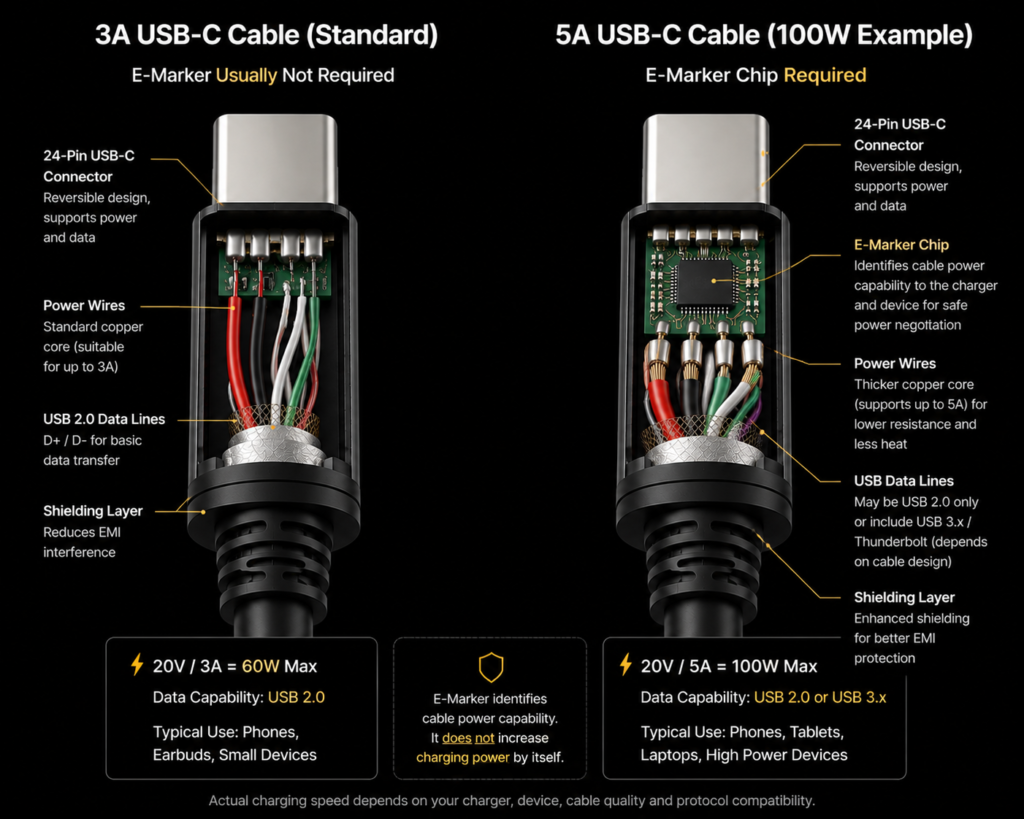
USB-C cables are grouped by how much current they can safely carry:
- 3A cables (up to 60W): The most common type. Works perfectly for most smartphones, which rarely exceed 45W over standard PD.
- 5A cables (up to 100W): Required for higher-power charging. These must include an E-Marker chip.
- EPR cables (up to 240W): Built for PD 3.1, mostly used with gaming laptops and high-performance devices. Most phone users will never need one.
For a typical smartphone, a good 3A cable is often enough. If you also charge a laptop or a 100W+ gaming phone, step up to a 5A cable.
5.3 The E-Marker Chip: Your Cable’s Electronic ID Card
An E-Marker (Electronic Marker) is a tiny chip built into the connector of higher-spec USB-C cables.
It stores the cable’s official capabilities — how much current it can handle, what data speeds it supports, and its manufacturer information. When you plug in, the charger reads this chip to know what it can safely deliver.
Per official USB-C rules, when a USB-C cable is designed to carry more than 3A of current (such as for 100W PD fast charging), it must include an E-Marker chip to report its capabilities. Without one, the charger will deliberately limit power to 3A to protect the cable and your device.
That is the #1 reason a “fast charger” might charge slowly: you are using a cheap cable without an E-Marker, and the system is throttling itself on purpose.
5.4 Charging Speed ≠ Data Speed
Another common misconception: a good charging cable is also a good data cable. Usually, it is not.
The vast majority of USB-C charging cables on the market only support USB 2.0 data speeds. They are built for power, not file transfers. This keeps costs down, and most people never notice.
If you also want to transfer large files, connect external drives, or output video, you need a cable rated for USB 3.2, USB4, or Thunderbolt. These are more expensive and do not charge your phone any faster than a basic charging cable.
5.5 How to Buy a Good Cable (and Avoid Junk)
Follow these simple rules:
- Check the rating. Look for clear labeling of current (3A / 5A) and power (60W / 100W / 240W).
- Look for USB-IF certification. Certified cables have been tested for compliance and safety.
- Do not judge by the braided jacket. Braided cables look premium, but cheap copper inside still performs poorly. What matters is wire gauge and shielding.
- Be careful with extra-long cables. Cables 2 meters or longer need thicker internal wires to avoid voltage drop. If you need a long cable, buy one explicitly rated for the power you need.
Cheap, unbranded cables are not just slow — they can be dangerous. Thin copper wires overheat, and poorly engineered chips can damage your phone’s USB-C port.
6. How to Choose the Right USB-C Charger
6.1 Start With What Your Phone Actually Needs
Before you shop, answer two questions:
- What is my phone’s maximum charging power?
- What fast-charging protocols does it support?
As a quick reference:
- Apple iPhone: 20–27W via USB PD
- Samsung Galaxy: 25–45W via PD + PPS
- Google Pixel: 18–30W via PD + PPS
- Chinese flagship Android: 33–120W, most also support standard PD/PPS
You do not need to match the wattage exactly. Slightly higher is actually better.
6.2 More Watts Does Not Always Mean Faster Charging
This is the single most common buying mistake.
A 100W charger will not charge a 25W phone any faster than a 25W charger. The phone simply takes what it needs and ignores the rest.
That said, buying a higher-wattage charger is not a waste — it means:
- The charger runs cooler and more relaxed when charging a phone
- You can use the same charger for a tablet, laptop, or your next phone
- Multi-port chargers can power several devices at once
A good rule of thumb: pick a charger with roughly 20% more wattage than your phone’s peak, plus extra if you plan to charge other devices. For most people, 45–65W is the sweet spot.
6.3 GaN Chargers: Smaller, More Efficient Designs
If you have bought a charger recently, you have probably seen the term GaN — short for Gallium Nitride.
Traditional chargers use silicon semiconductors. GaN is a third-generation semiconductor material that handles high voltage and high switching speeds much better. At the same power level, a GaN charger can usually be built with a smaller physical size and higher efficiency.
You will pay a small premium over basic silicon chargers, but for travel, desk use, and multi-device charging, GaN is almost always worth it.
6.4 Single-Port vs. Multi-Port Chargers
- Single-port: Cheaper, smaller, and delivers full power to one device. Great if you only charge your phone.
- Multi-port: More convenient for desks and travel. One charger can top up your phone, earbuds, and smartwatch at the same time. Just note that total power splits between ports when multiple devices are plugged in.
For most people, a 65W 2-port GaN charger (USB-C + USB-A) is the most versatile all-around choice.
6.5 Safety Certifications You Should Look For
Cheap no-name chargers are the #1 safety risk in USB-C charging. Always look for these marks:
| Certification | What It Means | Importance |
|---|---|---|
| USB-IF | Official USB compliance — protocols work correctly, no dangerous bugs | Highest |
| UL / ETL | North American electrical safety — fire and shock protection | Very High |
| CE | EU safety, health, and environmental compliance | High |
| FCC | Electromagnetic compatibility — does not interfere with other devices | High |
If a charger has no brand, no specs printed on it, and no certification marks, skip it. The few dollars you save are not worth the risk.
6.6 Simple Buying Framework for Normal People
- Protocol first: Prioritize chargers with USB PD support. If you own an Android flagship that uses PPS, choose a charger with PPS as well.
- Power second: 30W for iPhones and basic Android; 45–65W for flagships and multi-device use.
- Trust the brand: Reputable third-party brands are just as safe as official ones.
- Avoid the ultra-cheap: If the price seems too good to be true, it probably is.
7. Fast Charging and Battery Health: Myths vs. Facts
7.1 Does Fast Charging Damage Your Battery?
This is the most debated question in phone charging — and the answer is more nuanced than most headlines suggest.
Modern smartphones have sophisticated Battery Management Systems (BMS) that control voltage, current, and temperature every second. Independent long-term testing comparing fast and slow charging has found only minor differences in battery degradation under normal use.
What really wears out a lithium-ion battery?
- Sustained high temperature (above 45°C / 113°F)
- Long periods at 100% charge
- Deep discharges down to 0%
- Total number of full charge cycles
Fast charging produces some extra heat, but well-designed systems compensate for it. The truth is: a properly controlled fast charge is not nearly as bad for your battery as leaving it in a hot car all afternoon.
7.2 Can a High-Wattage Charger Break Your Phone?
No. Not if it is a certified, working charger.
Remember: the phone decides how much power to draw, not the charger. A 100W PD charger will happily deliver 18W to an older phone if that is all the phone asks for.
The only danger comes from cheap, non-certified chargers that skip safety circuits and can output unstable voltage. Quality chargers — even very high-wattage ones — are perfectly safe.
7.3 Practical Habits to Extend Battery Life
You do not have to baby your phone. A few simple habits make a real difference:
- Keep it in the sweet spot when you can. Staying between 20% and 80% charge is one way to optimize long-term battery life, but it is not a strict rule — charging to 100% sometimes is completely fine.
- Take the case off for fast charging. Thick cases trap heat. If you are doing a 15-minute top-up at full speed, removing the case helps keep temperatures down.
- Use optimized charging features. Both iPhone and Android have “Optimized Battery Charging” that learns your schedule and slows charging overnight so the battery does not sit at 100% for hours.
- Avoid extreme environments. Do not charge your phone on a sunny dashboard or in freezing cold.
7.4 Wired USB-C vs. Wireless Charging: Which Should You Choose?
People often wonder which is gentler on the battery. The reality depends on how you use them.
| Factor | USB-C Wired | Wireless Charging |
|---|---|---|
| Charging speed | Fast — 25W to 120W+ | Slower — ~15W for standard Qi, higher for proprietary systems |
| Energy efficiency | More efficient overall | Generally less efficient than wired; more energy is lost as heat |
| Heat profile | Lower heat per watt delivered | More waste heat from energy loss |
| Convenience | Requires plugging in | Set-and-forget, no cable fiddling |
| Best for | Quick top-ups, travel | Desk use, overnight charging |
Wireless charging efficiency varies a lot depending on coil alignment, distance, and product design. Both technologies include temperature controls and safety systems, and neither will destroy your battery with normal use. Choose based on your lifestyle, not fear.
7.5 When to Stop Charging: Safety Red Flags
Normal charging produces mild warmth — that is expected. Stop immediately if you notice:
- The charger or cable gets painfully hot to the touch
- The plastic housing is deformed, melted, or smells burnt
- The cable jacket is cracked and wires are exposed
- The port or cable gets wet
8. Common Myths Debunked
- Myth: Fast charging permanently ruins your phone battery.
Fact: Well-regulated fast charging causes minimal extra wear. Heat and long full-charge periods cause far more degradation. - Myth: You must use the original charger that came in the box.
Fact: Any certified charger that supports the right protocol is safe. Third-party options are often better value. - Myth: Charging overnight overcharges the battery.
Fact: Phones stop high-current charging at 100% and switch to tiny maintenance top-ups. Overcharging is not a concern on modern smartphones. - Myth: All USB-C cables charge at the same speed.
Fact: Current rating and E-Marker chips set the upper limit. A 3A cable cannot deliver 100W, no matter what the charger can do. - Myth: Every USB-C port supports fast data transfer.
Fact: Most charging cables only do USB 2.0 speeds. High-speed data is a separate, more expensive feature. - Myth: A bigger-watt charger always charges faster.
Fact: The phone sets the speed limit. Extra wattage is headroom, not extra speed. - Myth: Using your phone while charging causes explosions.
Fact: Genuine certified devices have multiple layers of protection. Normal use while charging is safe — it just generates more heat and slows the charge slightly.
9. Troubleshooting Common USB-C Charging Problems
9.1 Charging Slowly or Not Charging at All
Go through this checklist in order:
- Clean the port. Pocket lint and dust are the #1 cause of slow or unreliable charging. Gently pick out debris with a plastic toothpick or clean it with compressed air.
- Try a different cable. Cable failures are extremely common. Swap in a known-good cable to test.
- Try a different charger. If the cable is fine, test another charger to rule out a dead adapter.
- Check protocol compatibility. Make sure the charger supports the fast-charging standard your phone uses.
- Restart your phone. Software glitches can sometimes mess with charging detection.
9.2 Charging Keeps Connecting and Disconnecting
This usually means a bad physical connection:
- The cable plug is worn out or loose-fitting
- The phone port is dirty or damaged
- The E-Marker chip in the cable is failing
Start by cleaning the port and trying a different cable. If the problem stays, the port itself may need repair.
9.3 Charger or Cable Gets Very Hot
Warm is normal. Burning hot is not.
- If it only happens when charging multiple devices at max power, it may just be working hard.
- If it gets hot even with a small device, the charger or cable is probably low quality or defective.
- Stop using it immediately and replace it with a certified product.
9.4 Phone Says “Charging Slowly” or “Accessory Not Supported”
This message almost always means:
- The charger does not supply enough power
- The cable does not have an E-Marker and is limiting current
- The charger does not support the right fast-charge protocol
Upgrade to a proper PD/PPS charger and a 5A E-Marker cable, and the message will usually disappear.
10. The Future of USB-C Phone Charging
USB-C is already everywhere, but it is still evolving. Here is what comes next.
10.1 More Unified Protocols
Proprietary fast-charge chaos is slowly fading. Regulation in the EU and elsewhere is pushing manufacturers toward open standards like USB PD and PPS. Over time, “one charger for everything” will become less of a dream and more of reality.
10.2 Better, Smaller Chargers
GaN technology is already mainstream, and the next generation — including silicon carbide (SiC) — will push efficiency and size even further. Chargers will keep getting smaller, cooler, and more intelligent about sharing power between ports.
10.3 Will Phones Ever Lose the Charging Port Entirely?
MagSafe and Qi2 magnetic wireless charging have made port-free phones technically possible. Some people predict a completely wireless future.
But the math is not there yet. Wired charging is still much faster, far more efficient, and generates less heat. For the next 5–10 years, USB-C will remain the primary way most people charge their phones. Port-free designs will likely stay limited to niche, ultra-waterproof or minimalist devices.
11. FAQ: Quick Answers to Common Questions
Q: Can I use any USB-C charger with my phone?
A: Physically, yes — any certified USB-C charger will safely charge your phone. For fast charging, the charger must support the same protocol your phone uses.
Q: How many watts count as fast charging for a phone?
A: In the smartphone industry, roughly 18W and above is generally considered the starting point for fast charging, but exact definitions vary by brand. Mainstream flagships typically use 25–65W, and some high-end models go much higher.
Q: Is USB-C the same thing as USB Power Delivery?
A: No. USB-C is the physical connector shape. USB PD is the fast-charging protocol that runs over it. You can have USB-C without PD, but standard PD charging uses the USB-C connector.
Q: Why is my fast charger not charging fast?
A: Most often, the cable is the problem — no E-Marker chip, low current rating, or damage. Also check protocol support, battery level (above 80% it slows on purpose), and temperature.
Q: Can I charge my phone with my laptop’s USB-C charger?
A: Yes, and it is perfectly safe. Laptop PD chargers simply negotiate down to whatever power your phone accepts.
Q: Does fast charging shorten battery life?
A: Under normal conditions, the effect is very small. Heat and prolonged 100% charge cause far more wear than the charging speed itself.
Q: Are third-party chargers and cables safe?
A: Yes — as long as they are from a reputable brand and carry proper certifications like USB-IF, UL, or CE. Avoid no-name, unmarked cheap products.
Q: USB-C vs. Lightning — which is better?
A: USB-C is more universal, supports much higher power, and handles data and video at far higher speeds. It is the clear long-term industry standard. Lightning is Apple-only and being phased out.
Final Takeaways
USB-C is not just a better plug — it is a complete charging ecosystem. To get the most out of it, remember three things:
- Fast charging is a team sport. Your phone, charger, and cable all have to speak the same protocol. USB PD is the most universal language.
- The cable is the weakest link. Spend a few extra dollars for a certified cable with the right power rating if you want full speed. Cheap cables waste the potential of expensive chargers.
- Heat is the real enemy of battery health, not watts. Keep your phone cool while charging, avoid prolonged 100% charge, and your battery will last for years.
Simple Recommendation for Most People
- Charger: 65W GaN multi-port charger with USB PD support; add PPS if you have a compatible Android flagship
- Cable: At least one high-quality 100W 5A E-Marker USB-C to USB-C cable
- Rule to live by: If it has no brand, no specs, and no certifications, do not buy it
Stick to those guidelines, and you will have a charging setup that works with your current phone, your next phone, and almost every other gadget you own.