
1. Introduction: Reunderstanding Pixel Fast Charging
1.1 Real Impact of Fast Charging on Daily Use
Finding your phone nearly dead right before leaving home? Fast charging can top it up to a usable level in just 10 to 15 minutes. If you forget to charge at night, a quick top-up while you get ready in the morning can last you half a day. Fast charging is no longer just for tech enthusiasts — it is a basic feature that directly shapes your everyday phone experience. For Pixel users, understanding how fast charging actually works is the easiest way to end battery anxiety for good.
1.2 Clearing Up the Myth That “Pixel Phones Charge Slowly”
Many people believe Pixel phones charge slowly, but this is a common misunderstanding. Pixels do support fast charging. Google simply tunes them conservatively to protect long-term battery life, and they require specific charging protocols from your accessories. Use the wrong charger or cable, and even a 100W charger will only deliver slow speeds. Pick the right accessories and use the right settings, and Pixel’s charging speed is fully capable of meeting daily needs.
2. Fast Charging Basics & Full Device Specifications
2.1 Core Charging Protocols: USB PD and PPS
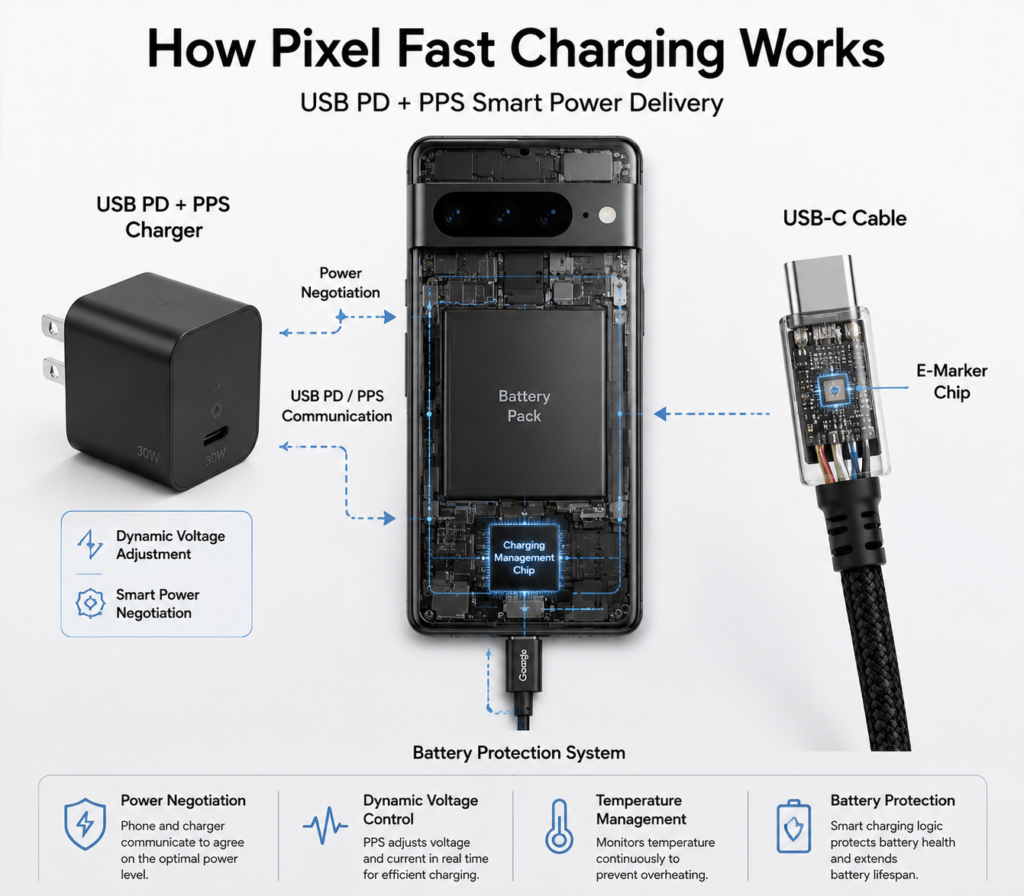
Think of charging protocols as the “shared language” between your phone and charger. Fast charging only works when both devices speak the same language.
All Pixel phones support USB PD (USB Power Delivery), the universal fast charging standard for USB-C devices with the widest compatibility. PPS (Programmable Power Supply) is an upgraded version of PD. It adjusts voltage and current dynamically based on your phone’s real-time status, so charging runs cooler and more efficiently. Most mid-range and flagship Pixel phones support PPS.
2.2 Google’s Charging Tuning and Battery Protection Logic
Unlike many Android flagships that chase high peak power numbers, Google prioritizes charging stability. Peak power only lasts for a short period, and charging speed gradually decreases as the battery fills up or the phone warms up. This approach does not deliver the most impressive 0–100% charge time, but it reduces battery wear and helps your battery last significantly longer overall.
2.3 Flagship Series (Pixel 6–9 & Pro Models) Charging Specs
Pixel 6/6 Pro: 22–23W peak wired, 21–23W wireless with Pixel Stand
Pixel 7/7 Pro: 23W peak wired, 20–21W wireless with Pixel Stand
Pixel 8/8 Pro: 27–30W peak wired, 23W wireless with Pixel Stand
Pixel 9 series: 27–37W peak wired (higher on premium models), 23W wireless; all support PPS
2.4 Mid-Range A-Series Charging Specs
The A-series uses practical charging specs. All models support USB PD and PPS, matching flagship safety standards:
Pixel 6a: 18W wired, no wireless charging
Pixel 7a: 18W wired, adds 7.5W Qi wireless charging
Pixel 8a: 18–20W wired, retains 7.5W wireless charging
Pixel 9a: upgraded to 23W wired, keeps 7.5W wireless charging
2.5 Charging Support for Foldables, Tablets and Other Devices
Fast Charging Specs for Popular Pixel Devices:
| Device Series | Max Wired Charging | Max Wireless Charging (Pixel Stand) | PPS Supported |
|---|---|---|---|
| Pixel 6/7/8/9 Flagships | 22–37W | 20–23W | Yes |
| Pixel A-series (6a–9a) | 18–23W | 7.5W (6a: no wireless) | Yes |
| Pixel Fold series | 30W | 23W | Yes |
| Pixel Tablet | 27W | — | Yes |
Devices like the Pixel Fold and Pixel Tablet also support USB PD fast charging, with power levels similar to flagship models. They work with the same fast charging accessories as regular Pixel phones.
3. Wired Fast Charging Accessory Buying Guide
3.1 Charger Selection: Protocols, Power and Buying Tips
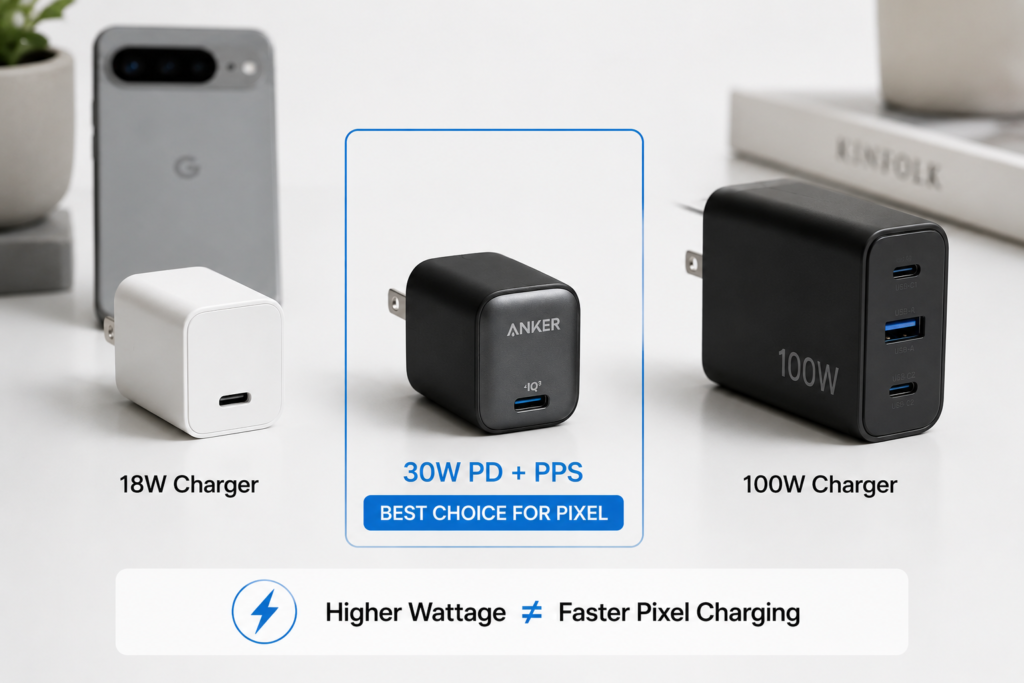
When choosing a charger for your Pixel, protocol comes first: it must support both USB PD and PPS. This is the basic requirement for full-speed fast charging.
Second, look at power rating. You do not need to chase extremely high wattage. For almost all Pixel models, a 30W PD charger is enough to reach peak charging speed. Buying a 65W or 100W charger will not make your phone charge any faster — it is simply a waste of money.
3.2 Cable Requirements: Specs to Look For and Common Pitfalls
Many people overlook the charging cable, but it is the critical path for fast charging. For Pixel phones, we recommend a USB-C to USB-C cable with an E-Marker chip. Simply put, this chip “tells” the charger how much power the cable can handle, so the cable itself does not become a bottleneck and slow things down.
For everyday use, look for cables rated for 5A current. Cheap no-name cables usually lack this chip and will almost always only charge at slow speeds.
3.3 Original vs. Third-Party Accessory Compatibility
Official Google chargers offer the best stability, but they come at a higher price. Any reputable third-party charger that clearly lists USB PD 3.0 and PPS support will trigger fast charging normally on your Pixel and will not damage the device.
3.4 Advantages of GaN (Gallium Nitride) Chargers
GaN chargers are widely popular and an excellent match for Pixel users. They are much smaller than traditional chargers, run cooler, and are easy to carry for commutes or travel. Many can also charge laptops, tablets and other devices, so one charger can replace several, offering great practical value.
4. Complete Guide to Wireless Charging
4.1 Qi Standard and Pixel Stand Exclusive Fast Charging
Qi is the universal standard for wireless charging. Every Pixel phone with wireless charging works with any Qi-compatible wireless charger.
Google’s own 2nd-gen Pixel Stand includes exclusive optimizations. It unlocks higher wireless charging speeds than standard Qi chargers, and also enables special features like a photo frame screen mode and Google Assistant dock mode.
4.2 Third-Party Wireless Charger Buying Tips
If you do not need maximum wireless charging speed, any reputable standard Qi wireless charger will work fine for casual top-ups throughout the day. If you want faster speeds, look for models rated for 23W+ Qi fast charging with PD protocol support.
4.3 Wired vs. Wireless Charging Experience
Wired vs. Wireless Charging Comparison:
| Category | Wired Fast Charging | Wireless Charging |
|---|---|---|
| Charging Speed | Fast; 0–80% takes ~30–60 minutes | Slower; takes 30–50% longer per charge |
| Heat Level | Low heat; steady power delivery | More noticeable heat; alignment-sensitive |
| Convenience | Requires plugging in the cable | Just set it down; no plugging needed |
| Best For | Quick top-ups, before long trips | Desk use, overnight charging |
4.4 Reverse Wireless Charging: What It Is and How to Use It
Most flagship Pixel phones support reverse wireless charging, called Battery Share. Think of it as turning your phone into a tiny wireless power bank. It is perfect for topping up wireless earbuds, smart watches and other small accessories in a pinch when you forget their chargers. The power output is low, so it is only intended for emergency use.
5. Charging Tips & Battery Care
5.1 Breakdown of Built-In Charging Optimization Features
Pixel phones include Adaptive Charging. It learns your daily charging routine — for example, if you charge overnight, it will charge up to 80% and pause, then finish the last 20% right before you usually wake up. This prevents your battery from sitting at 100% for hours on end, which helps extend its overall lifespan. We recommend leaving this feature enabled.
5.2 Practical Ways to Maximize Charging Speed
For the fastest possible charge, follow these simple tips: keep the screen off while charging, and do not play games or run heavy apps while plugged in. Remove thick phone cases to help the phone dissipate heat. Avoid charging in hot places like a car parked in direct summer sun — high temperatures will cause your phone to automatically slow down charging.
5.3 Daily Charging Habits to Extend Battery Life
You do not need to charge to 100% every time. Keeping your battery between 20% and 80% day-to-day is easiest on the battery. Try not to let your phone die completely before charging. If you are storing your phone long-term, charge it to about 50% first.
6. Common Pixel Fast Charging Myths Debunked
6.1 Myth 1: You must use an official Google charger to get fast charging
False. Any reputable charger that supports USB PD and PPS will trigger full-speed fast charging on your Pixel. Official chargers are not the only option.
6.2 Myth 2: The higher the charger wattage, the faster your phone charges
False. Every Pixel has a fixed maximum charging speed. If your phone tops out at 30W, using a 65W or 100W charger will not make it charge any faster. It will still only draw 30W at most.
6.3 Myth 3: Fast charging will drastically wear out your battery
False. Google includes built-in temperature control and battery protection features. Under normal use, fast charging has very little impact on battery lifespan — far less than high heat, overcharging or fully draining the battery.
6.4 Other Common Online Rumors
Claims like “third-party chargers will break your phone” or “wireless charging has dangerous radiation” are false. Properly certified accessories have built-in safety protections, and wireless charging radiation levels are well below international safety limits. You can use them without worry.
7. Troubleshooting Fast Charging Issues
7.1 Step-by-Step Fixes When Fast Charging Won’t Activate
First, try a different charger and cable to rule out broken accessories. Then check your phone’s charging port for dust or lint — gently clean it with a soft, dry brush. Finally, confirm your charger actually supports PD and PPS. Mismatched protocols are the most common reason fast charging does not kick in.
7.2 Why Your Charging Speed Suddenly Gets Slow
Once your battery passes 80%, the phone automatically slows down charging to protect the battery — this is normal behavior. High phone temperatures, heavy apps running in the background, and using the phone while charging will all also reduce charging speed.
7.3 What to Do If Your Phone Gets Too Hot While Charging
Unplug the charger, remove the phone case, and set the phone in a cool, well-ventilated place to cool down. Close any apps you are not using, then plug it back in once it cools off. If your phone regularly gets very hot while charging, double-check that your charger and cable are properly certified.
7.4 Fixing Third-Party Accessory Compatibility Issues
Stick to reputable brands that clearly state PD 3.0 and PPS support on the packaging. If a certain charger will not trigger fast charging, it almost always means it does not support the right protocol. Swap it for one that does, and it will work normally.
8. Scenario-Based Recommendations & Summary
8.1 Recommended Charging Setups for Different Scenarios
- Home / Office use: Pair a 30W PD+PPS wired charger for quick top-ups with a standard Qi wireless charger for casual desk use.
- Travel / Business trips: Choose a 65W multi-port GaN charger. It works with your phone, tablet and laptop, so you can pack fewer accessories.
- Car use: Pick a car charger that supports PD protocol so you can fast charge on the road.
8.2 Final Summary: Build a Practical, Battery-Friendly Pixel Charging Setup
The key to Pixel fast charging is not chasing the highest wattage number — it is picking the right protocols, using your charger sensibly, and taking care of your battery. You do not need expensive official accessories or ultra-high power chargers. Just pick a certified PD+PPS setup that fits your daily routine, and use the built-in battery optimization features. That is how you get the best balance of charging speed and long-term battery health.