
1. Basics: USB-C Port and Compatible iPad Models
All iPad Models With a USB-C Port
The following iPad models come with a USB-C port:
- iPad Pro: All 11-inch and 12.9-inch iPad Pro models released in 2018 and later
- iPad Air: 4th generation, 5th generation and newer models
- iPad mini: 6th generation, 7th generation and newer models
- iPad: 10th generation and newer models
Core Capabilities of the USB-C Port
USB-C is a global universal digital interface standard that works no matter which way you plug it in. Beyond charging, it supports high-speed data transfer and works with external accessories like USB drives, monitors, keyboards and mice. For charging, it supports higher power limits for faster speeds, and works with chargers for most other digital devices like phones and laptops.
Key Charging Differences From the Lightning Port
Lightning is Apple’s proprietary port. Only officially authorized accessories work reliably with it, so you have fewer options, and its fast-charging power limit is lower. USB-C is a universal standard with a wide range of reliable accessories at every price point. It supports higher charging power, and the cables work with devices from other brands — no need for dedicated cables just for your iPad.
2. Charging Protocols and Power Specifications
Basics of the USB PD Fast Charging Protocol
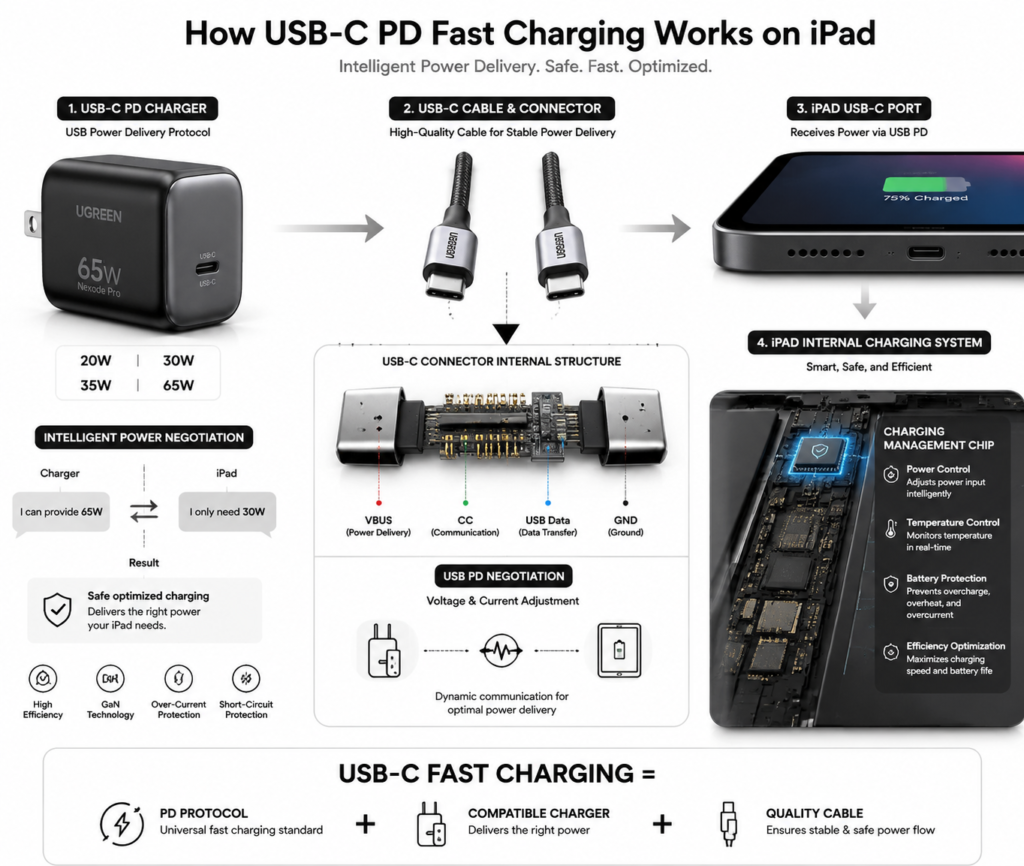
USB PD, short for USB Power Delivery, is the global universal fast-charging standard. Simply put, as long as both your charger and iPad support this protocol, fast charging will work — you don’t have to use Apple’s original accessories. Most modern phones, tablets and laptops use this standard for fast charging.
Official Charging Power for Each iPad Series
| iPad Series | Included Charger Power | Actual Peak Fast-Charging Power |
|---|---|---|
| iPad (10th generation) | 20W | ~20W |
| iPad mini (6th/7th generation) | 20W | ~20W |
| iPad Air (4th/5th generation) | 20W | ~30W |
| iPad Pro 11-inch (all generations) | 20W | ~30W |
| iPad Pro 12.9-inch (2018 and later) | 20W | ~35W |
Note: Peak power is a typical real-world range, and varies with battery level and temperature.
Peak Power vs. Actual Charging Speed
Peak power is the maximum power your iPad can draw for a short time when the battery is very low, usually lasting only a few dozen minutes. Once the battery passes 50%-60%, the system gradually lowers charging power to protect battery life. This means the average charging speed over a full charge is slower than the peak power suggests. There’s no need to chase extremely high-power chargers — power beyond your iPad’s limit won’t make it charge any faster.
Will a High-Power Charger Damage My iPad?
No. Your iPad has a built-in charging management chip that automatically controls how much power it takes in. It only draws the power it needs, and will not “overcharge” just because the charger is more powerful. As long as the charger is reputable and supports the PD protocol, even 65W or 100W laptop chargers will not damage your iPad.
3. USB-C Charger Buying Guide
Apple Original Chargers: Specs and Compatibility
Apple’s official USB-C chargers come in 20W, 30W, 35W dual-port, 70W and 140W versions, among others. Original chargers have consistent quality and work perfectly with all USB-C iPads with no compatibility issues, but they cost more. All official chargers work with lower-power models — a higher-power charger will not damage a lower-power iPad.
Key Standards for Third-Party Chargers
Look for two key things: first, explicit support for the USB PD fast-charging protocol; second, official safety certifications. For daily use, a 30W PD charger is enough for fast charging on almost all iPads. For the 12.9-inch iPad Pro, you can choose a 35W model. You don’t need higher power than that.
GaN Chargers: Features and Best Use Cases
Gallium Nitride (GaN) is a new semiconductor material. Chargers made with GaN are smaller, lighter and run cooler. They’re great for frequent travelers who carry a charger around, and they save space on your desk. They cost a little more than regular chargers, but they’re more versatile — one charger can power your phone, tablet and earbuds at the same time.
Power Sharing Notes for Multi-Port Chargers
When a multi-port charger powers multiple devices at once, its total power is split across the ports, so the power output of each individual port drops. For example, a 65W dual-port charger may deliver 65W through one port alone, but only 30W per port when both are in use. When buying one, make sure the port you use for your iPad delivers at least 20W for reliable fast charging.
Can I Use Chargers From Other Devices?
Yes, you can safely use them. Any reputable PD charger — even a high-power one made for a phone or laptop — will work with your iPad. The iPad will automatically adjust to the right power level with no safety issues. For example, a 65W PD laptop charger will fully fast-charge your iPad with no problems.
4. USB-C Charging Cable Buying Tips
Why You Must Use a USB-C to USB-C Cable
USB-C iPads use the USB PD protocol for fast charging, which requires a cable with USB-C connectors on both ends (USB-C to USB-C). A regular USB-A to USB-C cable only delivers around 12W at most, which is not fast charging and will charge very slowly.
Key Cable Specs: Current Rating and E-Marker Chip
A cable’s current rating determines the maximum power it can carry. A 3A cable supports up to 60W, while a 5A cable supports up to 100W. The E-Marker chip is a smart identification chip inside the cable. Fast charging over 60W requires a cable with this chip to work properly. For iPads, a standard 3A C-to-C cable is fully sufficient. Choosing a 5A cable gives you more versatility for use with laptops later.
Original, Branded and Generic Cables: What’s the Difference?
| Cable Type | Safety | Compatibility | Price | Recommendation |
|---|---|---|---|---|
| Apple original cable | Highest | Perfect compatibility, no issues | Higher | Great if budget allows |
| Reputable branded cable | High | Reliable fast charging, very few issues | Moderate | Best value for most people |
| No-name generic cable | Inconsistent | Often slow or fails to fast-charge | Low | Not recommended |
How Cable Length Affects Charging Efficiency
For standard 1–2 meter cables, there is no noticeable effect on charging speed. For extra-long cables of 3 meters or more, lower-quality cables will have power loss that slows charging down. For daily use, a 1–2 meter cable is ideal — there’s no need to buy an extra-long one.
5. Charging Solutions for Different Scenarios
Home & Office: Desktop Charging and Dock Power Delivery
For your desk, a compact GaN charger keeps things tidy and saves space. If you regularly use external monitors, USB drives or other accessories, you can choose a powered USB-C dock. When the dock is plugged into power, it can transfer data, connect accessories and charge your iPad at the same time — no extra charging cable needed. Choose a dock with at least 20W of power delivery to keep your iPad charging reliably.
On the Go: Car, Power Bank and Travel Charging
For car charging, buy a car charger that supports PD fast charging. Regular car USB ports have very low power and charge very slowly. For power banks, choose one with PD output — a 20,000 mAh model will charge your iPad 1–2 times, enough for a day out. For travel, a multi-port GaN charger is ideal — it charges your phone, earbuds and tablet, so you carry fewer accessories.
Special Feature: iPad Reverse Charging – Uses and Limits
The USB-C port on iPad supports reverse charging. In a pinch, you can use it to top up small accessories like AirPods, Apple Watch or Bluetooth earbuds, like a mini power bank. However, reverse charging runs at very low power — only a few watts. It only works for small, low-power accessories; charging another phone or tablet would be extremely slow and is not practical.
Tips for Charging While Using Your iPad
Light use like streaming video or taking notes while charging has almost no effect on your battery. But heavy use like playing high-end games or rendering files while charging will make your iPad run hotter. Sustained high temperatures speed up battery aging, and the system will also slow down charging speed. Try not to charge during heavy use. If it gets noticeably warm, take off the case and set it somewhere well-ventilated to cool down.
6. Battery Health and Charging Care
What Are Battery Cycles and Battery Health?
One battery cycle means you have used 100% of the battery’s total capacity — not necessarily all in one go. For example, using 60% one day and 40% the next counts as one full cycle. Apple’s iPad lithium-ion batteries are designed to retain at least 80% of their original capacity after 1000 full cycles under normal use, which is considered normal wear. Battery health is the system’s reading of your battery’s maximum capacity — the lower the number, the shorter your daily battery life.
How Optimized Battery Charging Works and How to Turn It On
This is a built-in battery protection feature in iPadOS. It learns your daily charging habits. For example, if you charge overnight, it will charge up to 80%, then finish the last 20% right before you usually wake up and use your device. This reduces the time your battery spends at 100% full charge, which effectively extends its lifespan.
To turn it on: Go to Settings → Battery → Battery Health & Charging → turn on Optimized Battery Charging.
Daily Habits to Extend Battery Life
- Charge little and often. Try to keep your battery between 20% and 80%. You don’t need to charge all the way to 100% every time, and you don’t need to wait until it dies to charge.
- Avoid leaving your iPad in very hot places, like direct sunlight, or using heavy apps while charging.
- Use reputable, good-quality chargers and cables. Avoid cheap, no-name accessories.
- Remove thick protective cases while charging if they trap heat.
Charging and Storage for Long-Term Idle Devices
If you won’t use your iPad for a long time, don’t store it fully charged or fully drained. Ideally, charge it to about 50%, turn it off, and keep it in a cool, dry place. Every six months or so, take it out and top it back up to 50% to prevent permanent battery damage from full discharge.
7. Common Charging Myths Debunked
Myth: You need an original Apple charger to get fast charging
False. Any reputable third-party charger that supports the USB PD protocol will fast-charge your iPad, at roughly the same speed as an original Apple charger.
Myth: Charging overnight will overcharge and damage the battery
False. Your iPad automatically stops charging when it reaches 100%. It only tops up again slightly if the battery drops a little. Full protection is in place the whole time. Charging overnight is completely safe and will not damage your battery.
Myth: You must charge to 100% every time
There’s no need. Lithium-ion batteries are most stable in the middle of their charge range. Staying at 100% full charge for long periods actually speeds up battery aging. Charge whenever you need to — you don’t have to fill it all the way up every time.
Myth: USB-C works with every brand’s fast charging protocol
False. USB-C is just the shape of the port — the charging speed depends on the protocols it supports. iPads only support the universal USB PD fast-charging protocol. They do not support proprietary fast-charging protocols from some Android phones — those will only charge at normal slow speeds.
8. Troubleshooting Common Charging Issues
What to Do If Your iPad Won’t Charge
- First, check the charging port for dust, lint or debris, and gently clean it with a soft, dry brush.
- Try a different charging cable and a different charger to rule out a broken accessory.
- Restart your iPad to rule out a temporary software glitch.
- If none of these work, it is likely a hardware issue. Contact Apple official support for inspection.
Why Charging Is Slow and How to Fix It
- You’re using a slow charger or cable: Switch to a PD charger and a USB-C to USB-C cable.
- Battery is above 80%: The system automatically slows charging at high battery levels — this is normal protection.
- Device is too warm: Heat limits charging power. Charging speed will return to normal once it cools down.
- Charging from a computer USB port: Computer USB ports have very low power, so slow charging is normal.
Normal Charging Heat and How to Deal With It
Slight warmth during charging is normal. As long as it’s not too hot to hold comfortably, it’s within the normal range. If it gets very warm, take off the case, stop using the device, and set it in a cool, well-ventilated place. If it gets unusually hot even when you’re not using it, check that your charger and cable are reputable, good-quality products.
What to Do About “This Accessory Is Not Supported” Alerts
- Most often, the cable is low-quality and doesn’t support the PD protocol. Replace it with a reputable USB-C to USB-C cable.
- It can also be caused by dirt or debris in the charging port. Clean it out and plug the cable back in.
- If the alert only pops up once in a while, re-plugging the cable usually fixes it. If it happens often, replace your charging accessory.
9. Summary and Buying Recommendations
Recommended Charging Kits for Different Scenarios
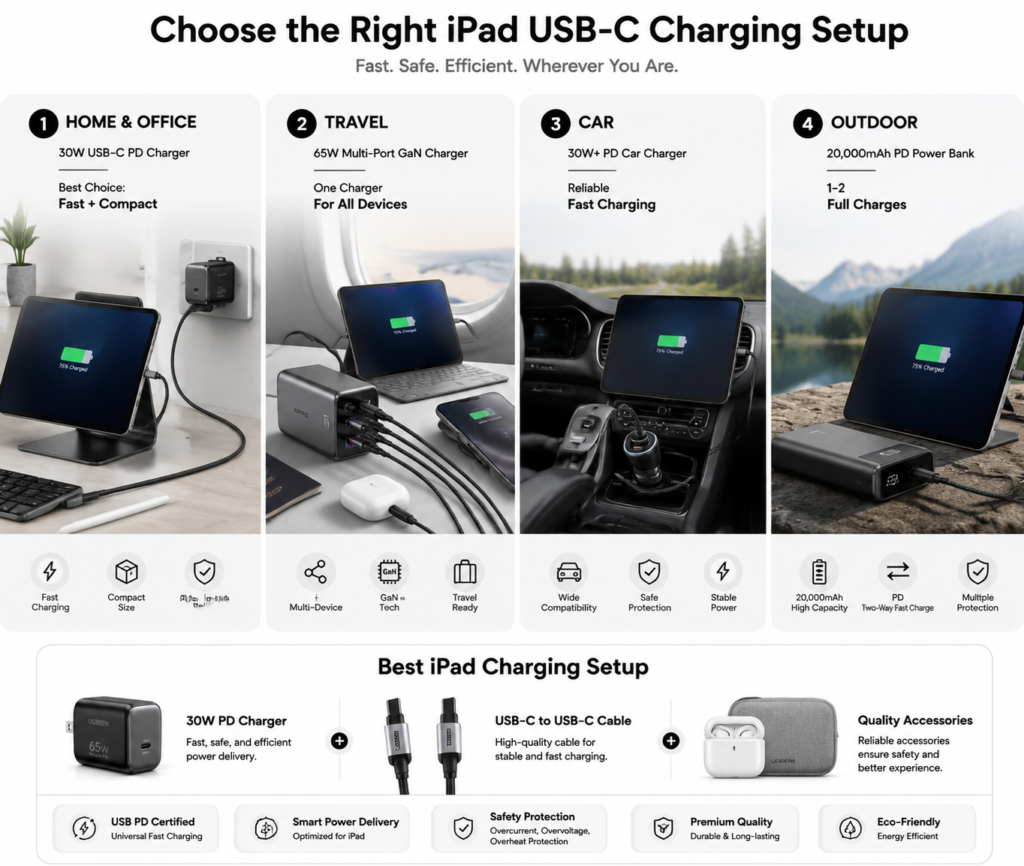
- Daily home/office use: A 30W reputable PD charger + 1m branded USB-C to USB-C cable. The best value, and enough for fast charging on almost all iPads.
- Frequent travel: A 65W multi-port GaN charger + 1.5m USB-C to USB-C cable. One charger powers your phone, tablet, laptop and all your devices.
- Car use: A 30W+ PD car charger + short cable for reliable fast charging and convenient use in the car.
- Out-and-about backup: A 20,000 mAh PD two-way fast-charging power bank for topping up when you’re away from outlets.
Balancing Fast Charging and Battery Life
Fast charging does generate slightly more heat than slow charging, which has a very minor effect on the battery, but the difference is negligible under normal use. You don’t need to avoid fast charging to protect your battery. Turn on Optimized Battery Charging, charge little and often, and avoid high heat — that’s enough to keep your battery healthy. Cheap, low-quality accessories are far more harmful to your battery and device than fast charging ever will be.